Apple today released iOS 15.2, the second major update to the iOS operating system that was released in September. iOS 15.2 introduces several features that Apple initially promised would come in iOS 15, but were ultimately delayed. This guide highlights everything new that's been added in the iOS 15.2 update.
App Privacy Report
App Privacy Report is one of the iOS 15 additions that Apple showed off at WWDC. It's a privacy feature designed to allow users to see how often apps have accessed their permission-restricted info like location, photos, camera, microphone, and contacts across the last seven days.
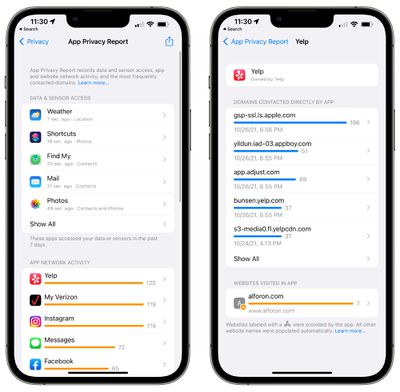
With App Privacy Report, users can also see which apps have contacted other domains and how recently they've contacted them to keep an eye on what apps are doing behind the scenes. You can, for example, see all of the trackers that a website is using, so you know where your data is going.
App Privacy Report is available by opening up the Settings app, selecting the Privacy section, and choosing App Privacy Report. From there, you can toggle it on. After you use apps for some time, data will begin showing up in this spot.
Apple has a dedicated support document for the App Privacy report feature, which includes additional information on how it works.
Emergency SOS
Emergency SOS, the feature that lets you call emergency services with a series of button presses, has been updated in iOS 15.2. You can now press the side button rapidly multiple times to initiate, or hold down the side button and the volume button together if preferred.
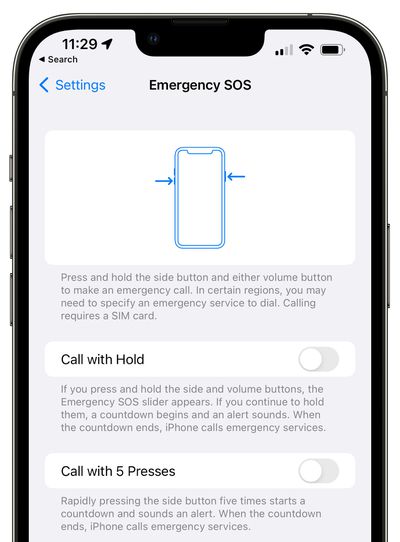
Prior to the update, the rapid press worked, but there was no option for holding down the buttons together. Apple has also added a longer eight-second countdown before a call is placed if you have Auto Call enabled, up from the prior three-second countdown.
Apple Music Voice Plan
iOS 15.2 adds support for the Apple Music Voice Plan that was first introduced in October. Priced at $4.99 per month, the Voice Plan provides access to all songs, playlists, and stations in Apple Music using Siri.
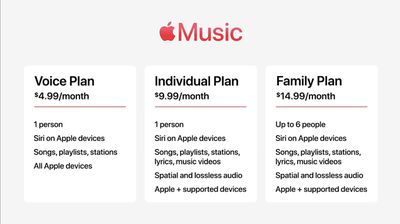
There is a limited on-device interface available as the experience is meant to be Siri oriented. Users can ask Siri for music suggestions that are provided based on listening history or likes and dislikes, and a "Play it Again" feature lets users access a list of recently played music.
Legacy Contacts
With Legacy Contacts, you can set a trusted person to be able to access your Apple ID and your data (or "Digital Legacy") after you die. The person that you designate as your contact can access your photos, messages, notes, files, contacts, calendar events, apps, device backups, and more. iCloud Keychain passwords remain inaccessible, as does licensed media.
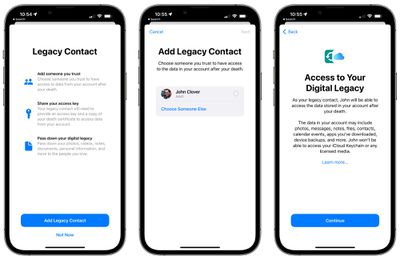
The Legacy Contact option can be accessed by opening up the Settings app, selecting "Password & Security," and choosing "Legacy Contact" from the list. From there, you can select a trusted person to access your account after you pass away. You can choose an iPhone user or an Android user, and share your special access key through Messages or by printing it out.
Find My Battery Reserve Feature
With this update, the Find My app can be used to locate an iPhone for up to five hours in Power Reserve, a feature activated when the iPhone's battery is dead.
TV app
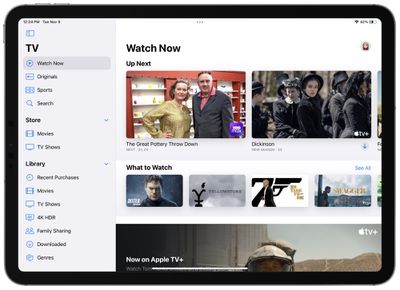
In iPadOS 15.2, Apple has introduced a new design for the TV app. The TV app features a sidebar, which makes navigation between the various sections of the TV app simpler.
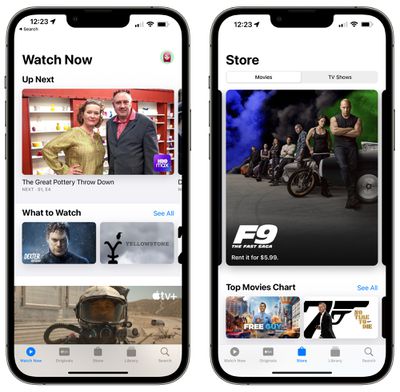
For iPhone users, there's a dedicated "Store" tab in the TV app for accessing movies and TV shows that can be purchased. The new design and the addition of a Store tab may help separate Apple TV+ content from paid content, as the existing design has been confusing for some users.
Hide My Email in the Mail App
You can use Hide My Email directly from the Mail app after installing the iOS 15.2 beta. When composing an email, just tap on the "From" field and select the "Hide My Email" option to generate a random email address.

Hide My Email is available to everyone who has an iCloud+ plan (priced starting at $0.99 per month), and it's a useful feature for protecting your email address.
All the emails sent to the random Apple-created email address are forwarded to you so you can respond if needed, but the person on the receiving end does not see your real email address. And if you start getting spam emails from someone, you can just delete the email address and put a stop to it.
Display Repair Restriction Changes
Apple promised a software update that will change an iPhone 13 policy that caused Face ID to be non-functional when repairs were made to a broken display, and that update is included in iOS 15.2.
Apple has a microcontroller that pairs the iPhone 13 to its display, and when performing a display repair, the microcontroller had to be paired to the display using Apple's tools in earlier versions of iOS. Because independent repair shops do not have access to those tools, they were upset about being unable to easily perform display repairs.
Apple has removed the microcontroller pairing requirement that disabled Face ID for iPhone 13 models with swapped displays, allowing for independent display repairs.
Communication Safety
In iOS 15.2, Apple is enabling Communication Safety in Messages for children. The feature is designed to scan incoming messages images on children's devices for nudity and warn them that such photos might be harmful.
Communication Safety is opt-in, privacy-focused, and must be enabled by parents. It is limited to the accounts of children, with detection done all on-device, and it is not the same as the anti-CSAM functionality that Apple still has in development.
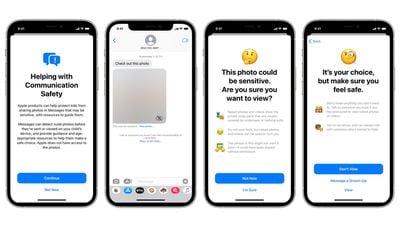
Compared to earlier versions of Communication Safety that Apple described, the implemented version does not notify parents if children open a photo containing nudity. Apple removed this feature after concerns that it could be dangerous in situations of parental abuse.
We have an in-depth explanation of how Communication Safety works to answer any questions that MacRumors readers have about the feature.
Apple is also introducing expanded guidance in Siri, Spotlight, and Safari Search that will help children and parents avoid unsafe situations online. Users who ask Siri how to report child exploitation, for example, will receive information on how to file a report.
Macro Mode Toggle
iOS 15.2 adds a manual toggle for Macro mode, in the form of a flower icon that can be tapped to toggle Macro mode off when the camera is close to an object.
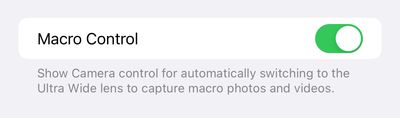
To get the new toggle, users need to go to Settings, navigate to Camera, and turn on "Macro Control." Then, when close enough to an object, the flower icon will Appear in the camera app. The icon can be tapped to enable or disable Macro mode.
Apple has also added a new Preserve Settings option for Macro Control. If Macro Control is disabled, the Camera will automatically switch into Macro mode when close enough to an object, so this feature is meant to give users unhappy with that function more control over when Macro mode activates.
Notification Summary
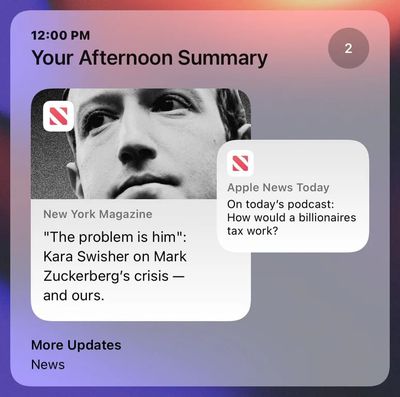
Apple tweaked Notification Summary in iOS 15.2, and it has a new look with a card-style view that shows main apps in the summary in overlapping cards, making it easier to see at a glance what's included in the summary.
Playlist Search in Music App
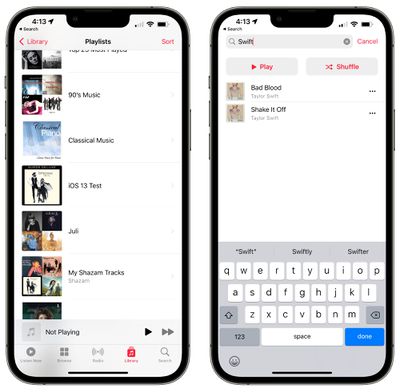
Apple has added a long-awaited feature that allows Apple Music users to search within playlists.
iCloud Private Relay
In the Cellular and WiFi sections of the Settings app, Apple has clarified the iCloud Private Relay wording. The toggle, which was previously called "iCloud Private Relay" has been renamed to "Limit IP Address Tracking" to make it clearer what happens when it's turned on.
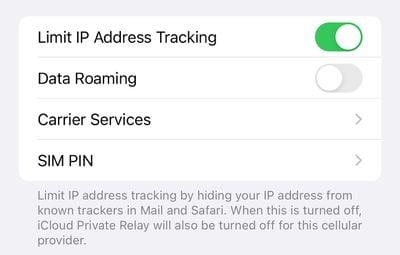
The general functionality is the same, and this is just a clarification to the wording.
Turning off the "Limit IP Address Tracking" feature turns off iCloud Private Relay for the cellular provider or the WiFi network, just as it did before. There have been no changes to the iCloud Private Relay feature, which can be activated separately for cellular and WiFi traffic.
Reminders and Notes Apps
Tags can now be bulk renamed and deleted in the Reminders and Notes apps.
On the iPad, Apple has added a new Notes setting to access Quick Note with a swipe from the lower left or lower right corner of the screen.
CarPlay
The CarPlay Apple Maps app is gaining enhanced detail in iOS 15.2, but only for cities where the new maps features are supported. The updated map includes road details like turn lanes, medians, bike lanes, and pedestrian crosswalks.
More detailed city maps are available in London, Los Angeles, New York, and the San Francisco Bay Area.
Stocks App
The Stocks app has been updated to allow users to view the currency for a ticker and see year-to-date performance information when viewing charts.
Siri Commands
iOS 15.2 reintroduces several Siri commands that were removed in iOS 15 and that were used by low vision and blind iPhone owners. The commands that now work are those for checking voicemail messages, playing the most recent voicemail, checking call history, and providing information on recent calls.

Bug Fixes
The update includes several bug fixes for issues with Siri, ProRaw, HomeKit, and CarPlay, with a list of fixes below.
- Siri may not respond while VoiceOver is running and iPhone is locked
- ProRAW photos may appear overexposed when viewing in third-party photo editing apps
- HomeKit scenes that include a garage door may not run from CarPlay when your iPhone is locked
- CarPlay may not update Now Playing information for certain apps
- Video streaming apps may not load content on iPhone 13 models
- Calendar events may appear on the wrong day for Microsoft Exchange users
Guide Feedback
Know of an iOS 15.2 feature we left out or want to offer feedback on this guide? Send us an email here.