Tim Hardwick

Tim is a Senior Editor at MacRumors and has been writing for the site since 2016. Formerly a magazine journalist, his work has appeared in over 30 newsstand print publications and online brands covering a range of topics, from the latest trends in technology to the mysteries of ancient history.
Based in the UK, Tim's current role at MacRumors involves editorial oversight and how tos, in addition to covering daily news and contributing occasional reviews. Tim can be reached at tim@macrumors.com, Telegram (@waxeditorial) or Twitter.
Based in the UK, Tim's current role at MacRumors involves editorial oversight and how tos, in addition to covering daily news and contributing occasional reviews. Tim can be reached at tim@macrumors.com, Telegram (@waxeditorial) or Twitter.
Tim Hardwick's Articles

How to Multitask on iPad With Slide Over
In iPadOS, Apple includes several multitasking options that let you work with more than one app on your iPad at the same time. This allows apps that support multitasking to be used in a few different ways. This article looks at Slide Over. Be sure to check out our separate Split View how-to guide by clicking the link. We've also provided a link for it at the end of this article.
Slide Over in ...
Read Full Article

How to Use Split Screen on iPad
In iPadOS, Apple includes several multitasking options that let you work with more than one app on your iPad at the same time. This allows apps that support multitasking to be used in a few different ways. This article looks at Split View, which makes two apps appear side by side in a split screen arrangement. Be sure to check out our separate Slide Over how-to guide by clicking the link. We've...

How to Use a Private Wi-Fi Address on Apple Watch
Did you know that your Apple Watch can use a different MAC address with each Wi-Fi network to prevent network operators from tracking your activity across different Wi-Fi networks?
To communicate with a Wi-Fi network, a device has to identify itself to the network with a unique network address called a media access control (MAC) address.
If your Apple Watch always uses the same Wi-Fi MAC...

How to Show Function Keys on a Mac's Touch Bar
When Apple first introduced the Touch Bar on its Macs in 2016, the company touted the adaptive app-specific features of the OLED strip and framed it as an improvement over the traditional function keys that it replaced.
What Apple didn't expect was the number of users who mourned the physical function keys, which often play an important role in the workflows of creative professionals and...

How to Make a FaceTime Call on Apple Watch
When most people hear the word FaceTime, they think of Apple's call service as a video communications platform. But you don't need a camera to use FaceTime, because it supports audio calls too. That means you can use it on Apple Watch as long as it's connected to Wi-Fi or cellular.
If you've ever taken a phone call on your Apple Watch when your iPhone isn't within easy reach, you'll know...

How to Enable Disappearing Messages in WhatsApp
WhatsApp in 2020 launched disappearing messages on its end-to-end encrypted chat platform as a way of doubling down on user privacy. If you want to have control over how long a message lasts in WhatsApp, read on to learn how it works.
When you sit down and have a face-to-face conversation with someone, usually you're reasonably confident that your conversation isn't being recorded and stored ...

Twitter Close Friends Feature in Beta Now Called 'Flock' With 150-Person Limit
Twitter continues to work on a new feature that lets users post certain tweets to a limited number of close friends in a parallel timeline on the social media platform.
Previously floated in July 2021 as "Trusted Friends," the feature is now called "Flock," and will allow users to limit their audience for specific content to no more than 150 people, according to screens uncovered by mobile...

How to Disable iMessage
Apple's iMessage is one of the most popular messaging platforms, and Apple continues to improve it with new features, hoping that it will keep people using its devices. However, there may be times when you want to disable iMessage. This article tells you how.
There are genuine reasons why you might want to disable iMessage. Turning off iMessage is usually the first thing to do if you're...

How to Remove the App Library From Your iPad's Dock
Apple includes an App Library feature in iOS and iPadOS that shows you all of the apps that are installed on your iPhone or iPad in one place, both in an icon view organized into smart categories and in an alphabetical list. Since all of the apps are listed in the App Library, app icons and Home Screen pages can be hidden for a cleaner look.
On iPad, Apple adds an App Library icon to the...

MediaTek Demos Next-Gen Wi-Fi 7 Standard Boasting Near Thunderbolt 3 Speeds
MediaTek has conducted the world's first live demo of Wi-Fi 7 for "key customers and industry collaborators," paving the way for the wireless network technology to enter mainstream consumer hardware as early as next year, according to the company.
Taiwan-based MediaTek said the demos demonstrated the ability of Wi-Fi 7 to achieve the maximum speed defined by IEEE 802.11be, the official name...

macOS: How to Manage Multiple Open Safari Tabs
Browser tabs in Safari are a great way to visit multiple webpages in the same browsing session without having to close any of them, which makes them particularly useful for cross-referencing and researching things online.
But all too often, the number of tabs you have open can get out of control. This makes navigating them tricky and it can also sap system resources, so to avoid being...

Apple Music Is the World's Second Most Popular Music Streaming Service Behind Spotify
Apple Music is the second most popular music streaming service globally, but remains far behind Spotify in its continuing quest for streaming dominance, according to new market research.
According to a new report by Midia Research, Apple Music subscribers made up 15% of all streaming service listeners in the global market in the second quarter of 2021, placing it in a distant second place...

Apple Stops Signing iOS 15.2 Following iOS 15.2.1 Release, Downgrading No Longer Possible
Following the release of iOS 15.2.1 earlier in January, Apple has stopped signing iOS 15.2, the previously available version of iOS that saw a public release on December 13. With iOS 15.2 no longer being signed, it is not possible to downgrade to that version if you've already updated to iOS 15.2.1.
Apple routinely stops signing older versions of software updates after new releases come out...
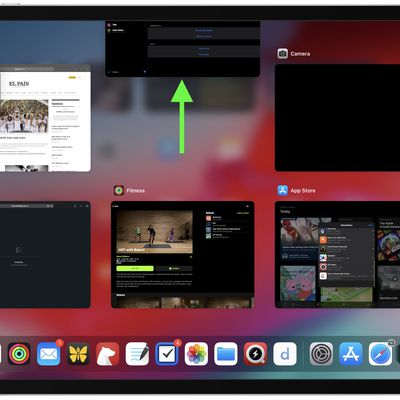
How to Close or Force Quit iPad Apps
Apple designed its iPadOS software so that you don't have to close an app when you're not using it, since most apps that are not active remain in a suspended state and don't use up any resources or eat up battery.
However, if an iPad app becomes unresponsive, you may need to force quit the app and restart it to get it to work properly again. Here's how you can do that on both older and...

How to Force Quit a Frozen Mac App
Macs aren't infallible, and at some point during your time using them you'll come across a situation in macOS where an app has become unresponsive, leaving you without access to its contents and functions, and only a continually revolving beachball for your troubles.
If the beachball stays on the screen for more than a few minutes and you can't interact with the app's interface, this usually ...

What's Notch to Like? Samsung Accidentally Leaks Its New Flagship Galaxy Tab
Despite mocking the display notch when it first appeared on the iPhone X, Samsung's opinion of notches appears to have swung from one extreme to the other as the company now thinks they don't look so bad on tablet devices either.
Spotted by 91Mobiles, the picture above briefly appeared on a Samsung support page for Bixby and shows the notched design of the upcoming Galaxy Tab S8 Ultra, the...

Aerial 3 Screen Saver for Mac Gains Redesigned UI, New Video Overlay and Storage Options, and More
Aerial, the popular open-source screen saver that lets you play Apple TV screen saver videos on Mac, has received an annual update that brings some notable new features and possibilities opened up by macOS Monterey.
First up, Aerial 3 brings full support for all the videos that tvOS 15 brought to Apple TV, including Grand Canyon and Patagonia, but also the latest Iceland and Scotland videos...

Ericsson Sues Apple Again Over 5G Patent Licensing Infringements
Telecom giant Ericsson has filed another set of patent infringement lawsuits against Apple in a long-running dispute between the two companies over royalty payments for the use of 5G wireless patents in iPhones.
In 2021, both companies sued each other in the US after negotiations failed over the renewal of a seven-year licensing contract for telecom patents covering 2G, 3G, and 4G...

Microsoft Releases Office for Mac Update With Full Apple Silicon Support in Excel
Microsoft has released a new version of its Office for Mac productivity suite that includes an updated Excel app with 100% native support for Apple silicon machines.
According to the release notes accompanying version 16.57, Excel will now run natively on Macs powered by Apple's M1-series processors without having to use the Rosetta 2 translation layer, which means anyone using a Mac with an ...

Foxconn Offers Big Bonuses to Recruit Workers Ahead of Lunar New Year Holiday
Apple's largest manufacturing partner Foxconn is again offering bumper signing bonuses to new and former workers in an effort to boost recruitment at its Zhengzhou campus, one of its main iPhone factories in China, according to the South China Morning Post.
The report claims Foxconn is giving returning workers a signing bonus of 9,500 yuan ($1,470), in addition to a monthly income of 6,865...