iOS 26's Liquid Glass Design Draws Criticism From Users

It's been two days since iOS 26 was released, and Apple's new Liquid Glass design is even more divisive than expected.
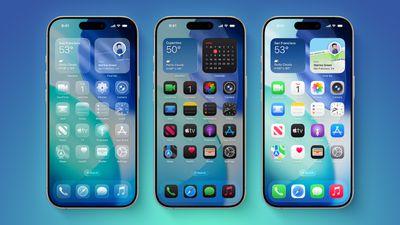
iOS 26 on Three iPhones
Any major design change can create controversy as people get used to the new look, but the MacRumors forums, Reddit, Apple Support Communities, and social media sites seem to feature more criticism than praise as people discuss the update.

Complaints

There are a long list of complaints about Liquid Glass, from the impact on readability to lag caused by animations. Here are some of the main critiques:

Some People Like It

On the MacRumors forums, complaints about Liquid Glass are interspersed with responses from people who have been using it during beta, and the consensus is "you'll get used to it."

It does always take time to get used to a new look, and Liquid Glass will become less jarring as people become accustomed to the new animations and the behavior of buttons and other interface elements.

Not everyone hates Liquid Glass, and there are also many positive comments from people who prefer the new design. Some of that sentiment:

Media Complaints

iOS 7

Everyone remembers iOS 7, because it was the first big design change that Apple made to iOS. Apple did away with skeuomorphism in favor of a "flat" design, and it was not a change that people were prepared for. A lot of the comments shared when iOS 7 came out mirror the comments we're seeing now about Liquid Glass.

Despite the complaints about iOS 7, Apple stuck with it. There were ongoing refinements to fix bugs and to tweak the overall design, but Apple didn't reverse course. Design updates in iOS 8, iOS 9, and iOS 10 didn't change the fundamentals, but it got better and better, and people got used to it.

Liquid Glass could follow the same path. Apple will make updates and optimizations, but it's probably going to inform the next decade of software releases. In discussion threads on Liquid Glass, you'll see a lot of comments from people recalling iOS 7 and reminding us all that we've been here before.

Tone Down Liquid Glass

If you're having a hard time adjusting to the Liquid Glass design, there is no opt out, but you can toggle on Reduce Transparency.

You can also increase your display contrast, and the two settings together will eliminate most of the translucency that was introduced with Liquid Glass.

Chime In

What do you love or hate about Liquid Glass? Let us know in the comments.

Related Roundups: iOS 26, iPadOS 26
Related Forum: iOS 26

Popular Stories

iphone 17 models

No iPhone 18 Launch This Year, Reports Suggest

Thursday January 1, 2026 8:43 am PST by
Apple is not expected to release a standard iPhone 18 model this year, according to a growing number of reports that suggest the company is planning a significant change to its long-standing annual iPhone launch cycle. Despite the immense success of the iPhone 17 in 2025, the iPhone 18 is not expected to arrive until the spring of 2027, leaving the iPhone 17 in the lineup as the latest...
duolingo ad live activity

Duolingo Used iPhone's Dynamic Island to Display Ads, Violating Apple Design Guidelines

Friday January 2, 2026 1:36 pm PST by
Language learning app Duolingo has apparently been using the iPhone's Live Activity feature to display ads on the Lock Screen and the Dynamic Island, which violates Apple's design guidelines. According to multiple reports on Reddit, the Duolingo app has been displaying an ad for a "Super offer," which is Duolingo's paid subscription option. Apple's guidelines for Live Activity state that...
Clicks Communicator Feature

'Clicks Communicator' Unveiled — Will You Carry This With Your iPhone?

Friday January 2, 2026 6:35 am PST by
The company behind the BlackBerry-like Clicks Keyboard accessory for the iPhone today unveiled a new Android 16 smartphone called the Clicks Communicator. The purpose-built device is designed to be used as a second phone alongside your iPhone, with the intended focus being communication over content consumption. It runs a custom Android launcher that offers a curated selection of messaging...
Low Cost MacBook Feature A18 Pro

Low-Price 12.9-Inch MacBook With A18 Pro Chip Reportedly Launching Early This Year

Friday January 2, 2026 9:08 am PST by
Apple plans to introduce a 12.9-inch MacBook in spring 2026, according to TrendForce. In a press release this week, the Taiwanese research firm said this MacBook will be aimed at the entry-level to mid-range market, with "competitive pricing." TrendForce did not share any further details about this MacBook, but the information that it shared lines up with several rumors about a more...
Apple Fitness Plus hero

Apple Announces New Fitness+ Workout Programs, Strava Challenge, and More

Friday January 2, 2026 6:43 am PST by
Apple today announced a number of updates to Apple Fitness+ and activity with the Apple Watch. The key announcements include: New Year limited-edition award: Users can win the award by closing all three Activity Rings for seven days in a row in January. "Quit Quitting" Strava challenge: Available in Strava throughout January, users who log 12 workouts anytime in the month will win an ...
Low Cost A18 Pro MacBook Feature Pink

Apple's 2026 Low-Cost A18 Pro MacBook: What We Know So Far

Friday January 2, 2026 4:33 pm PST by
Apple is planning to release a low-cost MacBook in 2026, which will apparently compete with more affordable Chromebooks and Windows PCs. Apple's most affordable Mac right now is the $999 MacBook Air, and the upcoming low-cost MacBook is expected to be cheaper. Here's what we know about the low-cost MacBook so far. Size Rumors suggest the low-cost MacBook will have a display that's around 13 ...
Mac Pro Feature Blue

What's Happening With the Mac Pro?

Wednesday December 31, 2025 9:59 am PST by
Apple hasn't updated the Mac Pro since 2023, and according to recent rumors, there's no update coming in the near future. In fact, Apple might be finished with the Mac Pro. Bloomberg recently said that the Mac Pro is "on the back burner" and has been "largely written off" by Apple. Apple apparently views the more compact Mac Studio as the ideal high-end pro-level desktop, and it has almost...

Top Rated Comments

Seoras Avatar
15 weeks ago
I absolutely love it! I love how my iPhone and iPad screens now look.
I also love how the buttons in my apps pop and are much more defined and obvious.
Lovely work! Nice and refreshing to look at.

EDIT: I should add this. I'm an App developer. This is the first time I can ever remember downloading the new Xcode and not having to spend all day fixing my apps so they still compile and work. They compiled first time.
Not only does '26 look good but it seems to run smoothly with no glitches or bugs. Normally I'd advise my family members not to install until the .1 or .2 updates came out but yesterday I was encouraging them all to upgrade immediately. Apple's really cleaned up their software in comparison to previous year's updates.
Score: 73 Votes (Like | Disagree)
Adysubman Avatar
15 weeks ago
Apple windows Vista
Score: 68 Votes (Like | Disagree)
MysticCow Avatar
15 weeks ago
Staying on 18 for a while. I’ve learned many times to NEVER update for a week or so, because problems and issues.
Score: 61 Votes (Like | Disagree)
MDTyKe Avatar
15 weeks ago
My issue is not with the design, it's with the sloppiness. Both iOS 26 and macOS 26 are full of visible bugs - ones which have been around, and well reported since the initial betas. There are gross inconsistencies everywhere, and basic legibility has gone out the window.

I am generally forgiving of a bug here and there, but what I am seeing is a complete disregard of any form of QC from Apple. For a trillion $ company their sheer inability to have a small team of developers focus on each official app to clean up very visible UI issues is appalling.

That is the main issue here.

Note: A simple example of well-reported bugs, which have been around since B1 and are unfixed:
- Spotlight: Swipe down... the search bar is a mess of overlapping text for a second until it fixes itself
- Home Screen: Each app icon undergoes some kind of redraw when it's minimized, making something 'pop' on the icon 1/2 second after it's finished minimizing.
- Spotlight: When you hold down on text in the search field to move the cursor, it glows so bright you cannot read the loupe at all
- Spotlight: Files content appears, despite being turned off.
- Keyboard: There are two versions of the keyboard, each which react differently to certain words. For example "Hey man how's it going man" will almost always drop the final "n" on the "old" keyboard.
Score: 60 Votes (Like | Disagree)
blicked Avatar
15 weeks ago
It's a surprisingly sloppy release that needs a ton of polishing. And reducing translucency and increasing contrast only helps a little bit - it should help more.
Score: 41 Votes (Like | Disagree)
velemar1 Avatar
15 weeks ago
I immediately downgraded back to iOS 18. I was embarrassed for how silly, cartoonish, and fruity my phone suddenly looked. And it ran super slow. Surprised they don’t even let you switch it off. Avoid the upgrade especially if on an older iPhone.
Score: 34 Votes (Like | Disagree)