iOS 18 Adds Control Center Options to Action Button on iPhone 15 Pro - MacRumors
Skip to Content

iOS 18 Adds Control Center Options to Action Button on iPhone 15 Pro

iPhone 15 Pro and iPhone 15 Pro Max models have an Action button in place of the Ring/Silent switch on older iPhones, and iOS 18 makes it even more useful.

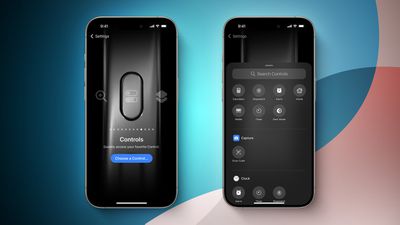
iOS 18 Control Center Toggles for Action Button FeatureScreenshot Credit: Aaron Perris

iOS 18 allows the Action button to be assigned to one of the dozens of controls available in the new Control Center gallery, allowing the Action button to invoke Dark Mode, Airplane Mode, Personal Hotspot, and more. Options like Low Power Mode and Orientation Lock do not appear to be available as of iOS 18 beta 1, but the Shortcut action already allows the Action button to be assigned to those options if desired.

These new options are in addition to the actions that were already available for the Action button on iOS 17, including Ring/Silent, Do Not Disturb, Camera, Flashlight, Voice Memo, Magnifier, Translate, Shortcut, and Accessibility. Some of the new Control Center options were already possible with the Shortcut or Accessibility options.

It has been rumored that the Action button will be expanded to all four iPhone 16 models later this year, so these new controls will come to even more devices.


iOS 18 is currently in beta and should be released in September.

Related Forums: iOS 18, iPadOS 18

Popular Stories

iOS 26

iOS 26.5 Features: Everything New in iOS 26.5

Monday May 11, 2026 5:09 pm PDT by
Apple released iOS 26.5 after a few months of beta testing, and while it doesn't have the Siri features we were hoping for since those are being held until iOS 27, there are a handful of useful changes worth knowing about. Subscribe to the MacRumors YouTube channel for more videos. End-to-End Encryption for RCS Support for end-to-end encryption (E2EE) for RCS messages between iPhone and...
Dynamic Island iPhone 18 Pro Feature

11 Reasons to Wait for the iPhone 18 Pro

Monday May 11, 2026 9:01 am PDT by
We're only four months out from the launch of Apple's premium next-generation smartphone lineup, and while we're not expecting a sea change in terms of functionality, there are still several enhancements rumored to be coming to the iPhone 18 Pro and iPhone 18 Pro Max. One thing worth noting is that Apple is reportedly planning a major change to its iPhone release cycle this year, adopting a...
Four iPhone 18 Pro Colors Mock Feature

iPhone 18 Pro May Have 'Aggressive' Starting Price Despite RAM Crisis

Tuesday May 12, 2026 6:53 am PDT by
While the ongoing RAM chip shortage is leading some Android smartphone makers to increase prices, one analyst believes that Apple will take advantage of the situation with the upcoming iPhone 18 Pro and iPhone 18 Pro Max. In a research note with GF Securities today, analyst Jeff Pu said he expects Apple to outperform in the smartphone market by having an "aggressive pricing strategy" for the ...

Top Rated Comments

25 months ago
ORIENTATION LOCK YYYYAAAAAASSSS

dang I might have to ruin my life and install the beta on my main

edit: seems the writer was wrong :/ oh well. I use shortcuts right now, but I was hoping for something a bit more native with synced haptics and stuff
Score: 9 Votes (Like | Disagree)
Joe Rossignol Avatar
25 months ago

ORIENTATION LOCK YYYYAAAAAASSSS

dang I might have to ruin my life and install the beta on my main
I wrote the MacRumors story, and unfortunately I made an error. I thought the Action button could be assigned to ANY control in the Control Center gallery, but it turns out that options like Orientation Lock and Low Power Mode are not available, at least as of iOS 18 beta 1.

Truly sorry to get your hopes up! I messed up that one.

EDIT: But as the comment below me pointed out, you can already map the Action button to Orientation Lock via Shortcuts on iOS 17, so the end result is still completely possible.
Score: 8 Votes (Like | Disagree)
kirky29 Avatar
25 months ago
This is pretty cool, I now wish you could change the volume up and down buttons to whatever, I'd be happy to control my volume manually from control centre and have, say, my volume up button as orientation lock, and volume down as quick access to the home app. Or something like that!
Score: 8 Votes (Like | Disagree)
FishyFish Avatar
25 months ago
But no way to use the button to actually just bring up Control Center which would be the most useful shortcut of all.
Score: 7 Votes (Like | Disagree)
mrat93 Avatar
25 months ago

This is pretty cool, I now wish you could change the volume up and down buttons to whatever, I'd be happy to control my volume manually from control centre and have, say, my volume up button as orientation lock, and volume down as quick access to the home app. Or something like that!
Anytime there’s an article about the Action Button, I’m reminded of the Jailbreak app Activator from over 10 years ago. You could assign literally over 100 actions systemwide similarly. It is so sad that Apple is restricting this to one action for one button.
Score: 6 Votes (Like | Disagree)
AppleInLVX Avatar
25 months ago
I feel like between adding things to control center, colorizing app icons, and making the Action button more robust, I'll finally be able to reach minimal iPhone using only native functionality, and that will be lovely.
Score: 5 Votes (Like | Disagree)