

With iOS 17.4, Apple is tweaking how battery health is reported to iPhone 15 users, making it easier for them to understand their battery status at a glance.
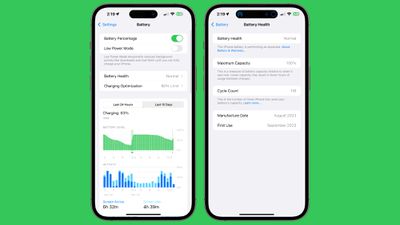
In the Battery section of the Settings app, the Battery Health listing now has a readout such as "Normal" that is accessible without tapping in to the prior "Battery Health & Charging" section.
If you tap on the battery health readout on an iPhone 15, the battery cycle count, manufacture date, and first use will be listed. This information was previously hidden in the General > About section of the Settings app.
The Charging Optimization section continues to provide the same settings. Optimized Battery Charging preserves battery health by learning usage habits and limiting the amount of time that the battery sits at a 100 percent charge. There is also an option to limit charging to 80 percent to further preserve health, and a toggle for turning off optimized charging all together.
Note that these changes are limited to the iPhone 15, iPhone 15 Plus, iPhone 15 Pro, and iPhone 15 Pro Max. Battery settings have not changed on older iPhone models.

















Top Rated Comments
Is there anything that prevents them from doing it on previous models?
It's not like this is such a killer feature that people would pick a 15 over a (likely cheaper by now) 14 or so if they're not already sold on a 15.
Otherwise, seems more useful to older iPhones than the latest and greatest…
A phone battery is a consumable. Use your phone as you need and replace the battery when it's done. It's like tires on a car - drive them until they need replacing, and get new ones when they are worn.
Just like the charge to 80% limit.
It's mind blowingly good!