Your Mac and Apple Vision Pro: What You Can Do (and What You Can't) - MacRumors
Skip to Content

Your Mac and Apple Vision Pro: What You Can Do (and What You Can't)

When Apple first unveiled its next-generation Vision Pro headset at WWDC 2023, the company shared promotional videos that briefly teased the potential applications of using the $3,499 spatial computing device in conjunction with a Mac.

vision pro macbook
Now that Vision Pro has launched in the United States, we have a better idea of what it can do when bringing a Mac into your virtual workflow. Here's what we know.

Mac and Vision Pro: What You Can Do

Create a Virtual Desktop

When it comes to the Mac, the keystone feature of Apple Vision Pro is something called Mac Virtual Display. The system uses AirPlay 2, and allows you to connect your Mac wirelessly to the headset just by looking at your computer through your Vision Pro. This allows you to place and resize a virtual representation of your Mac's display anywhere in space, and use Vision Pro as an enormous 4K display. The feature is compatible with any Mac running macOS Sonoma, but if the Mac has an Intel processor, resolution is limited to up to 3K.

Use visionOS Apps Alongside Your Mac

With Mac Virtual Display enabled, you can use visionOS apps right alongside your virtual Mac screen. This will allow you to, for example, work on a Final Cut Pro project on an enormous Mac display while also viewing and interacting with separate screens displaying visionOS apps like Photos, Notes, Files, and so on.

Mirror Vision Pro to Mac

Apple Vision Pro supports screen mirroring via AirPlay or FaceTime. When wearing Vision Pro, you can select a Mac from the visionOS Control Center to mirror content from the headset ("Mirror My View"), allowing you to share your view with others and reduce any sense of isolation.

Connect Mac Accessories

Vision Pro includes a virtual keyboard for spatial computing sessions, but you can also wirelessly connect Mac accessories to the Vision Pro, including the Magic Keyboard and the Magic Trackpad for more traditional tactile input. Attaching Bluetooth accessories allows for a typical Mac workflow to continue to be used, just with the Mac display replaced by Vision Pro.

Mac and Vision Pro: What You Can't Do

Arrange Mac Apps in Virtual Space

Prior to Apple's official unveiling of Vision Pro, many Mac users envisioned an ideal multitasking scenario where it would be possible to break out Mac apps individually in a mixed reality workspace and switch attention between them at a glance. However, now we know that it is not possible to view individual Mac apps in virtual windows alongside one another in Vision Pro's spatial computing environment.

Create Multiple Virtual Displays

Another limitation of the first-generation Vision Pro is that it only supports mirroring your Mac's built-in display. In other words, it isn't currently possible to extend your Mac's screen or recreate a multiple monitor Mac setup in the mixed reality workspace. This could be due to bandwidth limitations (Mac Virtual Display outputs in 4K). On that basis, multiple Mac displays in Vision Pro's spatial computing environment may be something supported in a future version or with a future software update, but don't expect such functionality out of the box.

Connect a Bluetooth Mouse

Unfortunately, the ‌Apple Vision Pro‌ does not work with Bluetooth mice at all, even if it is one made by Apple. As mentioned above, Vision Pro does work with the Apple Magic Trackpad, but older Trackpads with removable batteries are not compatible, nor are trackpads from other manufacturers.

Apple Vision Pro and the Future of Mac

As the above suggests, Mac and Vision Pro interoperability remains fairly basic at the time of writing. However, there's good reason to be optimistic about the future of Mac in the era of spatial computing. This is just the first-generation version of Apple's headset. Expect more to come.
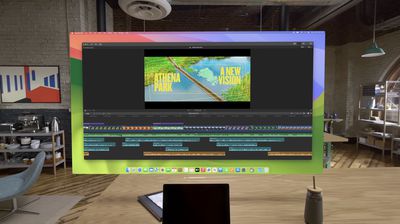
vision pro mirrored mac screen
Apple Vision Pro went on sale in the U.S. on Friday, February 2, with availability in Canada and the United Kingdom expected to follow later in the year.
Related Roundup: Apple Vision Pro
Buyer's Guide: Vision Pro (Neutral)
Related Forum: Apple Vision Pro

Popular Stories

Vision Pro M5 Announcement

New Vision Pro Headset: Apple Considering Four Different Concepts

Monday September 28, 2026 3:52 am PDT by
Apple is working on a "completely revamped" Vision Pro headset that could go in any of four directions and likely won't arrive before late 2028 or early 2029, according to Bloomberg's Mark Gurman. Writing in his latest Power On newsletter, Gurman said Apple's Vision team is exploring four concepts for the device, codenamed N224, including designs that offload internal components in a similar ...
General visionOS watchOS and tvOS Betas Feature Redux

Apple Releases First watchOS 27.2, tvOS 27.2 and visionOS 27.2 Betas

Wednesday September 16, 2026 10:12 am PDT by
Alongside new betas of iOS 27.2, iPadOS 27.2, and macOS Golden Gate 27.2, Apple has released the first betas of watchOS 27.2, tvOS 27.2, and visionOS 27.2. The betas come two days after the 27.0 software updates were released. Registered developers can download the betas through the Settings app on each device. Two new Apple Intelligence features are coming to the Apple Watch Series 12...
General visionOS watchOS and tvOS Betas Feature Redux

Apple Releases Second watchOS 27.2, tvOS 27.2 and visionOS 27.2 Betas

Monday September 21, 2026 10:20 am PDT by
Alongside new betas of iOS 27.2, iPadOS 27.2, and macOS Golden Gate 27.2, Apple has released the second betas of watchOS 27.2, tvOS 27.2, and visionOS 27.2. The betas come week after Apple released the first betas. Registered developers can download the betas through the Settings app on each device. With iOS 27.2 and watchOS 27.2, Apple is testing the new Health app that it showed off...

Top Rated Comments

36 months ago

it is a future, whether we like it or not.
It won’t be THE future though, 3D TVs failed because no one liked wearing glasses all the time and it made some people sick, I wonder if this Vision Pro will do the same like other VR headsets can? For the price too most will probably opt to buy that MacBook Pro on the desk as I imagine it’s a lot more versatile then the headset is if it’s based on iOS.
Score: 30 Votes (Like | Disagree)
36 months ago
“This is stupid no one is going to pay $600 for an iPhone”

“Why do I need an iPhone again?”

“The iPhone is not the future and it will flop”.

Steve Balmer: “the iPhone will never be a success”
Score: 27 Votes (Like | Disagree)
36 months ago
Virtual display is what sold me. I don't know if I would buy just for that, but I don't live in the US so I don't have a choice anyway. But I have an ultrawide display in my home office and I work from hotels on a small laptop screen more often than I like. Only that one feature has a massive value to me.
Score: 24 Votes (Like | Disagree)
HobeSoundDarryl Avatar
36 months ago
For my purposes, THIS is the killer app, as relatively simple as it is vs. the great stack of potentials of high resolution VR/AR.

All one needs to do is switch from a large, expansive Mac screen to a relatively tiny 16" or smaller and miss the larger screen R.E. to want a remedy. That remedy is NOT building even bigger laptops, or laptops with screens that fold out... or roll out. For most of those options, it would add a LOT of weight. This doesn't. I envision a new kind of laptop usage here: laptop + Vpro in the bag... and maybe a lidless MB and Vpro in the bag.

And like laptop screens, this is an any-size screen you can summon to use wherever you happen to be. In my case, a major use will be on long flights where cramped seating spaces sometimes doesn't even allow for a laptop to be used in the normal way (can't fully open it at the normal angle to use it).

Bummer that one can't summon multiple Mac screens in the overall view. However, since it is projecting ONE Mac screen and since Mac easily manages multiple screens in Spaces, leave the heavy lifting to Spaces by opening any number of Mac apps across any number of Spaces and then switching to alt Spaces when you want access to those other running apps in the Vpro view. You can basically fake this right now by air-playing a Mac through AppleTV to your big-screen TV. Open up any number of Spaces, run Mac apps in those Spaces and then switch to them via Mission Control as desired. That same thing should work the same way with Vpro (minus the AppleTV need).

Very common apps that I will want to use WITH some Mac apps are Mail, Safari and Messages. Since those are native apps that work fine on iPad, they WILL float next to the one Mac screen. So instead of running them on Mac or on a Mac Space, I'll run the iPad/Vpro versions of them and float them around this Mac screen, switching to and using them as desired and then back to the main workspace. The whole Mac virtual canvas could be owned by some key Mac app while collaboration via texts or email can be flowing around that view... and/or research via web can be done in Safari floating around the view... and/or copy could be polished in the Vpro version of Pages... or calculations fleshed out in the Vpro version of Numbers, etc.

Everyone who wishes for a MB 17" or MB 18" or MB 20" can get a variation of that want met here... along with a MB 24", MB 27", MB 30", MB 40", MB 50", etc. Anyone who has flown and watched the movie on any puny screen (phone, iPad, laptop) and wished they could watch it on a bigger screen, can basically have their biggest big (TV-sized) screen with them in that small seating space too, able to deliver video via this headset, like delivering music in the same setting via headphones.

Since my flights are often LONG ones and 2 hour battery life will not outlast the flight, I anticipate resolving that issue the same way I resolved the very same battery life with my original Powerbook G4: I'll buy & carry a couple of battery packs. If there is a socket on the plane, I'll use it. If not, spare battery packs will make it work until a G4 evolves into an Intel or Silicon (battery life) MB in future versions. My guess is OWC-type players will offer third-party, improved batteries soon after this thing is in the wild.

If it does this one thing really well- that is, it delivers a sharp, super-sized Mac screen for all those situations where having access to an actual larger screen can't work (which is pretty much all situations where I'm using a MB), that's good enough for me, regardless of what else it is able to do. Several of the cheapie, low-resolution ones can already do this at so-so virtual screen quality. Hopefully, 4K-per-eye delivers an outstanding Apple screen quality.

Make no mistake: I do NOT see this as a REPLACEMENT for desktop screens where Vpro becomes my ONLY screen. So all of the collaboration around a screen, etc, issues still get facilitated in traditional setups. However, in all those solo use of laptop scenarios where it's just me hammering out some project, much more screen R.E. will be extraordinarily welcomed. I feel far more productive on my 40" desktop screen than any 16" MB screen. I'm hoping this allows a 40" (or larger) virtual screen to easily go with me when I'm away from desktop settings. No way to easily accomplish that in actual reality (no easily carrying a 40" desktop screen around, balancing it on a tray table, powering it on the airplane, etc). But Vpro will apparently make this easy to do in a relatively light-weight, portable package in the same laptop bag.
Score: 23 Votes (Like | Disagree)
36 months ago

Exactly. Much cheaper to get a larger screen
A larger screen is not portable and battery driven.
Score: 17 Votes (Like | Disagree)
36 months ago

Feels like we are just arguing in circles.
There are a group of people on MacRumors whose purpose seems to be "arguing in circles" over a product they've told us for months they have no interest in.
Score: 14 Votes (Like | Disagree)
Latest Stories
Apple 'Welcome Home' Launch: Everything to Expect Tomorrow
14 hours ago
You Can Now Set Up Your iPhone Duo Pre-Order - Do It Before Friday
14 hours ago
Apple Plans Two-Day Event to Showcase Trio of New Macs and iPad Mini
15 hours ago
Apple and Pokémon Tease Special Pikachu-Themed Beats Pill Speaker
15 hours ago
Apple Announces 'Indie Games Week' on App Store
17 hours ago
Amazon Discounting 2026 MacBook Pro by as Much as $600 This Week
17 hours ago
Apple Watch Ultra 1 vs. Ultra 4 Buyer's Guide: Is It Worth Upgrading?
17 hours ago
Apple Watch SE 3 Available From Just $199.99 on Amazon
17 hours ago
Tim Cook Visits China for the Third Time in 2026
17 hours ago
OLED iPad Mini Could Be $200 More Expensive Than Current Model
20 hours ago
Apple Launches Special Edition AirPods 5 in India
21 hours ago
New Apple TV 4K and HomePod Mini 2 Pre-Orders Expected to Begin This Week
1 day ago
New Apple TV 4K, HomeView, and HomePod Mini: 16 Details Just Leaked
1 day ago
New Entry-Level iPad Not Expected Until Early 2027
2 days ago
Apple Plans Major iPhone Duo Retail Showcase, But Supply Will Be Limited
2 days ago
Apple TV 4K Getting A19 Chip and a Potentially Easier-to-Find Siri Remote
2 days ago
New Mac Mini and Mac Studio Receive Up to $200 Price Cuts at Amazon
2 days ago
Apple HomeView Smart Hub to Ship in Mid-November in Four Colors
2 days ago
New Apple TV 4K and HomePod Mini to Ship on October 30
2 days ago
AirPods Max 2 Available for $429 in All Colors on Amazon
2 days ago
Rumor: Apple to Announce New Partnership With ADT
2 days ago
AirPods 5 vs. AirPods 5 With Wireless Charging Case Buyer's Guide
3 days ago
Accessory Deals This Weekend: Save on TVs, Headphones, and Smart Home Gear
3 days ago
Apple's All-New Home Hub Will Be Revealed October 13: What to Expect
3 days ago
Apple Announcing HomePod Mini 2 Next Week With These New Features
3 days ago
A New Apple TV 4K is Finally Coming on Tuesday
3 days ago
Top Stories: Apple's 'Welcome Home' Launch on October 13 and More
3 days ago
Apple Stores Will Add Your Name to iPhone Duo's Startup Screen
3 days ago
SpaceX Inches Closer to Becoming a U.S. Carrier
3 days ago
Apple Potentially Behind 'HomeView' Trademark Filed Alongside 'homeOS' Last Year
3 days ago