Apple Launches Multiview Sports Feature for Apple TV 4K
Apple today announced the launch of a new multiview feature for the Apple TV 4K, which is designed to allow MLS Season Pass and Friday Night Baseball fans to watch multiple sports games at the same time.
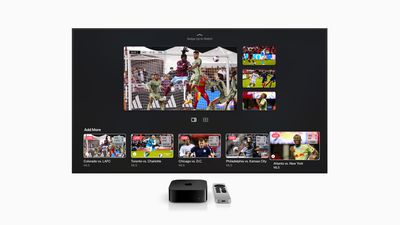
Apple TV 4K owners can watch up to four simultaneous sports streams, including Major League Soccer matches, Friday Night Baseball games, and some MLS and MLB live shows like MLS 360 and MLB Big Inning.
The customizable multiview experience in the Apple TV app lets users see available live games at the bottom of the screen, and they can select the games that they want to watch. There are multiple layout options available for two matches and for matches, along with audio control preferences. Swapping back to one screen can be done with a click.
Though Apple does not mention it, multiview sports could require tvOS 16.5, as the feature has been active during the tvOS 16.5 beta testing period. tvOS 16.5 is available as of today.
Popular Stories
Just two days before Apple's "Welcome home" experience in New York, Bloomberg's Mark Gurman has leaked several details about the new products set to be unveiled, including an all-new smart home hub, a HomePod mini 2, and a new Apple TV 4K.
Here is an all-in-one summary of the details shared by Gurman:Apple's home hub with a touch-enabled display will be named HomeView, seemingly confirming a ...
Apple today announced the fourth-generation Apple TV 4K, with key features including an A19 chip, Siri AI support, an updated Siri Remote that has Find My support with Precision Finding, built in far-field microphones, support for surround sound with four HomePods in front and rear pairs, and more.
The A19 chip in the new Apple TV 4K delivers up to 50% faster CPU performance and up to twice...
Apple likely plans to release MacBook Pro models with OLED displays, 14-inch MacBook Pro and iMac models with M6 chips, and/or an iPad mini 8 with an OLED display on Friday, November 6, according to Bloomberg's Mark Gurman.
The devices are expected to be announced on Tuesday, October 27 or Wednesday, October 28.
If this timeframe proves to be accurate, then Apple will be releasing new...



















































