Apple Details macOS Ventura and iOS 16 Continuity Camera Feature

Apple has detailed macOS Ventura's and iOS 16's new Continuity Camera feature in a recently published support document, offering details, instructions, and tips for the feature.
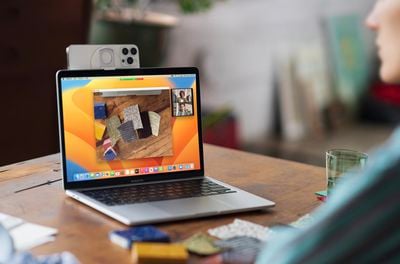
continuity camera
Continuity Camera is a new feature in macOS Ventura that allows users to use an iPhone as a webcam on their Mac. Continuity Camera works wirelessly or wired in FaceTime, Zoom, and other apps. With Continuity Camera, users will get video directly from their ‌iPhone‌ camera, which has significantly better quality than the built-in camera on Macs.

Continuity Camera also allows users to use different effects from their iPhones. For the first time on Mac, for example, users can use the Wide Camera on the ‌iPhone‌ to enable Center Stage. Studio Light, Portrait mode, and Desk View, which simultaneously shows a user's desk and face, are also available.

To attach an ‌iPhone‌ to a MacBook, users can purchase a new Belkin iPhone mount that attaches an ‌iPhone‌ to the top bezel of a MacBook. The mount retails for $29.95 and is available on Apple's online store.

According to the support document, users will need an ‌iPhone‌ running iOS 16 or later and a Mac with macOS Ventura to use Continuity Camera. Additionally, users must be signed into the same Apple ID on both devices with two-factor authentication enabled, and Bluetooth or Wi-Fi must also be enabled.


Related Forum: macOS Ventura

Popular Stories

imac video apple feature

Apple Unveils First New Products of 2026

Monday January 26, 2026 1:55 pm PST by
Apple today introduced its first two physical products of 2026: a second-generation AirTag and the Black Unity Connection Braided Solo Loop for the Apple Watch. Read our coverage of each announcement to learn more:Apple Unveils New AirTag With Longer Range, Louder Speaker, and More Apple Introduces New Black Unity Apple Watch BandBoth the new AirTag and the Black Unity Connection Braided...
Apple Logo Black

Apple Just Made Its Second-Biggest Acquisition Ever After Beats

Thursday January 29, 2026 10:07 am PST by
Apple today confirmed to Reuters that it has acquired Q.ai, an Israeli startup that is working on artificial intelligence technology for audio. Apple paid close to $2 billion for Q.ai, according to sources cited by the Financial Times. That would make this Apple's second-biggest acquisition ever, after it paid $3 billion for the popular headphone and audio brand Beats in 2014. Q.ai has...
iPhone 5s

iPhone 5s Gets New Software Update 13 Years After Launch

Monday January 26, 2026 3:56 pm PST by
Alongside iOS 26.2.1, Apple today released an updated version of iOS 12 for devices that are still running that operating system update, eight years after the software was first released. iOS 12.5.8 is available for the iPhone 5s and the iPhone 6, meaning Apple is continuing to support these devices for 13 and 12 years after launch, respectively. The iPhone 5s came out in September 2013,...
Apple Creator Studio

Apple's Next Launch is Today

Tuesday January 27, 2026 2:39 pm PST by
Update: Apple Creator Studio is now available. Apple Creator Studio launches this Wednesday, January 28. The all-in-one subscription provides access to the Final Cut Pro, Logic Pro, Pixelmator Pro, Motion, Compressor, and MainStage apps, with U.S. pricing set at $12.99 per month or $129 per year. A subscription to Apple Creator Studio also unlocks "intelligent features" and "premium...
Apple Event Logo

Apple Teases 'Innovations That Have Never Been Seen Before' This Year

Friday January 30, 2026 5:40 am PST by
Apple CEO Tim Cook believes that his company will have opportunities to deliver "innovations that have never been seen before" this year. "As I said at the beginning of my remarks, this was, in so many ways, a remarkable quarter for Apple, and we're excited for all the opportunities we'll have in the year ahead to deliver innovations that have never been seen before and enrich the lives of...

Top Rated Comments

vjpulp Avatar
43 months ago
I would argue that this feature is being marketed completely wrongly.
It should not be used for laptops or iMacs (which already have a webcam), but mainly targeted for owners of Mac Minis, Mac Studios, Mac Pros, etc. who use a third party screen and have no or an old webcam. These are the real beneficiaries of this feature.
I for one have an LG 5K Screen hanging on my Mac Studio and will definitely use it.
Score: 14 Votes (Like | Disagree)
icanhazmac Avatar
43 months ago
I cannot think of a single thing that would make me hang my phone off the back of my laptop.
Score: 11 Votes (Like | Disagree)
TheYayAreaLiving ?️ Avatar
43 months ago
Is it weird that I don't plan on using this feature at all?
Score: 8 Votes (Like | Disagree)
Nicole1980 Avatar
43 months ago
All this because they were too cheap to put decent built-in cameras in their laptops or iMacs
Score: 7 Votes (Like | Disagree)
mthomas184 Avatar
43 months ago

Why should Apple include a fancy camera in their laptops?
People just like to complain about Apple at every chance they get.
Score: 6 Votes (Like | Disagree)
rookie_macuser! Avatar
43 months ago
On a tripod with MagSafe this seems like a really good idea if you have a lot of meetings and want good quality video.
Score: 6 Votes (Like | Disagree)