First Mac Studio and Studio Display Orders Begin Arriving to Customers in Australia and New Zealand

It is officially March 18 in Australia and New Zealand, which means that it's Mac Studio and Studio Display launch day. Customers in these countries are always the first to get their hands on new devices, and Apple's new studio devices are being delivered.
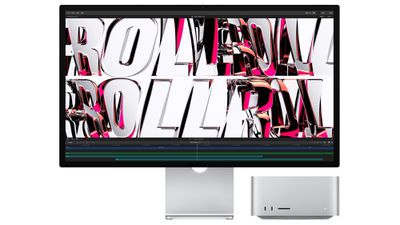
mac studio studio display duo
The ‌Mac Studio‌ and Studio Display are starting to arrive to customers who pre-ordered when the devices went up for sale following the "Peek Performance" event, and customers will soon begin to share their photos on Twitter, Instagram, and the MacRumors forums.

New Zealand does not have Apple Stores, so Australian customers will be the first who are able to pick up a Studio Display or ‌Mac Studio‌ at a retail location, provided Apple has stock. Availability in Australia will give us an idea of what we can expect from other stores worldwide.

Apple will likely sell stock configurations of the Studio Display and the ‌Mac Studio‌ at its retail stores, with pricing beginning at $1,599 for the Studio Display and $1,999 for the ‌Mac Studio‌. Supplies of both devices were limited on ordering day, so retail stores may also have limited quantities.

If you try to order a ‌Mac Studio‌ or Studio Display online, the order won't ship until April, so a retail store is now the only way to get a launch day device.

Following New Zealand and Australia, sales of the MacBook Pro will begin in Asia, the Middle East, Europe, and then North America. Apple Stores‌ globally are opening up right around 9:00 or 10:00 a.m. local time to allow customers to pick up reserved devices and make walk-in purchases.

Today also marks the delivery of the first iPhone SE and iPad Air models, though those are mostly iterative updates and not quite as exciting as the new studio product lines.

Have a new ‌Mac Studio‌ or Studio Display? Share pictures below and let us know what you think of your new device.

Buyer's Guide: Mac Studio (Neutral)
Related Forums: Mac Accessories, Mac Studio

Popular Stories

iOS 26

iOS 26.2 Coming Soon With These 8 New Features on Your iPhone

Thursday December 11, 2025 8:49 am PST by
Apple seeded the second iOS 26.2 Release Candidate to developers earlier this week, meaning the update will be released to the general public very soon. Apple confirmed iOS 26.2 would be released in December, but it did not provide a specific date. We expect the update to be released by early next week. iOS 26.2 includes a handful of new features and changes on the iPhone, such as a new...
AirPods Pro Firmware Feature

Apple Releases New Firmware for AirPods Pro 2 and AirPods Pro 3

Thursday December 11, 2025 11:28 am PST by
Apple today released new firmware designed for the AirPods Pro 3 and the prior-generation AirPods Pro 2. The AirPods Pro 3 firmware is 8B30, up from 8B25, while the AirPods Pro 2 firmware is 8B28, up from 8B21. There's no word on what's include in the updated firmware, but the AirPods Pro 2 and AirPods Pro 3 are getting expanded support for Live Translation in the European Union in iOS...
iOS 26

iOS 26.4 and iOS 27 Features Revealed in New Leak

Friday December 12, 2025 10:56 am PST by
Macworld's Filipe Espósito today revealed a handful of features that Apple is allegedly planning for iOS 26.4, iOS 27, and even iOS 28. The report said the features are referenced within the code for a leaked internal build of iOS 26 that is not meant to be seen by the public. However, it appears that Espósito and/or his sources managed to gain access to it, providing us with a sneak peek...
Google maps feaure

Google Maps Quietly Added This Long-Overdue Feature for Drivers

Wednesday December 10, 2025 2:52 am PST by
Google Maps on iOS quietly gained a new feature recently that automatically recognizes where you've parked your vehicle and saves the location for you. Announced on LinkedIn by Rio Akasaka, Google Maps' senior product manager, the new feature auto-detects your parked location even if you don't use the parking pin function, saves it for up to 48 hours, and then automatically removes it once...
iOS 26

Apple Releases iOS 26.2 With Alarms for Reminders, Lock Screen Changes, Enhanced Safety Alerts and More

Friday December 12, 2025 10:10 am PST by
Apple today released iOS 26.2, the second major update to the iOS 26 operating system that came out in September, iOS 26.2 comes a little over a month after iOS 26.1 launched. ‌iOS 26‌.2 is compatible with the ‌iPhone‌ 11 series and later, as well as the second-generation ‌iPhone‌ SE. The new software can be downloaded on eligible iPhones over-the-air by going to Settings >...
Foldable iPhone 2023 Feature 1

Apple to Make More Foldable iPhones Than Expected [Updated]

Tuesday December 9, 2025 9:59 am PST by
Apple has ordered 22 million OLED panels from Samsung Display for the first foldable iPhone, signaling a significantly larger production target than the display industry had previously anticipated, ET News reports. In the now-seemingly deleted report, ET News claimed that Samsung plans to mass-produce 11 million inward-folding OLED displays for Apple next year, as well as 11 million...
AirTag 2 Mock Feature

Apple AirTag 2: Four New Features Found in iOS 26 Code

Thursday December 11, 2025 10:31 am PST by
The AirTag 2 will include a handful of new features that will improve tracking capabilities, according to a new report from Macworld. The site says that it was able to access an internal build of iOS 26, which includes references to multiple unreleased products. Here's what's supposedly coming: An improved pairing process, though no details were provided. AirTag pairing is already...
iOS 26

15 New Things Your iPhone Can Do in iOS 26.2

Friday December 5, 2025 9:40 am PST by
Apple is about to release iOS 26.2, the second major point update for iPhones since iOS 26 was rolled out in September, and there are at least 15 notable changes and improvements worth checking out. We've rounded them up below. Apple is expected to roll out iOS 26.2 to compatible devices sometime between December 8 and December 16. When the update drops, you can check Apple's servers for the ...
macOS Tahoe 26 Thumb

Apple Releases macOS Tahoe 26.2 With Edge Light

Friday December 12, 2025 10:08 am PST by
Apple today released macOS Tahoe 26.2, the second major update to the macOS Tahoe operating system that came out in September. macOS Tahoe 26.2 comes five weeks after Apple released macOS Tahoe 26.1. Mac users can download the macOS Tahoe update by using the Software Update section of System Settings. macOS Tahoe 26.2 includes Edge Light, a feature that illuminates your face with soft...

Top Rated Comments

socialwill Avatar
49 months ago
Next Article:

"First Studio Displays are being returned in New Zealand and Australia"
Score: 35 Votes (Like | Disagree)
szw-mapple fan Avatar
49 months ago
20 years later this is probably the closest we’ve gotten to Jobs’ vision for the G4 cube. A computer positioned between consumer macs and high-end workstations contained in a miniaturized cube.

Score: 30 Votes (Like | Disagree)
moodler Avatar
49 months ago
First impressions on my Mac Studio Display which arrived today:

[LIST=1]
* Basic display is 100% equivalent to the LG Ultrafine 5K display I had before. No visible difference.
* Overall feel of the design is clean and sturdy (unlike the Ultrafine)
* Basic unadjustable stand height is luckily about the right height for me so it works. It was nice to have the capability on the Ultrafine but I guess that contributed to the wobbliness.
* The speakers are very good compared to other built-in display speakers, nice spatial presence but very much lacking in low end. They're 30% as good as my professional monitoring speakers that I use to make music, but it will be nice to have as an alternative just to try my mixes on. However, having them BOTH on at the same time (by configuring them as a multi-output device) sounds absolutely amazing (unfortunately it makes controlling the volume difficult). Sigh.
* The camera is very disappointing. I really had my hopes up that it would replace my Logitech 4K Brio but no chance. First of all quite grainy. Also there appears to be NO WAY TO ADJUST THE SETTINGS so it just does it's own levels adjustments whenever it feels likes, making it USELESS FOR VIDEOCONFERENCING IF YOU USE A GREEN SCREEN (as I do).

So now I still have a 3rd-party webcam sitting on top of my fancy new monitor :(


Attachment Image
Score: 10 Votes (Like | Disagree)
macsplusmacs Avatar
49 months ago
New Zealand.

Beautiful country AND they get macs faster than anyone.

win.

win.
Score: 10 Votes (Like | Disagree)
jz0309 Avatar
49 months ago
will love to read impressions/reviews from real people ...
Score: 8 Votes (Like | Disagree)
Sebosz Avatar
49 months ago
Blue iPad Air (5th gen) looks really beautiful IRL. Much better than 4th gen.
Score: 7 Votes (Like | Disagree)