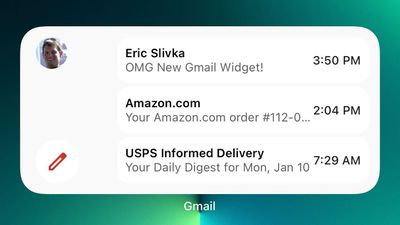
Google recently updated the Gmail app for iOS devices, and though it's not mentioned in the release notes, the new version of the app introduces a second Gmail widget.
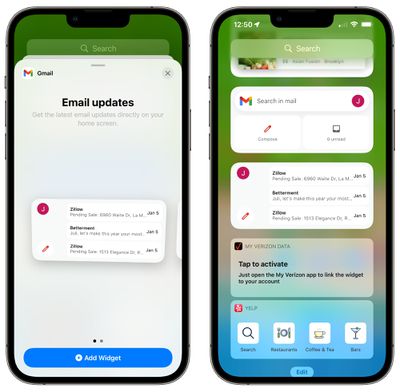
The new Gmail widget displays the last three emails in the Gmail inbox, along with a button to compose a new email. The widget joins the existing widget that displays a compose button, a search interface, and lets users know how many unread emails are in the inbox.
Google's new widget is much more informative because it provides actual email content, unlike the prior version.
The widget can be added to either the Today screen alongside other widgets or to the Home screen among apps. To add the new widget, long press on the Home screen, tap the "+" button upper left corner, and scroll down to Gmail.
You will need the latest version of the Gmail app, which can be downloaded from the App Store for free. [Direct Link]
Apple today announced it will be permanently closing three retail stores in the U.S. in June, including Apple Trumbull in Trumbull, Connecticut, Apple North County in Escondido, California, and Apple Towson Town Center in Towson, Maryland.
Apple Towson Town Center in Maryland
Apple issued the following statement to MacRumors:At Apple, we are constantly striving to deliver exceptional service...
Wednesday April 8, 2026 7:17 pm PDT by Joe Rossignol
Apple has released a minor iOS 26.4.1 update for the iPhone 11 and newer. While the release notes for the update only mention unspecified "bug fixes," we have since learned about two specific changes that are included in it.
First, 9to5Mac spotted an Apple Developer Forums thread suggesting that iOS 26.4.1 fixes an iOS 26.4 bug that affected iCloud syncing in some apps.
Second, an...
As we wait for WWDC to kick off next Monday, Apple today announced the winners of its annual Apple Design Awards, recognizing apps and games for their innovation, ingenuity, and technical achievement.
The 2025 Apple Design Award winners are listed below, with one app and one game selected per category:
Delight and Fun - CapWords (App) and Balatro (Game)
Innovation - Play (App) and PBJ -...
Google has expanded Gmail's end-to-end encryption for Workspace users to iOS and Android, allowing mobile users to compose and read encrypted messages natively within the Gmail app for the first time.
The feature is part of Gmail's client-side encryption (CSE) offering, which until now was limited to desktop. According to Google's Workspace update, users no longer need to download additional ...
Google today announced that you can finally change the Google Account email address that you use for Gmail, Google Calendar, Google Photos, Google Drive, and more, but this ability is only rolling out to U.S. accounts for now. The company did not indicate if or when this functionality will be available in other countries.
You can switch to any available @gmail.com address, and your previous...
Apple today announced it will be permanently closing three retail stores in the U.S. in June, including Apple Trumbull in Trumbull, Connecticut, Apple North County in Escondido, California, and Apple Towson Town Center in Towson, Maryland.
Apple Towson Town Center in Maryland
Apple issued the following statement to MacRumors:At Apple, we are constantly striving to deliver exceptional service...
I know it's quite popular, but why anybody would use Google Mail (knowing they data mine every last word) is beyond me. EDIT: and before everybody beats me to it, even if Apple don't data mine their iCloud customers, I guess the email recipient's email provider and indeed all the ISPs along the way data mine everything so there's that. I guess there's just no escaping it. Sigh.
I use Google Mail for work and I prefer to use it in the Google app instead of Apple Mail so I can keep work and personal email separate.
Anyone else's Gmail app awful when scrolling inside emails? Especially one with images?
I'm not sure if it's always been there but I'm not able to ignore it on my 13 Pro Max and have since switched to the native Mail app. The inbox scrolls fine and at 120 Hz but it just stutters like crazy inside emails.