iOS 15 Can Automatically Add and Remove Widgets to a Smart Stack

On iOS 14, Smart Stacks for widgets allow users to stack different widgets on top of each other and then allow iOS to display the most relevant widget depending on the time of day, location, and more. On iOS 15, Apple is taking Smart Stacks even further with Widget Suggestions, which automatically add and remove widgets in a Smart Stack depending on context.
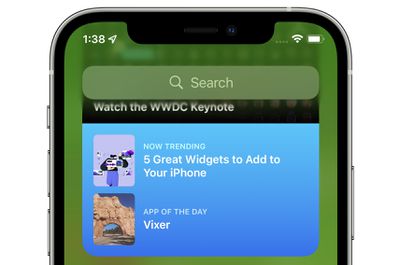
app store widget
For example, if a user has an existing Smart Stack which includes the Weather and Reminders widget, iOS 15 may add a Calendar widget to the stack if the user has an upcoming meeting. Then, after the meeting, iOS 15 will remove the widget from the Smart Stack, reverting it to the stack that the user had set up with Weather and Reminders. Apple says it hopes this new feature, which can be disabled on a per Smart Stack basis, will allow users to discover new and helpful widgets.

iOS 15 and iPadOS 15 introduces new widgets for Find My, Game Center, App Store Today, Sleep, Mail, and more. Developers interested in learning more about widget suggestions and how they can be implemented into their app can check out this WWDC session.

Related Forum: iOS 15

Popular Stories

iOS 26

iOS 26.2 Coming Soon With These 8 New Features on Your iPhone

Thursday December 11, 2025 8:49 am PST by
Apple seeded the second iOS 26.2 Release Candidate to developers earlier this week, meaning the update will be released to the general public very soon. Apple confirmed iOS 26.2 would be released in December, but it did not provide a specific date. We expect the update to be released by early next week. iOS 26.2 includes a handful of new features and changes on the iPhone, such as a new...
iOS 26

iOS 26.4 and iOS 27 Features Revealed in New Leak

Friday December 12, 2025 10:56 am PST by
Macworld's Filipe Espósito today revealed a handful of features that Apple is allegedly planning for iOS 26.4, iOS 27, and even iOS 28. The report said the features are referenced within the code for a leaked internal build of iOS 26 that is not meant to be seen by the public. However, it appears that Espósito and/or his sources managed to gain access to it, providing us with a sneak peek...
AirPods Pro Firmware Feature

Apple Releases New Firmware for AirPods Pro 2 and AirPods Pro 3

Thursday December 11, 2025 11:28 am PST by
Apple today released new firmware designed for the AirPods Pro 3 and the prior-generation AirPods Pro 2. The AirPods Pro 3 firmware is 8B30, up from 8B25, while the AirPods Pro 2 firmware is 8B28, up from 8B21. There's no word on what's include in the updated firmware, but the AirPods Pro 2 and AirPods Pro 3 are getting expanded support for Live Translation in the European Union in iOS...
iOS 26

Apple Releases iOS 26.2 With Alarms for Reminders, Lock Screen Changes, Enhanced Safety Alerts and More

Friday December 12, 2025 10:10 am PST by
Apple today released iOS 26.2, the second major update to the iOS 26 operating system that came out in September, iOS 26.2 comes a little over a month after iOS 26.1 launched. ‌iOS 26‌.2 is compatible with the ‌iPhone‌ 11 series and later, as well as the second-generation ‌iPhone‌ SE. The new software can be downloaded on eligible iPhones over-the-air by going to Settings >...
Google maps feaure

Google Maps Quietly Added This Long-Overdue Feature for Drivers

Wednesday December 10, 2025 2:52 am PST by
Google Maps on iOS quietly gained a new feature recently that automatically recognizes where you've parked your vehicle and saves the location for you. Announced on LinkedIn by Rio Akasaka, Google Maps' senior product manager, the new feature auto-detects your parked location even if you don't use the parking pin function, saves it for up to 48 hours, and then automatically removes it once...
AirTag 2 Mock Feature

Apple AirTag 2: Four New Features Found in iOS 26 Code

Thursday December 11, 2025 10:31 am PST by
The AirTag 2 will include a handful of new features that will improve tracking capabilities, according to a new report from Macworld. The site says that it was able to access an internal build of iOS 26, which includes references to multiple unreleased products. Here's what's supposedly coming: An improved pairing process, though no details were provided. AirTag pairing is already...
macOS Tahoe 26 Thumb

Apple Releases macOS Tahoe 26.2 With Edge Light

Friday December 12, 2025 10:08 am PST by
Apple today released macOS Tahoe 26.2, the second major update to the macOS Tahoe operating system that came out in September. macOS Tahoe 26.2 comes five weeks after Apple released macOS Tahoe 26.1. Mac users can download the macOS Tahoe update by using the Software Update section of System Settings. macOS Tahoe 26.2 includes Edge Light, a feature that illuminates your face with soft...
iOS 26

15 New Things Your iPhone Can Do in iOS 26.2

Friday December 5, 2025 9:40 am PST by
Apple is about to release iOS 26.2, the second major point update for iPhones since iOS 26 was rolled out in September, and there are at least 15 notable changes and improvements worth checking out. We've rounded them up below. Apple is expected to roll out iOS 26.2 to compatible devices sometime between December 8 and December 16. When the update drops, you can check Apple's servers for the ...

Top Rated Comments

tod Avatar
59 months ago
I hate this stuff. A good UI is predictable and boring.
Score: 3 Votes (Like | Disagree)
cmaier Avatar
59 months ago
A trend in Apple's UX designs lately - try and guess what will appear when you swipe the smart stack! Try and guess where the text box is to type a new address into safari! Try and guess where the keys are on the TouchBar!
Score: 2 Votes (Like | Disagree)
bchery21 Avatar
59 months ago

Hmm. Sounds like an okay idea to me, as long as I can disable it if I don't like the behavior. I was disappointed to not hear that the widgets will be interactive (checking items off a todo list, for example), but maybe that will still happen?
I hope so, especially with the example you gave. Checking something off the Reminders widget instead of bringing you into the app would be welcomed especially since that's how it use to behave.
Score: 2 Votes (Like | Disagree)
TheYayAreaLiving ?️ Avatar
59 months ago
I have to admit. The widgets are cool
Score: 2 Votes (Like | Disagree)
contacos Avatar
59 months ago
I never understood why the stack does not just have a "+" button to add other widgets to the stack. Instead I always have to add a new widget and drag and drop it on the stack in hope it does not mess up my whole app icons on the Home Screen.

By the way, what ever happened to resizing widgets straight from the Home Screen? That never made it past the announcement on iOS14 last year
Score: 1 Votes (Like | Disagree)
Octavius8 Avatar
59 months ago
Bring back the "up next" widget!. I don't need "smart" unreliabale suggestions!. I just need a dumb one that works as in IOS 13!!!. Pretty please?
Score: 1 Votes (Like | Disagree)