Microsoft Excel for iPad Now Supports Split View, Word Gains Full Trackpad Support, and PowerPoint Offers Presenter Coaching

Microsoft today released updates to its suite of Office apps for iPad, including Word, PowerPoint, and Excel. Notably, Excel for ‌‌iPad‌‌ now supports Split View, which allows you to open two spreadsheets simultaneously side-by-side to view and edit. Word and PowerPoint received support for Split View in May 2020.

word excel powerpoint ipad
Split View can be accessed by touching and holding on a spreadsheet document in any file view and then dragging it to the left or right side of the screen. To exit Split View, grab the slider in the middle of the screen and drag it to either the left or right to close one of the spreadsheet documents and take the remaining one full-screen.

Meanwhile in PowerPoint, users can now rehearse their presentations with the new Presenter Coach feature, which offers feedback on the things that keep an audience engaged, such as pacing, pitch, filler words, sensitive phrases, and more.
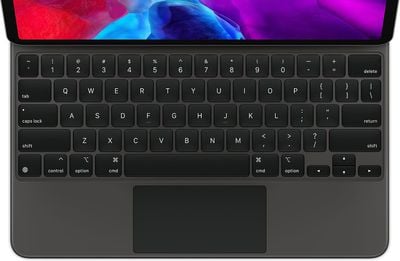
ipadpromagickeyboardtrackpad
Microsoft has also been working to implement full support for the iPadOS trackpad controls that were introduced in iPadOS 13.4, and the latest version of Word (2.45) does just that. Following the update, users can connect a trackpad and mouse to their ‌iPad‌ to interact with documents. Keyboards with trackpads include Apple's Magic Keyboard and Brydge's Pro+ for the iPad Pro and Logitech's Combo for the 10.2-inch ‌iPad‌ and the 10.5-inch iPad Air.

Popular Stories

Apple Creator Studio

Apple Introduces New 'Creator Studio' Bundle of Apps for $129 Per Year

Tuesday January 13, 2026 6:11 am PST by
Apple today introduced a new Apple Creator Studio bundle that offers access to six creative apps, as well as exclusive AI features and content, as part of a single subscription. In the U.S., pricing is set at $12.99 per month or $129 per year. Here are the six apps included with an Apple Creator Studio subscription:Final Cut Pro on the Mac and iPad Logic Pro on the Mac and iPad Pixelmator...
Verizon New

Verizon is Down: iPhones Show 'SOS' Mode Due to Network Outage [Resolved]

Wednesday January 14, 2026 10:18 am PST by
Verizon is experiencing a major outage across the U.S. today, with hundreds of thousands of customers reporting issues with the network on the website Downdetector. There are also complaints across Reddit and other social media platforms. iPhone users and others with Verizon service are generally unable to make phone calls, send text messages, or use data over 5G or LTE due to the outage....
iPhone Top Left Hole Punch Face ID Feature Purple

New Leak Reveals iPhone 18 Pro Display Sizes, Under-Screen Face ID, and More

Wednesday January 14, 2026 7:09 am PST by
While the iPhone 18 Pro models are still around eight months away, a leaker has shared some alleged details about the devices. In a post on Chinese social media platform Weibo this week, the account Digital Chat Station said the iPhone 18 Pro and iPhone 18 Pro Max will have the same 6.3-inch and 6.9-inch display sizes as the iPhone 17 Pro and iPhone 17 Pro Max. Consistent with previous...
iPhone Top Left Hole Punch Face ID Feature Purple

iPhone 18 Pro Launching Later This Year With These 12 New Features

Thursday January 15, 2026 10:56 am PST by
While the iPhone 18 Pro and iPhone 18 Pro Max are not expected to launch for another eight months, there are already plenty of rumors about the devices. Below, we have recapped 12 features rumored for the iPhone 18 Pro models, as of January 2026: The same overall design is expected, with 6.3-inch and 6.9-inch display sizes, and a "plateau" housing three rear cameras Under-screen Face ID...
iOS 26

Here's What's New in iOS 26.3 So Far

Monday January 12, 2026 1:15 pm PST by
Apple today seeded the second beta of iOS 26.3, nearly a month after the first beta. So far, the update includes a couple of new features for iPhones. iOS 15.3 through iOS 18.3 were all released in late January over the years, so it is thereby likely that iOS 26.3 will be released towards the end of this month as well. The update is compatible with the iPhone 11 series and newer. Below,...

Top Rated Comments

7149041 Avatar
66 months ago

trackpad on the ipad is so stupid. doesn't belong on a touch first device.
Then don't buy it... I have a MK and am loving it.
Score: 12 Votes (Like | Disagree)
GDF Avatar
65 months ago

trackpad on the ipad is so stupid. doesn't belong on a touch first device.

i knew arm MacBooks were coming out (redesigned ones are coming soon that will be far lighter and thinner than an iPad Pro with magic keyboard attached) and have said it before it even came out: you don't need a cursor on an iPad.
Totally disagree. I use my iPad 12.9 Pro with Magic Keyboard for almost everything for work and home. Barely use my work laptop. Have trackpad and touch is awesome. I am sure you are in the minority here, but that is why we have choices. :)
Score: 5 Votes (Like | Disagree)
jlc1978 Avatar
65 months ago

Totally disagree. I use my iPad 12.9 Pro with Magic Keyboard for almost everything for work and home. Barely use my work laptop. Have trackpad and touch is awesome. I am sure you are in the minority here, but that is why we have choices. :)
I agree - a touchscreen is fine for many applications, and probably better for some; but a mouse/trackpad and cursor make using the iPad much more viable as a laptop replacement for many use cases.
Score: 4 Votes (Like | Disagree)
jlc1978 Avatar
65 months ago

excel still cannot handle date before 1900? shame on microsoft!

Is this a joke?
No. if you are doing analysis or work that includes dates prior to 1900 you cannot easily calculate durations, sort, etc. Granted it is a bit of an edge case but still highlights how decisions made in development (computers are a new phenomena so if develop a date code structure that starts in 1900 we'll be fine) impact software usability.

The problem is edge cases are often written off as low probability events and thus not worth addressing; I has a situation where emergency parameter logging software was not programmed to allow for daylight savings time switches, so when we has an emergency and the computer automatically adjusted for DST, the logging software went haywire. When we asked the developers about this, they said we figured the chance a serious event would occur at that exact time was too small to worry about; well guess what?
Score: 1 Votes (Like | Disagree)
kave Avatar
65 months ago
This was announced many months ago and shipped the 17th of december as per: https://forums.macrumors.com/threads/microsoft-updates-office-apps-for-ipad-with-mouse-and-trackpad-support.2263715/post-29405848
Score: 1 Votes (Like | Disagree)
bradman83 Avatar
65 months ago

Regarding Word and trackpad: anyone notice a difference in capabilities or handling compared to 2.44? I don't see any at first glance, trackpad integration was already offered with 2.44 ....
I don’t think this is a new feature to 2.45. I think MS just repeats the same recently added major features for a few updates for those who don’t update as often.
Score: 1 Votes (Like | Disagree)