Google has updated its 2FA Authenticator app for iOS with a new account transfer feature that makes it much easier to transfer two-factor authentication codes to a new iPhone.

2FA adds an extra layer of security to your online accounts by requiring a randomly generated six-digit code after you've entered your password. Google's app generates codes for your accounts on the fly, but until now the process of transferring accounts to a new iPhone was time-consuming and involved multiple steps.
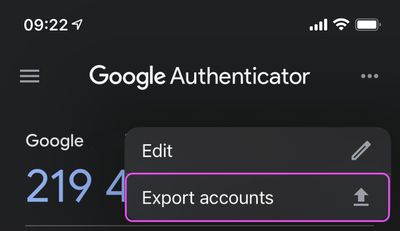
Thankfully, that's no longer the case, and you can now select which accounts to export by tapping the three dots in the top-right corner of the app and choosing Export accounts.
After you've chosen which accounts to export (you can export up to 10 accounts at a time), the Authenticator app will generate a QR code. Scan this code using the Authenticator app on your new device, and the chosen accounts will be automatically transferred.
In addition to 2FA export, the latest update to the app also adds a refreshed interface and Dark Mode support, which respects your systemwide settings.
Remember, if you buy a new iPhone to replace your existing one and you use the Google Authenticator app, you should transfer those accounts to your new phone as soon as possible, because without the 2FA codes close at hand, you could find yourself locked out of your online accounts.
Google Authenticator is a free download for iPhone available on the App Store. [Direct Link]

Monday January 26, 2026 1:55 pm PST by Joe Rossignol
Apple today introduced its first two physical products of 2026: a second-generation AirTag and the Black Unity Connection Braided Solo Loop for the Apple Watch.
Read our coverage of each announcement to learn more:Apple Unveils New AirTag With Longer Range, Louder Speaker, and More
Apple Introduces New Black Unity Apple Watch BandBoth the new AirTag and the Black Unity Connection Braided...
Monday January 26, 2026 3:56 pm PST by Juli Clover
Alongside iOS 26.2.1, Apple today released an updated version of iOS 12 for devices that are still running that operating system update, eight years after the software was first released.
iOS 12.5.8 is available for the iPhone 5s and the iPhone 6, meaning Apple is continuing to support these devices for 13 and 12 years after launch, respectively. The iPhone 5s came out in September 2013,...
Monday January 26, 2026 6:07 am PST by Joe Rossignol
Apple today introduced the second-generation AirTag, with key features including longer range for tracking items and a louder speaker.
For those who are not familiar, the AirTag is a small accessory that you can attach to your backpack, keys, or other items. Then, you can track the location of those items in the Find My app on the iPhone, iPad, Mac, Apple Watch, and iCloud.com.
The new...
Tuesday January 27, 2026 2:39 pm PST by Joe Rossignol
Update: Apple Creator Studio is now available.
Apple Creator Studio launches this Wednesday, January 28. The all-in-one subscription provides access to the Final Cut Pro, Logic Pro, Pixelmator Pro, Motion, Compressor, and MainStage apps, with U.S. pricing set at $12.99 per month or $129 per year.
A subscription to Apple Creator Studio also unlocks "intelligent features" and "premium...
Sunday January 25, 2026 6:02 pm PST by Joe Rossignol
2026 promises to be yet another busy year for Apple, with the company rumored to be planning more than 20 product announcements over the coming months.
Beyond the usual updates to iPhones, iPads, Macs, and Apple Watches, Apple is expected to release its all-new smart home hub, which was reportedly delayed until the more personalized version of Siri is ready. Other unique products rumored for ...
Too few, too late. Authy has taken the spot as a decent and easy to transfer 2FA application with a much better approach of using iCloud storage for backups and restore. Move along, Google - you had your time.
I use Microsoft Authenticator now (I used Google Authenticator for many years and Authy for a year or two) and I'm very happy with it. Many ways to add your codes, backups (if you want, you can disable it), plus password-less login to your Microsoft account which I initially didn't think I'd use but boy is it a time-saver. You can also perform several security related tasks on your Microsoft account through the app. For someone like me with one foot in the Microsoft world and one foot in the Apple world it's perfect.
Yep, I'm in the OTP Auth camp too (https://apps.apple.com/gb/app/otp-auth/id659877384). Hassle-free syncing across devices, Safari plugins to make entering the codes a doddle. I don't know why people would use Google's version. Even this solution requires that you have the new and old phone at the same time, so doesn't work for trade ins, or replacements of lost/broken phones.
I appreciate not storing the keys in the cloud is more secure, but come on, they're stored encrypted in iCloud with a key Apple don't have. I doubt anybody with the power to hack that is particularly interested in pretending to be me on MacRumors forums!