What's New in iOS 14.3: ProRAW Support for iPhone 12 Pro, Shortcuts Icon Changes, Cardio Fitness Features, and More

Apple this afternoon briefly released the first betas of iOS and iPadOS 14.3 before pulling the updates again, but during the time the software was available, some people were still able to download it and have been digging into the features.

ProRAW Support

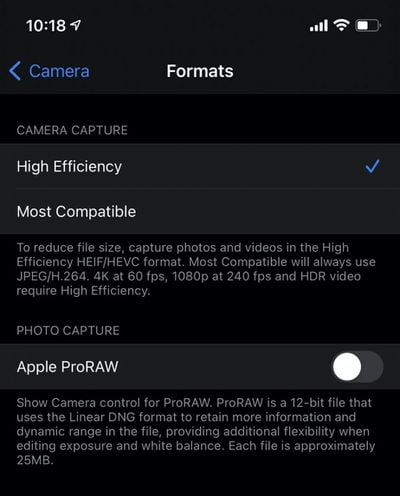
As noted on the MacRumors forums, iOS 14.3 introduces the ProRAW format for the iPhone 12 Pro and iPhone 12 Pro Max. Apple introduced ProRAW when announcing the new ‌iPhone‌ 12 lineup, but said that it would be coming at a later date.
apple proraw
ProRAW is designed for those who prefer to shoot in RAW but also want to take advantage of the Apple image pipeline data like noise reduction and multiframe exposure adjustments.

The ProRAW feature can be enabled in the Camera section of the Settings app for those who have installed the iOS 14.3 beta on a new ‌iPhone‌ 12 Pro or Pro Max. When enabled, there's a RAW toggle in the upper right side of the camera app that can be tapped to turn it off or on.

Photos taken with ProRAW are approximately 25MB in size, so photographers may want to use the feature sparingly if ‌iPhone‌ storage space is an issue.

Third-Party App Suggestions

Along with ProRAW support, the update also appears to add suggested third-party apps. According to 9to5Mac, there's code in iOS 14.3 that indicates Apple will show third-party app options to those who are updating to the software.

These app suggestions will be provided only in some countries where required by local laws, so users in the United States may not see the third-party app menu. It's not entirely clear which countries will see the app suggestions, but those that do will see this message: "In compliance with regional legal requirements, continue to view available apps to download."

Health App

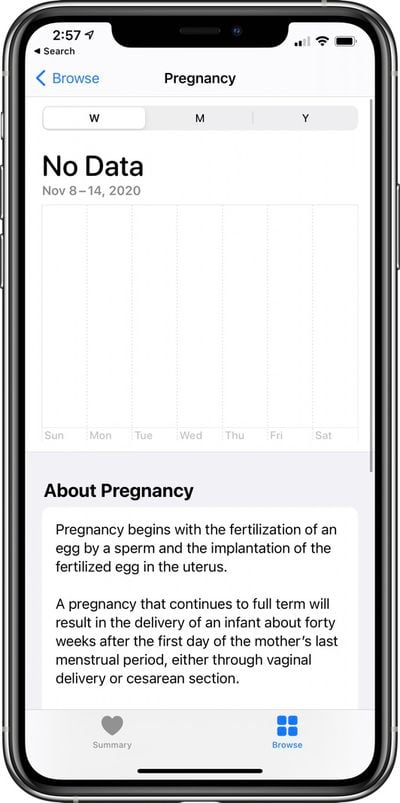
The Health app appears to have a new section on Pregnancy .
apple health app pregnancy

App Clips

According to Apple's release notes, App Clips can be launched by scanning App Clip Codes using Camera or from Control Center.

Default Search Engine

Ecosia can now be set as the default search engine as an alternative to Google, Yahoo, Bing, and DuckDuckGo. Ecosia lets users fund the planting of trees when searches are conducted.

Home App

The Home app appears to have new notifications for when accessories have updates available, which suggests that some HomeKit accessories might be able to be updated through the Home app in the future.

Cardio Fitness

Code in iOS 14.3 confirms a new Cardio Fitness feature for Apple Watch. "Apple Watch can access your cardio fitness, a strong indicator of overall health. To enable estimates outside of a workout, turn on Wrist Detection."

Cardio Fitness levels are available for users age 20 and above, and are estimated by age. Apple will send Cardio Fitness Notifications to the ‌iPhone‌ from the Apple Watch.

Weather

Air quality health recommendations are provided at specific air quality levels in the U.S., UK, Germany, India, and Mexico, with air quality data provided by Breezometer. Air quality data is also now available in China.

AirPods Studio

There's an icon in iOS 14.3 that may hint at the design of the AirPods Studio.

ios 14 3 headphones icon airpods studio

Find My

Code in iOS 14.3 suggests that Apple is rolling out the groundwork to add support for third-party item trackers to the Find My app, as well as additional support for AirTags. Third-party item trackers and Bluetooth-enabled items will be able to be tracked using the ‌Find My‌ app, and it seems the first items with this capability could perhaps be launching soon.

Fitness+

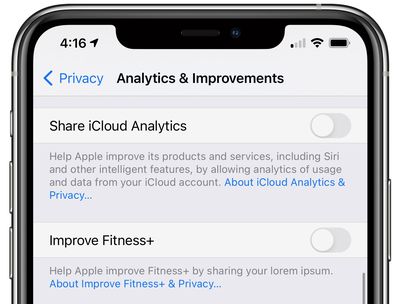
As noted by The 8-Bit, the first beta of iOS 14.3 had a reference to Fitness+ in the iOS 14.3 analytics settings under Privacy > Analytics & Improvements. The setting was unfinished and could not be toggled on, but it suggests that Fitness+ may be released alongside iOS 14.3. The setting was removed in beta 2.
apple fitness plus ios 14 3 beta

Home Screen Shortcuts

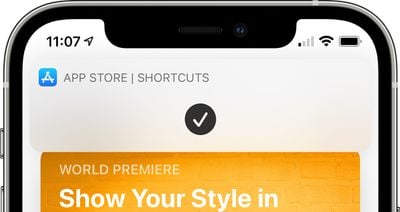
In iOS 14.3, it's easier than ever to launch apps with custom icons right from the Home Screen, which is great for those who prefer to customize their Home Screens.
shortcuts home screen banner
When opening an app that has a custom icon created using Shortcuts, it is no longer routed through the Shortcuts app and is instead able to open much more quickly. There's still a banner that pops up, but it's a more streamlined experience than before.

Other Features

Know of other new features in iOS 14.3 that aren't highlighted here? Let us know in the comments and we'll add them to the list.


Related Forum: iOS 14

Popular Stories

iOS 26

iOS 26.4 and iOS 27 Features Revealed in New Leak

Friday December 12, 2025 10:56 am PST by
Macworld's Filipe Espósito today revealed a handful of features that Apple is allegedly planning for iOS 26.4, iOS 27, and even iOS 28. The report said the features are referenced within the code for a leaked internal build of iOS 26 that is not meant to be seen by the public. However, it appears that Espósito and/or his sources managed to gain access to it, providing us with a sneak peek...
iOS 26

iOS 26.2 Coming Soon With These 8 New Features on Your iPhone

Thursday December 11, 2025 8:49 am PST by
Apple seeded the second iOS 26.2 Release Candidate to developers earlier this week, meaning the update will be released to the general public very soon. Apple confirmed iOS 26.2 would be released in December, but it did not provide a specific date. We expect the update to be released by early next week. iOS 26.2 includes a handful of new features and changes on the iPhone, such as a new...
iOS 26

Apple Releases iOS 26.2 With Alarms for Reminders, Lock Screen Changes, Enhanced Safety Alerts and More

Friday December 12, 2025 10:10 am PST by
Apple today released iOS 26.2, the second major update to the iOS 26 operating system that came out in September, iOS 26.2 comes a little over a month after iOS 26.1 launched. ‌iOS 26‌.2 is compatible with the ‌iPhone‌ 11 series and later, as well as the second-generation ‌iPhone‌ SE. The new software can be downloaded on eligible iPhones over-the-air by going to Settings >...
AirPods Pro Firmware Feature

Apple Releases New Firmware for AirPods Pro 2 and AirPods Pro 3

Thursday December 11, 2025 11:28 am PST by
Apple today released new firmware designed for the AirPods Pro 3 and the prior-generation AirPods Pro 2. The AirPods Pro 3 firmware is 8B30, up from 8B25, while the AirPods Pro 2 firmware is 8B28, up from 8B21. There's no word on what's include in the updated firmware, but the AirPods Pro 2 and AirPods Pro 3 are getting expanded support for Live Translation in the European Union in iOS...
macOS Tahoe 26 Thumb

Apple Releases macOS Tahoe 26.2 With Edge Light

Friday December 12, 2025 10:08 am PST by
Apple today released macOS Tahoe 26.2, the second major update to the macOS Tahoe operating system that came out in September. macOS Tahoe 26.2 comes five weeks after Apple released macOS Tahoe 26.1. Mac users can download the macOS Tahoe update by using the Software Update section of System Settings. macOS Tahoe 26.2 includes Edge Light, a feature that illuminates your face with soft...
AirTag 2 Mock Feature

Apple AirTag 2: Four New Features Found in iOS 26 Code

Thursday December 11, 2025 10:31 am PST by
The AirTag 2 will include a handful of new features that will improve tracking capabilities, according to a new report from Macworld. The site says that it was able to access an internal build of iOS 26, which includes references to multiple unreleased products. Here's what's supposedly coming: An improved pairing process, though no details were provided. AirTag pairing is already...
ipados 26 1 slide over

Apple Releases iPadOS 26.2 With Multitasking Improvements

Friday December 12, 2025 10:09 am PST by
Apple today released iPadOS 26.2, the second major update to the iPadOS 26 operating system released in September. iPadOS 26.2 comes a month after iPadOS 26.1. The new software can be downloaded on eligible iPads over-the-air by going to Settings > General > Software Update. iPadOS 26.2 continues with the multitasking improvements that were added with iPadOS 26.1. You can now drag and...
bug security vulnerability issue fix larry

Update Now: iOS 26.2 Fixes 20+ Security Vulnerabilities

Friday December 12, 2025 11:11 am PST by
Apple today released iOS 26.2, iPadOS 26.2, and macOS 26.2, all of which introduce new features, bug fixes, and security improvements. Apple says that the updates address over 20 vulnerabilities, including two bugs that are known to have been actively exploited. There are a pair of WebKit vulnerabilities that could allow maliciously crafted web content to execute code or cause memory...

Top Rated Comments

applicious84 Avatar
67 months ago
A fix on the texting delay. Please!!! How long will this take?
Score: 8 Votes (Like | Disagree)
Unregistered 4U Avatar
67 months ago

I may be wrong but I don’t think these are technically raw photos... raw as in exactly what the sensor saw.
I think even with these there have been some computational adjustments made which is why the extra ram of the 12 pro is required?
The problem with RAW for non-Pro’s is that it DOES give you control, BUT, since Apple’s AI isn’t applied, you get a pic that looks worse than what you take with HEIC. You can MAKE it look better if you know how to, but most don’t. So, Apple captures RAW and then, in real-time applies the same kind of adjustments someone who KNOWS what they’re doing would do. So, you get a good looking pic BUT if you want to go deep and mess around at the RAW data level, you can do that.


That’s how u feel about Live Photos. I never use it except for the rare occasion when I want to capture something cute my dog might be doing.
I know someone that uses it all the time now just because there’s that one grandkid that always wants to hide once they know the shutter’s ready to snap. She showed me a pic she had taken saying that “my granddaughter always ducks”. I showed her the Live Photo feature and she captured the moment BEFORE her grandkid hid her face :)
Score: 5 Votes (Like | Disagree)
GeoStructural Avatar
67 months ago

A fix on the texting delay. Please!!! How long will this take?
Yes. In addition to the texting bug there is an annoying one in the Mail app that will not mark a message as read after properly reading it for a long time.
Score: 4 Votes (Like | Disagree)
PortoMavericks Avatar
67 months ago
At this point, Stadia is dead.


Is the latest Series X controller supported too?
Yes, it uses the same Xbox One profile.
Score: 3 Votes (Like | Disagree)
luvbug Avatar
67 months ago
How about fixing your enterprise network infrastructure so your bzillion customers can go on with their lives??
Score: 3 Votes (Like | Disagree)
applicious84 Avatar
67 months ago

How about fixing the damn carplay/apple watch bug.
Yeah, they need to work on a lot of things right now. I feel like both my phone and my macbook are running windows 93.

https://www.windows93.net/
Score: 2 Votes (Like | Disagree)