iOS 14 Notifies Users When an App or Widget Reads Your Clipboard

Earlier this year, developers Talal Haj Bakry and Tommy Mysk revealed that many iPhone and iPad apps quietly access the clipboard, which is where text that has been copied and pasted is temporarily stored. Given that users may have sensitive information copied to the clipboard, such as passwords, this could pose privacy and security concerns.
ios 14 clipboard notifications featured carousel
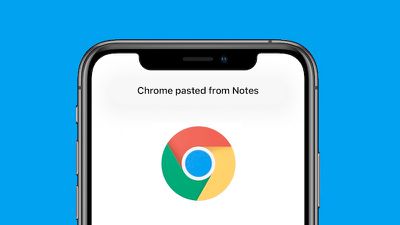
Fortunately, it appears that Apple is making a change to provide users with more transparency. As demonstrated by Mysk, the first developer beta of iOS 14 notifies users when an app or widget pastes text from the clipboard.

These clipboard notifications are one of many privacy-focused changes introduced in iOS 14, with others including an indicator whenever an app is using your device's microphone or camera, as well as a new setting that lets you choose to share your approximate location, rather than your precise location, with an app.


Installing the iOS 14 beta currently requires an Apple Developer Program membership, which costs $99 per year, but a free public beta will be rolled out next month. The software update will be released to all users with an iPhone 6s or newer in the fall.

Related Forum: iOS 14

Popular Stories

M3 iPad Air

Apple's Next Two Products Are Coming Soon

Thursday February 12, 2026 11:17 am PST by
Apple plans to release an iPhone 17e and an iPad Air with an M4 chip "in the coming weeks," according to the latest word from Bloomberg's Mark Gurman. "Apple retail employees say that inventory of the iPhone 16e has basically dried out and the iPad Air is seeing shortages as well," said Gurman. "I've been expecting new versions of both (iPhone 17e and M4 iPad Air) in the coming weeks."...
Apple Sales Coach App

Apple Launching New 'Sales Coach' App

Friday February 13, 2026 2:01 pm PST by
Apple plans to launch a rebranded "Sales Coach" app on the iPhone and iPad later this month, according to a source familiar with the matter. "Sales Coach" will arrive as an update to Apple's existing "SEED" app, and it will continue to provide sales tips and training resources to Apple Store and Apple Authorized Reseller employees around the world. For example, there are articles and videos...
m5 macbook pro deal

Why You Shouldn't Buy the Next MacBook Pro

Tuesday February 10, 2026 4:27 pm PST by
Apple is planning to launch new MacBook Pro models as soon as early March, but if you can, this is one generation you should skip because there's something much better in the works. We're waiting on 14-inch and 16-inch MacBook Pro models with M5 Pro and M5 Max chips, with few changes other than the processor upgrade. There won't be any tweaks to the design or the display, but later this...
Coffee Burgundy and Purple iPhone 18 Pro Mock

Five iPhone 18 Pro Features Revealed in New Report

Friday February 13, 2026 8:43 am PST by
While the iPhone 18 Pro and iPhone 18 Pro Max are still seven months away, an analyst has revealed five new features the devices will allegedly have. Rumored color options for the iPhone 18 Pro models In a research note with investment firm GF Securities on Thursday, analyst Jeff Pu outlined the following upgrades for the iPhone 18 Pro models: Smaller Dynamic Island: It has been rumored...
macbook air prime day 2025

M5 MacBook Air: Release Date, Features, and Performance Predictions

Wednesday February 11, 2026 3:36 am PST by
The MacBook Air is Apple's most popular laptop – a thin, fanless machine that wields quiet power thanks to the efficiency of Apple silicon. While the M4 model isn't exactly old, attention is already turning to its successor. Apple doesn't telegraph new product launches ahead of time, but we can draw a surprisingly clear picture of what to expect by looking at Apple's silicon roadmap,...

Top Rated Comments

Porco Avatar
74 months ago
Is it just me or... why not prevent apps from reading the copy/paste buffer without specific user consent (or at least make that an option, I can understand/imagine there might be some specific instances where users want automatic pasting of the buffer, though I’d guess that would be a small minority)?

Telling me an app is being naughty is good - but preventing them from being able to be naughty in the first place is better, surely?
Score: 32 Votes (Like | Disagree)
74 months ago
It should be an option in Privacy, to toggle which apps are allowed access to the clipboard.
Score: 12 Votes (Like | Disagree)
74 months ago
This is great. Bringing greater situational awareness to the users is a good thing.
Score: 6 Votes (Like | Disagree)
oneMadRssn Avatar
74 months ago

Is it just me or... why not prevent apps from reading the copy/paste buffer without specific user consent (or at least make that an option, I can understand/imagine there might be some specific instances where users want automatic pasting of the buffer, though I’d guess that would be a small minority)?

Telling me an app is being naughty is good - but preventing them from being able to be naughty in the first place is better, surely?
The Deliveries app has a pretty good workflow that benefits from automatically reading the clipboard. You copy a tracking number, open the Deliveries app, and it immediately parses the tracking number in the clipboard, identifies the carrier, and suggests adding it to the list of tracked packages.

There might be other workflows that benefit from reading the clipboard.

Is it worth losing those workflows for the sake of privacy and security? Maybe, not sure. But there are workflows that benefit from it.

[EDIT: just re-read your post. I agree, it should be an opt-in dialog that you allow on a per-app basis, like with location tracking.]
Score: 3 Votes (Like | Disagree)
Mdracer Avatar
74 months ago
Burn them at the stake!

I don’t want them seeing how often I copy corrected ways to spell words.
Score: 3 Votes (Like | Disagree)
uniquexoxo Avatar
74 months ago

One problem I could see with this is that it could make some of the platform features not functional, such as the auto fill of validation codes from Messages to basically any app.Apple doesn’t seem to like allowing the user to disable something they specifically designed (took a while, initially, to be able to delete built-in apps, for example).
I don’t think clipboard copies those codes such as OTP for transactions. Rather AI reading the text and understanding it as a verification code and the system detects that you have a numberpad open in app hence AI learning detects it as a validation code for that app hence suggesting it, that is also why validation code doesn’t appear when you have a full on keyboard open onscreen. The code wasn’t really copied per se, but rather read and understood in an AI level.

this is to my understanding on how validation code and OTP works.
Score: 2 Votes (Like | Disagree)