

Apple Working on iPadOS Shortcuts for Changing iPad Keyboard Brightness

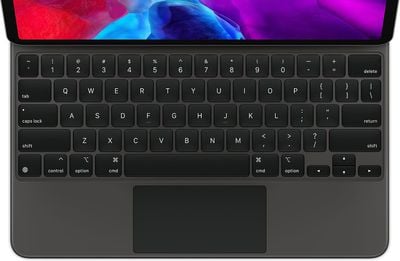
Apple appears to be working on keyboard shortcuts that will allow users who have a Magic Keyboard or other attached keyboard with key brightness settings to adjust the brightness level.
ipadpromagickeyboardtrackpad
Signs of Apple's work on the shortcuts were found in iOS 13.5.5 code by 9to5Mac. The site says the beta has references to keyboard shortcuts that replace some function keys.

We've found evidence in code that suggests the existence of new keyboard shortcuts to change the brightness of the iPad screen or even the backlight of the keyboard. However, we haven't been able to activate these shortcuts yet, and it's unclear if these will be customizable.

One of the negatives of the Magic Keyboard designed for the iPad Pro is that there's no quick way to change the brightness of the backlit keys because the keyboard lacks a function row in an effort to keep it compact.

iPadOS offers an option to remap modifier keys to do things like allow the Caps Lock button to serve as an Escape key, and 9to5Mac suggests that the brightness function keys will be adjustable similar to modifier keys, but with shortcut combinations.

iPad keyboards not designed by Apple that do feature function row keys typically have built-in brightness controls for backlighting, but this would be a welcome change for those that do not such as the Magic Keyboard.


Related Forum: iOS 13

Popular Stories

iOS 26

iOS 26.2 Coming Soon With These 8 New Features on Your iPhone

Thursday December 11, 2025 8:49 am PST by
Apple seeded the second iOS 26.2 Release Candidate to developers earlier this week, meaning the update will be released to the general public very soon. Apple confirmed iOS 26.2 would be released in December, but it did not provide a specific date. We expect the update to be released by early next week. iOS 26.2 includes a handful of new features and changes on the iPhone, such as a new...
iOS 26

iOS 26.4 and iOS 27 Features Revealed in New Leak

Friday December 12, 2025 10:56 am PST by
Macworld's Filipe Espósito today revealed a handful of features that Apple is allegedly planning for iOS 26.4, iOS 27, and even iOS 28. The report said the features are referenced within the code for a leaked internal build of iOS 26 that is not meant to be seen by the public. However, it appears that Espósito and/or his sources managed to gain access to it, providing us with a sneak peek...
iOS 26

Apple Releases iOS 26.2 With Alarms for Reminders, Lock Screen Changes, Enhanced Safety Alerts and More

Friday December 12, 2025 10:10 am PST by
Apple today released iOS 26.2, the second major update to the iOS 26 operating system that came out in September, iOS 26.2 comes a little over a month after iOS 26.1 launched. ‌iOS 26‌.2 is compatible with the ‌iPhone‌ 11 series and later, as well as the second-generation ‌iPhone‌ SE. The new software can be downloaded on eligible iPhones over-the-air by going to Settings >...
AirPods Pro Firmware Feature

Apple Releases New Firmware for AirPods Pro 2 and AirPods Pro 3

Thursday December 11, 2025 11:28 am PST by
Apple today released new firmware designed for the AirPods Pro 3 and the prior-generation AirPods Pro 2. The AirPods Pro 3 firmware is 8B30, up from 8B25, while the AirPods Pro 2 firmware is 8B28, up from 8B21. There's no word on what's include in the updated firmware, but the AirPods Pro 2 and AirPods Pro 3 are getting expanded support for Live Translation in the European Union in iOS...
macOS Tahoe 26 Thumb

Apple Releases macOS Tahoe 26.2 With Edge Light

Friday December 12, 2025 10:08 am PST by
Apple today released macOS Tahoe 26.2, the second major update to the macOS Tahoe operating system that came out in September. macOS Tahoe 26.2 comes five weeks after Apple released macOS Tahoe 26.1. Mac users can download the macOS Tahoe update by using the Software Update section of System Settings. macOS Tahoe 26.2 includes Edge Light, a feature that illuminates your face with soft...
AirTag 2 Mock Feature

Apple AirTag 2: Four New Features Found in iOS 26 Code

Thursday December 11, 2025 10:31 am PST by
The AirTag 2 will include a handful of new features that will improve tracking capabilities, according to a new report from Macworld. The site says that it was able to access an internal build of iOS 26, which includes references to multiple unreleased products. Here's what's supposedly coming: An improved pairing process, though no details were provided. AirTag pairing is already...
ipados 26 1 slide over

Apple Releases iPadOS 26.2 With Multitasking Improvements

Friday December 12, 2025 10:09 am PST by
Apple today released iPadOS 26.2, the second major update to the iPadOS 26 operating system released in September. iPadOS 26.2 comes a month after iPadOS 26.1. The new software can be downloaded on eligible iPads over-the-air by going to Settings > General > Software Update. iPadOS 26.2 continues with the multitasking improvements that were added with iPadOS 26.1. You can now drag and...
iphone fold text

'iPhone Fold' Arrival Expected to Cement Book-Style Era for Foldables

Friday December 12, 2025 3:55 am PST by
Foldable smartphone panel shipments are projected to jump 46% year-over-year in 2026, with Apple's entry into the market serving as the main catalyst, according to Counterpoint Research's latest Foldable-Rollable Display Shipment Tracker. "Apple is the key driver as it starts to procure panels for its first foldable iPhone," said Counterpoint's Guillaume Chansin. The research firm expects...

Top Rated Comments

xxray Avatar
72 months ago
They should make the entire numbers key row an alternative function key row paired with another key, like function or option.

Ex: option + 1 = lower brightness
Score: 16 Votes (Like | Disagree)
bluespark Avatar
72 months ago
What would be great would be a bar above the keyboard that you could touch for different functions.
Score: 12 Votes (Like | Disagree)
hipnetic Avatar
72 months ago
How about a key combo (like ALT-Globe) that brings up a touchbar-like bar at the bottom of the iPad screen, where it will be easy to reach and adjust several different things?
Score: 7 Votes (Like | Disagree)
rp2011 Avatar
72 months ago

How about a key combo (like ALT-Globe) that brings up a touchbar-like bar at the bottom of the iPad screen, where it will be easy to reach and adjust several different things?
Great idea. Or just add it to control center
Score: 6 Votes (Like | Disagree)
rp2011 Avatar
72 months ago
I have never once missed not having the function keys. It’s pretty easy to change any setting as it is.
Score: 5 Votes (Like | Disagree)
PlayUltimate Avatar
72 months ago

They should make the entire numbers key row an alternative function key row paired with another key, like function or option.

Ex: option + 1 = lower brightness
Seems silly that they hadn't. IMO, massive oversight.
Score: 4 Votes (Like | Disagree)















