There appears to be an issue with recent versions of Adobe Premiere Pro that can result in blown out MacBook Pro speakers.
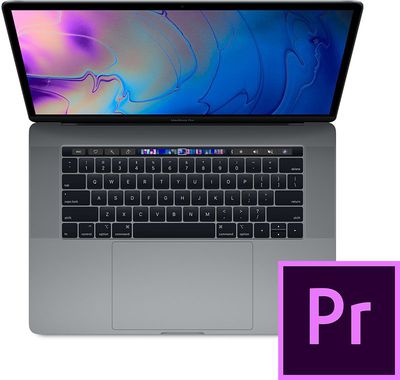
MacRumors reader Alvin Shen alerted us to multiple users on the Adobe support forums who report that Premiere Pro suddenly caused loud, distorted audio to play through their MacBook Pro speakers, resulting in permanent damage. In many cases, the issue arose when users were editing the audio settings of video clips.
"I was using the Adobe Premiere 2019 Audio suite for background sound and while tweaking the settings it made a loud distorted noise that hurt even my ears," wrote one user. "After that my speakers are unusable."
The discussion topic was posted in November, and there are replies from affected users through January, suggesting that the apparent bug is present in both versions 12.0.1 and 12.0.2 of Premiere Pro CC for Mac. It's unclear when the issue began, how many users are affected, or what the exact cause is.
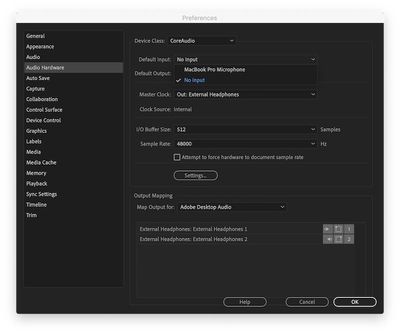
It appears Adobe advised at least one customer to try disabling the MacBook Pro's microphone in Premiere Pro by selecting No Input under Preferences > Audio Hardware > Default Input, but the issue persists for some users.
Our tipster Shen took his MacBook Pro to the Genius Bar at an Apple Store in Canada and was provided with an over $600 repair quote for his 2018 15-inch MacBook Pro. The price is so high because Apple replaces the entire top case assembly containing the speakers, keyboard, trackpad, and battery.
It's unclear if Adobe, Apple, or both companies are at fault. We've reached out to both Adobe and Apple for comment.

Saturday February 7, 2026 9:26 am PST by Joe Rossignol
Apple today shared an ad that shows how the upgraded Center Stage front camera on the latest iPhones improves the process of taking a group selfie.

"Watch how the new front facing camera on iPhone 17 Pro takes group selfies that automatically expand and rotate as more people come into frame," says Apple. While the ad is focused on the iPhone 17 Pro and iPhone 17 Pro Max, the regular iPhone...
Tuesday February 10, 2026 4:27 pm PST by Juli Clover
Apple is planning to launch new MacBook Pro models as soon as early March, but if you can, this is one generation you should skip because there's something much better in the works.
We're waiting on 14-inch and 16-inch MacBook Pro models with M5 Pro and M5 Max chips, with few changes other than the processor upgrade. There won't be any tweaks to the design or the display, but later this...
Wednesday February 11, 2026 10:07 am PST by Juli Clover
Apple today released iOS 26.3 and iPadOS 26.3, the latest updates to the iOS 26 and iPadOS 26 operating systems that came out in September. The new software comes almost two months after Apple released iOS 26.2 and iPadOS 26.2.
The new software can be downloaded on eligible iPhones and iPads over-the-air by going to Settings > General > Software Update.
According to Apple's release notes, ...
Monday February 9, 2026 6:24 am PST by Joe Rossignol
In select U.S. states, residents can add their driver's license or state ID to the Apple Wallet app on the iPhone and Apple Watch, and then use it to display proof of identity or age at select airports and businesses, and in select apps.
The feature is currently available in 13 U.S. states and Puerto Rico, and it is expected to launch in at least seven more in the future.
To set up the...
Tuesday February 10, 2026 6:33 am PST by Joe Rossignol
It has been a slow start to 2026 for Apple product launches, with only a new AirTag and a special Apple Watch band released so far. We are still waiting for MacBook Pro models with M5 Pro and M5 Max chips, the iPhone 17e, a lower-cost MacBook with an iPhone chip, long-rumored updates to the Apple TV and HomePod mini, and much more.
Apple is expected to release/update the following products...
This sounds like it's primarily Apple's problem. Maybe Adobe could release a fix that would avoid triggering the issue, but the issue shouldn't exist to trigger in the first place. No software on a computer should have the ability to physically destroy the speakers, by accident or on purpose. If this is happening under the right circumstances with Adobe Premiere Pro, it can probably happen with other software that triggers the same conditions.
Adobe's software quality is absolutely terrible these days. They seem to be using their new subscription model as permission to push out half-baked and buggy software updates, because they can more readily "fix" them later.
Adobe Illustrator CC has well-documented issues with GPU previews on machines with Intel integrated graphics. I personally contacted Adobe about this, and they blamed Apple, but I have seen exactly the same rendering issues on Windows laptops running Intel video chipsets.
Get it right, Adobe. We're professionals, not hobbyists.