

Skip to Content

Amazon Alexa App Gains Redesigned Interface for Controlling Devices and Groups

by

Amazon is currently rolling out an updated version of its companion app for Alexa-enabled devices that includes a significantly redesigned user interface.

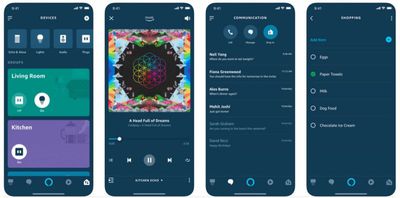
The visual changes are immediately apparent on firing up the app, and center around a new Devices and Groups tab located in the lower right of the screen.
alexa app update
With the new menu selected, the devices are listed in a horizontal strip along the top of the interface, allowing users to control individual smart lights, audio devices, and power outlets all from the same screen.

Below that, Alexa devices are also grouped by room indicated by colored cards, which have on/off buttons and can also be tapped to control and edit included devices.

Elsewhere, users can add new devices by tapping a plus button in the upper right of the interface, while the original clunky sidebar menu remains available via a button in the upper right.

The changes to the app come on the heels of Amazon's recent additions to its ecosystem of Alexa-powered devices, which include new Echo speakers, a subwoofer, amplifiers, a microwave, wall clock, and more.

The Amazon Alexa app is a free download on the App Store for iPhone and iPad. [Direct Link]

Tags: Alexa, Amazon

Top Rated Comments

97 months ago
I haven’t used it yet but it’s a welcomed change. The old app was HORRIBLE and I tried to use it as little as possible.
It was way better than Google Home, though. Google’s app is one of the worst UI nightmares I’ve ever seen.

On a positive note, good for Amazon for all the recent improvements to the Alexa ecosystem. Amazon is playing to win!
Score: 2 Votes (Like | Disagree)
Centris 650 Avatar
97 months ago
I haven’t used it yet but it’s a welcomed change. The old app was HORRIBLE and I tried to use it as little as possible.
Score: 2 Votes (Like | Disagree)
UnseenLlama Avatar
97 months ago
I haven’t used it yet but it’s a welcomed change. The old app was HORRIBLE and I tried to use it as little as possible.
Yes. It seemed to use a WebKit view to display settings pages. This update looks to be using much more native iOS code which is awesome. Makes it so much faster.
Score: 1 Votes (Like | Disagree)

Popular Stories

Multicolored Low Cost A18 Pro MacBook Feature

Apple Accidentally Leaks 'MacBook Neo'

Tuesday March 3, 2026 7:00 am PST by
Apple appears to have prematurely revealed the name of its rumored lower-cost MacBook model, which is expected to be announced this Wednesday. A regulatory document for a "MacBook Neo" (Model A3404) has appeared on Apple's website. Unfortunately, there are no further details or images available yet. While the PDF file does not contain the "MacBook Neo" name, it briefly appeared in a link...
MacBook Neo Feature Pastel 1

Apple Announces $599 'MacBook Neo' With A18 Pro Chip

Wednesday March 4, 2026 6:15 am PST by
Apple today announced the "MacBook Neo," an all-new kind of low-cost Mac featuring the A18 Pro chip for $599. The MacBook Neo is the first Mac to be powered by an iPhone chip; the A18 Pro debuted in 2024's iPhone 16 Pro models. Apple says it is up to 50% faster for everyday tasks than the bestselling PC with the latest shipping Intel Core Ultra 5, up to 3x faster for on-device AI workloads,...
imac video apple feature

Apple Unveils Two New Products

Monday March 2, 2026 7:49 am PST by
Apple today introduced two new devices, including the iPhone 17e and an updated iPad Air. iPhone 17e features the same overall design as the iPhone 16e, but it gains Apple's A19 chip, MagSafe for magnetic wireless charging and magnetic accessories, Apple's second-generation C1X modem for faster 5G, and a doubled 256GB of base storage. In the U.S., the iPhone 17e starts at $599, just like the ...















