Logitech's Crayon Stylus Expands to All Users Through Apple Store Availability - MacRumors
Skip to Content

Logitech's Crayon Stylus Expands to All Users Through Apple Store Availability

by

Logitech today announced that its Crayon stylus, which was previously only available to schools, is coming to Apple retail stores, which means it will be available for everyone to purchase for the first time.

Introduced in March alongside the 6th-generation 9.7-inch iPad, the Crayon is designed to operate as a lower-cost alternative to the Apple Pencil.


The Crayon features a slim aluminum body and an Apple Pencil-style tip. Functionally, it works just like the Apple Pencil, with support for palm rejection and the same latency and tilt as you get with the Apple Pencil. There is, however, no pressure sensitivity.

Logitech designed the Crayon with students in mind, so it has a flat surface to prevent rolling, a tethered rubber end cap, a comfortable grip for small hands, and the ability to withstand drops of up to four feet.
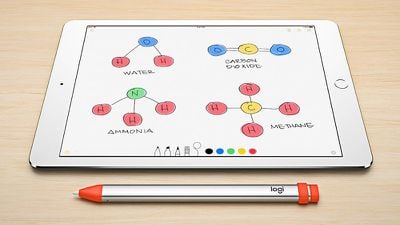
logitechcrayondesign
The Crayon does not need Bluetooth to connect to the iPad, and it's able to last for up to seven hours before needing to be recharged with the built-in Lightning port.

It's worth noting that the Crayon is designed to be compatible only with the sixth-generation iPad.
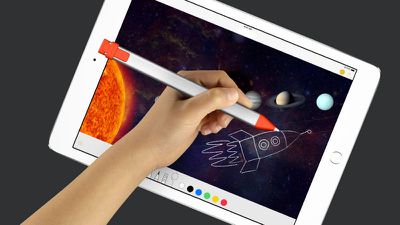
logitechcrayoninhand
We were able to get our hands on one of Logitech's Crayons ahead of its Apple Store availability, so if you're considering picking one of these up for your 9.7-inch iPad, make sure to check out our review video above.

The Crayon will be available in Apple retail stores, on the Apple website, and on the Logitech website starting on September 12 before expanding to additional retail outlets in October.

While schools can purchase the device for $50, customers who purchase the Crayon from Apple or Logitech will need to pay $70.


Top Rated Comments

aevan Avatar
102 months ago
No pressure sensitivity = no one should get this instead of Apple Pencil.
Score: 7 Votes (Like | Disagree)
tehStickMan Avatar
102 months ago
I'd buy it over Apple Pencil purely for the non-rolly shape, and that it charges like a normal damn device.

Score: 4 Votes (Like | Disagree)
unsaltedrhino Avatar
102 months ago
...is this correct??
Nope! Needs Bluetooth;

https://support.apple.com/en-us/HT205236
Score: 3 Votes (Like | Disagree)
102 months ago
It's weighted so that it rolls around less. If it builds momentum, it will roll.
Then don’t roll it down a hill.
Score: 2 Votes (Like | Disagree)
Dave245 Avatar
102 months ago
12th September that sounds like a coincidence ;)
Score: 2 Votes (Like | Disagree)
aevan Avatar
102 months ago
Why? Mark up and note taking don't need pressure sensitivity.
Functionally (for notes and markup) no, but it does make it feel much more natural - and for only $30 more, you get “the real deal”, so I don’t see who this is for at $70. Especially if you want to do anything other than writing notes and markup, even only casual drawing and doodling. With a school discount, at $50, I can see it having its place. But at this price, I would recommend the full Apple Pencil to everyone, even if you just plan on using it for handwriting or markup. For anything creative, though, Pencil is a must-have.


[doublepost=1536251265][/doublepost]
Hah! I was just looking into trying to buy this yesterday! My daughter will start school next year and I was thinking about getting her an iPad to get ready since I think her school uses them.
This is a good example for what I wrote above. If you’re getting it for your daughter, I would seriously consider adding $30 more (unless you can get it at $50 school price) for the full Apple Pencil. Even if she’s not planning to use it artistically, you never know if it will inspire her to do anything creative where the pressure sensitivity is paramount.

Please take this as just a well-meaning advice, of course you know what is best for your daughter.
[doublepost=1536251522][/doublepost]
I'd buy it over Apple Pencil purely for the non-rolly shape, and that it charges like a normal damn device.

It’s a worse solution, even though it looks more “normal”. But in reality, it WILL loose charge while you’re outside, in the middle of the day, and you won’t be able to charge it - while you can just quickly plug the Pencil into the iPad for a few minutes.

People have to realize that charging the Pencil by sticking it into an iPad is just an emergency solution. You have a nice little Lightning adapter for charging it when you’re home. At least with the Pencil, you have the option to charge it just with your iPad. Stick it in for literally 30 seconds and get 30 minutes of usage.
Score: 1 Votes (Like | Disagree)

Popular Stories

iphone 16 teal

'Siri AI' Lawsuit Update: Apple to Pay Owners of These iPhone Models

Thursday July 9, 2026 7:08 am PDT by
In May, Apple agreed to pay $250 million to settle a U.S. class action lawsuit over Siri AI's delayed launch, and eligible iPhone users could receive up to a $95 payout. This week, the California court overseeing the case held a hearing regarding preliminary approval of the settlement, but the judge has not yet issued a ruling. It will likely be at least a few more months before eligible...
Apple TV Thumb 3

Everything Coming in the 2026 Apple TV 4K

Wednesday July 8, 2026 4:51 pm PDT by
The Apple TV 4K hasn't been updated since 2022, and it's due for a refresh. An update is planned for 2026, but Apple is likely going to wait to launch it after Siri AI launches in iOS 27. Design Apple TV design updates don't happen often, and that's not changing. The next Apple TV is going to have the same squircle shape as the current model, and it'll continue to be made from a black...
apple wallet drivers license feature iPhone 15 pro

Apple Says iPhone Driver's Licenses Will Expand to These 6 U.S. States

Thursday July 9, 2026 7:29 am PDT by
In select U.S. states, residents can add their driver's license or state ID to the Apple Wallet app on the iPhone and Apple Watch, and then use it to display proof of identity or age at select airports and businesses, and in select apps. To set up the feature, open the Wallet app on the iPhone and tap on the plus sign in the top-right corner. Next, tap on Driver's License and ID Cards,...