

Apple Seeds Eighth Beta of macOS Mojave to Developers [Update: Public Beta Available]

Apple today seeded the eighth beta of an upcoming macOS Mojave update to developers for testing purposes, one week after releasing the seventh beta and more than two months after introducing the software at the Worldwide Developers Conference.

macOS Mojave introduces a new method of installing software updates, so after you've installed the initial beta using the appropriate profile from the Developer Center, additional betas can be downloaded through opening up System Preferences and choosing the "Software Update" icon.

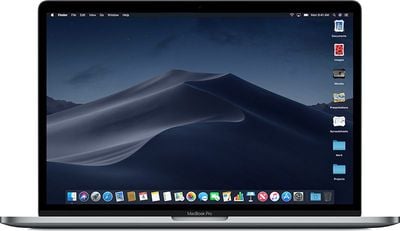
Apple's macOS Mojave update introduces a systemwide Dark Mode, with Mojave users able to choose between a light theme or the new dark theme, which changes the color of the dock, menu bar, apps, and other elements. Dark Mode is accompanied by Dynamic Desktops, aka wallpapers that subtly change throughout the day. Additional wallpapers were introduced in the fourth and fifth betas.

Stacks, a new desktop organization system, keeps all of your desktop files neat and organized, while Finder has been enhanced with a Gallery View, a Sidebar, a revamped Quick Look option and Quick Actions, so you can do more in the Finder window than ever before.

Screenshots can now be edited using Markup tools and a new management options that also allow for easy screen recording, while Continuity camera, a new feature, allows you to import photos and document scans directly from an iPhone or iPad to the Mac.
macosmojavestacks
The Apple News, Stocks, Home, and Voice Memos apps have been ported from iOS to macOS as part of a multiyear project Apple is working on to make it easier to bring iOS apps to Macs, and Apple has introduced several new privacy protections to keep your data safer than ever.

Apple is also making it harder for websites to track you with a range of new Safari tools, and it's also easier to make and store secure, hard-to-guess passwords for each and every website.

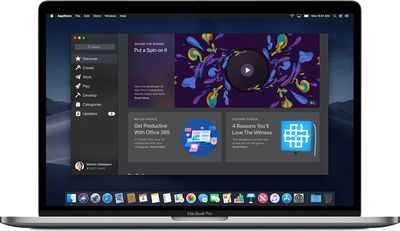
Apple has added an entirely revamped Mac App Store to macOS Mojave that makes it easier to discover apps with a featured section and specific categories for games, creative apps, productivity apps, apps for developers, and more.
macosmojavemacappstore
macOS Mojave was initially supposed to include a Group FaceTime feature that includes support for chatting with up to 32 people at one time, but it was removed in macOS Mojave beta 7 and the feature won't be available until later in the year.

macOS Mojave is available to developers and public beta testers to work out bugs and other issues ahead of an upcoming fall public release.

Update: Apple has also made a new beta of macOS Mojave available to its public beta testers.

Related Forum: macOS Mojave

Popular Stories

iOS 26

iOS 26.2 Coming Soon With These 8 New Features on Your iPhone

Thursday December 11, 2025 8:49 am PST by
Apple seeded the second iOS 26.2 Release Candidate to developers earlier this week, meaning the update will be released to the general public very soon. Apple confirmed iOS 26.2 would be released in December, but it did not provide a specific date. We expect the update to be released by early next week. iOS 26.2 includes a handful of new features and changes on the iPhone, such as a new...
iOS 26

iOS 26.4 and iOS 27 Features Revealed in New Leak

Friday December 12, 2025 10:56 am PST by
Macworld's Filipe Espósito today revealed a handful of features that Apple is allegedly planning for iOS 26.4, iOS 27, and even iOS 28. The report said the features are referenced within the code for a leaked internal build of iOS 26 that is not meant to be seen by the public. However, it appears that Espósito and/or his sources managed to gain access to it, providing us with a sneak peek...
iOS 26

Apple Releases iOS 26.2 With Alarms for Reminders, Lock Screen Changes, Enhanced Safety Alerts and More

Friday December 12, 2025 10:10 am PST by
Apple today released iOS 26.2, the second major update to the iOS 26 operating system that came out in September, iOS 26.2 comes a little over a month after iOS 26.1 launched. ‌iOS 26‌.2 is compatible with the ‌iPhone‌ 11 series and later, as well as the second-generation ‌iPhone‌ SE. The new software can be downloaded on eligible iPhones over-the-air by going to Settings >...
AirPods Pro Firmware Feature

Apple Releases New Firmware for AirPods Pro 2 and AirPods Pro 3

Thursday December 11, 2025 11:28 am PST by
Apple today released new firmware designed for the AirPods Pro 3 and the prior-generation AirPods Pro 2. The AirPods Pro 3 firmware is 8B30, up from 8B25, while the AirPods Pro 2 firmware is 8B28, up from 8B21. There's no word on what's include in the updated firmware, but the AirPods Pro 2 and AirPods Pro 3 are getting expanded support for Live Translation in the European Union in iOS...
macOS Tahoe 26 Thumb

Apple Releases macOS Tahoe 26.2 With Edge Light

Friday December 12, 2025 10:08 am PST by
Apple today released macOS Tahoe 26.2, the second major update to the macOS Tahoe operating system that came out in September. macOS Tahoe 26.2 comes five weeks after Apple released macOS Tahoe 26.1. Mac users can download the macOS Tahoe update by using the Software Update section of System Settings. macOS Tahoe 26.2 includes Edge Light, a feature that illuminates your face with soft...


AirTag 2 Mock Feature

Apple AirTag 2: Four New Features Found in iOS 26 Code

Thursday December 11, 2025 10:31 am PST by
The AirTag 2 will include a handful of new features that will improve tracking capabilities, according to a new report from Macworld. The site says that it was able to access an internal build of iOS 26, which includes references to multiple unreleased products. Here's what's supposedly coming: An improved pairing process, though no details were provided. AirTag pairing is already...
ipados 26 1 slide over

Apple Releases iPadOS 26.2 With Multitasking Improvements

Friday December 12, 2025 10:09 am PST by
Apple today released iPadOS 26.2, the second major update to the iPadOS 26 operating system released in September. iPadOS 26.2 comes a month after iPadOS 26.1. The new software can be downloaded on eligible iPads over-the-air by going to Settings > General > Software Update. iPadOS 26.2 continues with the multitasking improvements that were added with iPadOS 26.1. You can now drag and...
iphone fold text

'iPhone Fold' Arrival Expected to Cement Book-Style Era for Foldables

Friday December 12, 2025 3:55 am PST by
Foldable smartphone panel shipments are projected to jump 46% year-over-year in 2026, with Apple's entry into the market serving as the main catalyst, according to Counterpoint Research's latest Foldable-Rollable Display Shipment Tracker. "Apple is the key driver as it starts to procure panels for its first foldable iPhone," said Counterpoint's Guillaume Chansin. The research firm expects...

Top Rated Comments

nortonandreev Avatar
96 months ago
So what’s the verdict been so far? Better than Sierra/High Sierra or worse? I’m excited for the extra 1st party apps and the dynamic wallpaper as well as dark mode more than anything else.

Does anyone know if emulators like OpenEmu and MAME are still working in the Mojave beta? I am a retro gaming fanatic and if they’re broken because of OpenGL then I’ll have to stay away until they hopefully port everything to Metal but that will take a lot of time or maybe never happen since it’s a lot of work just to support the Mac when the majority of people out there are running Windows. May have to set up a Bootcamp partition after all.
I don't think I have had much troubles with Sierra and High Sierra, so cannot say if it's better performance wise, but it's not worse for sure. I really enjoy the new features, such as the dark mode. Also, it they have tweaked the GUI a bit, so even the light mode looks more modern (for example Safari, Finder and etc.). It is stable enough even since the first betas, so I would say it's my favourite macOS version and I'm really happy with it.
I cannot say anything about the emulators and, when it comes to Bootcamp, from my experience it's not a good idea to use it while the macOS is in beta, especially if you want to install the latest build of Windows.
Score: 3 Votes (Like | Disagree)
pnoyblazed Avatar
96 months ago
build 18A371a
Score: 2 Votes (Like | Disagree)
Guy Clark Avatar
96 months ago
is that the build # version for DB or PB
Both.
Score: 1 Votes (Like | Disagree)
uneeko1ne Avatar
96 months ago
Installing Public Beta
Score: 1 Votes (Like | Disagree)
zmon Avatar
96 months ago
So what’s the verdict been so far? Better than Sierra/High Sierra or worse? I’m excited for the extra 1st party apps and the dynamic wallpaper as well as dark mode more than anything else.

Does anyone know if emulators like OpenEmu and MAME are still working in the Mojave beta? I am a retro gaming fanatic and if they’re broken because of OpenGL then I’ll have to stay away until they hopefully port everything to Metal but that will take a lot of time or maybe never happen since it’s a lot of work just to support the Mac when the majority of people out there are running Windows. May have to set up a Bootcamp partition after all.
I've had no trouble with it so far. Clearly had some bugs in the earlier builds, but they've all seem to have been fixed so far. I've had no trouble using Bootcamp though regardless of the beta version. I haven't checked OpenEmu/MAME yet, but VBA-M works fine which it uses OpenGL. OpenGL is simply depreciated now, and Apple has told developers to start moving to Metal, but it still works fine. Most likely OpenGL will be gone in 10.15/10.16 though.
Score: 1 Votes (Like | Disagree)
Ritsuka Avatar
96 months ago
OpenEmu doesn't work right now because it uses a private api that changed a bit, not because of OpenGL.
Score: 1 Votes (Like | Disagree)








































