

Microsoft's Edge Browser for iOS Gaining Built-In Adblock Plus Functionality - MacRumors
Skip to Content

Microsoft's Edge Browser for iOS Gaining Built-In Adblock Plus Functionality

by

Microsoft is testing built-in Adblock Plus integration in its mobile Edge browser available for both iOS and Android devices, reports The Verge.

With built-in Adblock Plus functionality, Edge browser users on iOS will not need to download a separate ad blocking app, which may attract more users to Microsoft's browser. Adblock Plus can be enabled in Microsoft Edge's settings, with no add-on app required.
microsoft edge ios
Google has built ad blocking into Chrome for Android devices, but it is somewhat limited and not available on iOS devices. As noted by The Verge, Adblock Plus is a more aggressive ad blocking option.

iOS Safari users can, of course, install one of several ad block apps available in the iOS App Store, but there is no native ad blocking functionality in Safari.

Adblock Plus is available in a beta capacity on both Android and iOS devices at the current time, with Microsoft planning to roll the feature out to all Edge for iOS and Android users in the near future.

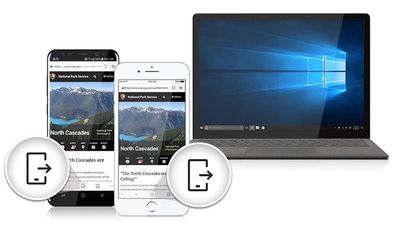
Microsoft has made its Edge browser available across a range of devices, including iPhones, iPads, and Android devices in addition to Windows computers. The Edge browser includes syncing of favorites, passwords, and reading lists, along with a "Continue on PC" option for transferring what you're reading from the mobile Edge browser to the desktop.

Top Rated Comments

Brad9893 Avatar
101 months ago
iOS Safari users can, of course, install one of several ad block apps available in the iOS App Store, but there is no native ad blocking functionality in Safari.

I guess it depends on your definition of native. WebKit content blocking exists, and it is indeed built right into Safari – the third-party app is just needed to load filter lists into the content blocker.
Score: 4 Votes (Like | Disagree)
Eminemdrdre00 Avatar
101 months ago
Didn’t know they had “ad blocking” apps for safari on iOS. Has anyone noticed any performance/speed drops when using any of these apps?
Since iOS 9! No issues with speed. In fact, it'll make Safari feel faster. 1Blocker is my favorite. I definitely recommend it.
Score: 3 Votes (Like | Disagree)
Mikey44 Avatar
101 months ago


I am definitely being pedantic. :)
As long as you acknowledge it. ;)

I merely thought you might not know, now... I am the one who looks dumb. Haha, thanks for the good spirited post.
Score: 2 Votes (Like | Disagree)
TheIntruder Avatar
101 months ago
You know, it'd be cool to take this - and a great many other browsers - out for a spin, but first Apple needs to allow us to change our default browser in IOS. I've looked but can't find a way to do so. Click any link at all and up comes Safari.

I'm not complaining too loudly, as I don't mind Safari. But if other browsers are going to get any traction at all, this functionality needs to be in place. Microsoft was forced to do so at one point in time. Wonder if the EU will complain to its courts about Apple about this.
It's frustrating, but there isn't.

Most users don't stray from the bundled defaults, even on desktop, so there's little incentive to., and Apple's current mindset is far removed from the Think Different days, even if that was only a marketing slogan.

By allowing browser alternatives, Apple keeps clear of regulators, but that doesn't mean it makes it easy to stray from Safari, even for users who do wish to use something different. I doubt the EU would take any action, since the browser market is in a different, more competitive situation than when IE ruled.

As one of the most used tools, I like to have a level of customization that isn't found in the common defaults like Chrome and Safari; think Eudora and Firefox. On iOS, iCab is the one that comes closest to replicating such an experience, and is well worth the cost. But it can be infuriating when links invariably launch Safari unintentionally, because iOS doesn't give users the power to choose a default other than Safari, even if those users are a minority.
Score: 1 Votes (Like | Disagree)
101 months ago
I'd installing anything Microsuc on my Apple devices, just as soon as I'd shoot myself in the head.
Score: 1 Votes (Like | Disagree)
wolfshades Avatar
101 months ago
You know, it'd be cool to take this - and a great many other browsers - out for a spin, but first Apple needs to allow us to change our default browser in IOS. I've looked but can't find a way to do so. Click any link at all and up comes Safari.

I'm not complaining too loudly, as I don't mind Safari. But if other browsers are going to get any traction at all, this functionality needs to be in place. Microsoft was forced to do so at one point in time. Wonder if the EU will complain to its courts about Apple about this.
Score: 1 Votes (Like | Disagree)

Popular Stories

iOS 26

iOS 26.4 Adds Two New Features to CarPlay

Tuesday March 24, 2026 1:55 pm PDT by
iOS 26.4 was released today, and it includes a couple of new features for CarPlay: an Ambient Music widget and support for voice-based chatbot apps. To update your iPhone 11 or newer to iOS 26.4, open the Settings app and tap on General → Software Update. CarPlay will automatically offer the new features so long as the iPhone connected to your vehicle is running iOS 26.4 or later....
Apple Business hero

Apple Unveils 'Apple Business' All-in-One Platform

Tuesday March 24, 2026 8:53 am PDT by
Apple today announced Apple Business, a new all-in-one platform that unifies device management, productivity tools, and customer outreach features. The service is designed to be a consolidated replacement for several of Apple's existing business-focused offerings, including Apple Business Essentials, Apple Business Manager, and Apple Business Connect. It provides organizations with a single...
AirPods Pro Firmware Feature

Apple Releases New Firmware for AirPods Pro 3, AirPods Pro 2 and AirPods 4

Tuesday March 24, 2026 12:31 pm PDT by
Apple today released new firmware for the AirPods Pro 2, AirPods Pro 3, and the AirPods 4. The firmware has a version number of 8B39, up from 8B34 on the AirPods Pro 3, 8B28 on the AirPods Pro 2, and 8B21 on the AirPods 4. There is no word on what's included in the firmware, but Apple has a support document with limited notes. Most updates are limited to bug fixes and performance...










































