

Russian company ElcomSoft today claimed that the latest version of its Phone Breaker software can remotely access iMessage conversation histories stored in iCloud, although there are several strings attached.

Namely, the person attempting to extract iMessages from an iCloud account would need the following before being able to do so:
- Elcomsoft Phone Breaker version 8.3
- The associated Apple ID email and password for the iCloud account
- The passcode, if an iPhone, iPad, or iPod touch, or system password, if a Mac, of at least one device on the account enrolled in Messages in iCloud, which requires iOS 11.4 and macOS 10.13.5 or later
- Access to a two-factor authentication method, such as a trusted secondary device, which may or may not have the same passcode or system password, or a SIM card for a phone number that has been authorized to receive one-time verification codes via SMS
It's worth noting that if the perpetrator has obtained physical access to at least one of your trusted secondary devices, and its passcode, they would be able to read at least part of your iMessage history regardless by simply opening the Messages app.
Apple obviously cares very deeply about the security of its customers, but if a bad actor has gained access to another person's Apple ID credentials, your passcode, and at least one of your Apple devices, or your SIM card, there arguably isn't really much the company can do at that point to protect you.
That's why it's so important, as Apple routinely stresses, to set a strong password for your Apple ID, not share that password with others, enable two-factor authentication, and keep careful possession of your devices. It also helps to set a strong alphanumeric passcode on an iOS device, rather than a four-digit one.
Apple says iMessages are protected with end-to-end encryption, and notes that messages can't be accessed by anyone without your device passcode. As an additional safeguard, Apple requires that users have two-factor authentication turned on for their Apple ID accounts to enable Messages in iCloud.
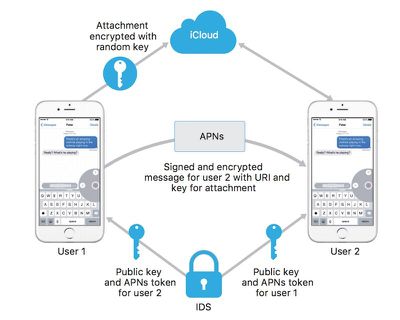
ElcomSoft's tool seems to be taking advantage of the fact that, if iCloud Backups are turned on, a copy of the encryption key protecting iMessages is included in the backup, according to a support document on Apple's website:
If you have iCloud Backup turned on, a copy of the key protecting your Messages is included in your backup. This ensures you can recover your Messages if you’ve lost access to iCloud Keychain and your trusted devices. When you turn off iCloud Backup, a new key is generated on your device to protect future messages and it is not stored by Apple.
Given the extenuating circumstances required, the vast majority of users shouldn't have anything to worry about. But it's a good reminder to maintain strong security practices on all of your devices to stay safe.

















































