Skip to Content

VLC 3.0 Update Adds Cross-Platform 4K and 8K Hardware Decoding, HDR10, Chromecast Support, and More

by

VideoLAN on Friday released VLC 3.0 "Vetinari", a major update to the popular media player that is rolling out across all platforms, including macOS, iOS, and tvOS.

Version 3 includes a huge number of new features and improvements to the app, including automatic hardware decoding for 4K and 8K playback, support for 10-bit HDR, 360-degree video and 3D audio, and Chromecast streaming with support for non-native formats.
Screen Shot 32
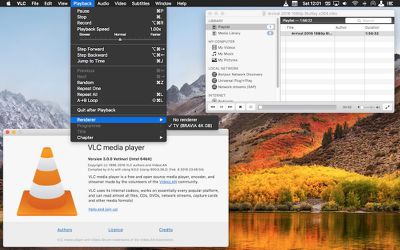
VLC now works with Blu-Ray Java menus and features network browsing support for local network and NAS drives, including those with SMB, FTP, SFTP, NFS filesystems. The iOS app has also been optimized for iPhone X displays, while on Mac, Chromecast streaming to supported devices can be found in the menu bar under Playback -> Renderer.

Among many other changes and improvements in VLC Vetinari, further standout features include: a redesigned and resizable fullscreen controller; a new status bar icon which displays metadata and play controls; support for keyboard blacklight dimming during fullscreen video playback; significant performance improvements in playlist handling; and a simplified preferences window. Check the online changelog for the complete list of updates.

VLC 3.0 is a free downloaded for Mac from the VideoLan website. (Note that version 3.0.0 of VLC removes support for OS X 10.6 Snow Leopard and requires Mac systems to run OS X 10.7 Lion or later.) VLC 3.0.0 is already available on the tvOS App Store, but the iPhone and iPad update still appears to be rolling out as of writing.


Tag: VLC

Top Rated Comments

HobeSoundDarryl Avatar
105 months ago
Wow! Way to go VLC team! A big pile of video upgrades for a whopping cost of free, and no ongoing subscription required either. Amazing.
Score: 21 Votes (Like | Disagree)
berrymetal Avatar
105 months ago
I switched to IINA and never looked back...
Score: 16 Votes (Like | Disagree)
Kabeyun Avatar
105 months ago
First I’m hearing about 8K. Wow. That’s a lot of K. I guess I shouldn’t be surprised. At a certain point consumers really won’t need any more K, but there’ll always be a push for more K. At 4K, I already get treated to the skin pores of the actors I’m watching. With 8K I’ll be able to enjoy actors’ pimples and pores on a screen the size of a bus. I think the K people might be in cahoots with the TV people. I guess that’s O-K.
Score: 9 Votes (Like | Disagree)
Secondempire Avatar
105 months ago
I like the new Yosemite style icon. Call it OCD if you want, but the old Leopard style icon was really annoying after macOS went flat.
Score: 4 Votes (Like | Disagree)
Guy Clark Avatar
105 months ago
Great makeover for the greatest MultiMedia player.

As it has done so for years VLC continues to stand Head and Shoulders above all other Media players.
Score: 3 Votes (Like | Disagree)
nathansz Avatar
105 months ago
surprised to read so much vlc hate.

must be near 20 years and over many different os from mac to win to bsd and back again and countless machines from the shiniest new box to the alley salvage find. vlc is always one of the first few softwares i put on a machine

it’s never failed me and always does what i need it to do

for me, it always has and still does play any video file, in any format, from any source (networked or locally) at the best possible quality given the machine it is running on

and it can do so much more than that

for free software to have that kind of quality and longevity is amazing

to me anyway


if it doesn’t work for you than yr prob doing it wrong
[doublepost=1518337792][/doublepost]
Respect to VLC for making an effort here, but most people stopped using VLC years ago because it's so resource heavy.
what do you mean by “resource heavy” exactly?

i’ve always found vlc to be quite capable on machines with slow old cpu’s and meagre amounts of ram
[doublepost=1518338575][/doublepost]
I tried on my 2017 iMac and VLC doesn't seem to use HW acceleration for 4K HEVC.
IINA does it.
what real world use case does this difference affect
Score: 3 Votes (Like | Disagree)

Popular Stories

imac video apple feature

Apple Unveils Seven New Products

Friday March 6, 2026 11:48 am PST by
Apple this week unveiled seven products, including an iPhone 17e, an iPad Air with the M4 chip, updated MacBook Air and MacBook Pro models, a new Studio Display, a higher-end Studio Display XDR, and an all-new MacBook Neo that starts at just $599. iPhone 17e features the same overall design as the iPhone 16e, but it gains Apple's A19 chip, MagSafe for magnetic wireless charging and magnetic...
Apple MacBook Pro M4 hero

Apple Planning 'MacBook Ultra' With Touchscreen and Higher Price

Sunday March 8, 2026 8:05 am PDT by
Apple is planning to launch an all-new "MacBook Ultra" model this year, featuring an OLED display, touchscreen, and a higher price point, Bloomberg's Mark Gurman reports. Gurman revealed the information in his latest "Power On" newsletter. While Apple has been widely expected to launch new M6-series MacBook Pro models with OLED displays, touchscreen functionality, and a new, thinner design...
MacBook Neo Feature Pastel 1

First MacBook Neo Benchmarks Are In: Here's How It Compares to the M1 MacBook Air

Thursday March 5, 2026 4:07 pm PST by
Benchmarks for the new MacBook Neo surfaced today, and unsurprisingly, CPU performance is almost identical to the iPhone 16 Pro. The MacBook Neo uses the same 6-core A18 Pro chip that was first introduced in the iPhone 16 Pro, but it has one fewer GPU core. The MacBook Neo earned a single-core score of 3461 and a multi-core score of 8668, along with a Metal score of 31286. Here's how the...