iCloud Messages Returns to iOS in First Beta of iOS 11.3
Apple in iOS 11 promised a new Messages in iCloud feature that will allow customers to save their iMessages in iCloud and sync them across devices. Messages in iCloud was pulled from iOS 11 during the beta testing period, with Apple promising to reintroduce it at a later date.
It was not clear if and when the feature was actually going to be implemented, though, as Apple stripped all mentions of it from the iOS 11 website.
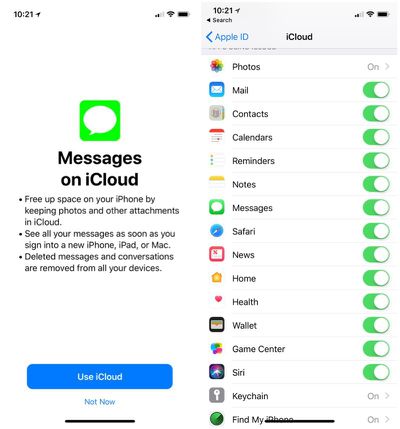
As of iOS 11.3, Messages in iCloud is back and is available for "testing and evaluation purposes," marking the official return of the feature. According to Apple's release notes, once iOS 11.3 beta 1 is installed, Messages will prompt users to turn on Messages in the Cloud when it is first launched.
Messages in the Cloud is automatically enabled for users who have two-factor authentication and iCloud Backup enabled, says Apple.
The new Messages in iCloud feature will be a welcome change for iPhone, iPad, and Mac users who prefer not to delete their messages. Over the course of several years, Messages can take up a lot of space. That space can now be freed up with the bulk of older messages stored directly in iCloud rather than on-device.
Popular Stories
Apple is releasing five new products this Friday, November 6, following pre-orders that opened last week, including its first touchscreen MacBook Pro models.
The following new products will be available from Friday:
iPad mini with OLED display and A20 Pro chip
iMac with M6 chip
14-inch MacBook Pro with M6 chip
14-inch MacBook Pro with OLED touchscreen
16-inch MacBook Pro with OLED...
In a memo shared with Apple Stores and Apple Authorized Service Providers this week, and later obtained by MacRumors, Apple provided technicians with guidance on how to diagnose and address the iPhone Duo's inner display cracking issue.
If a customer reports the issue, Apple advised technicians to inspect the iPhone Duo and repair or replace it in accordance with their standard procedures....
Apple's busiest season isn't over yet. Far from it. With two hardware launch dates still to come in November, plus software updates and new smart home accessories running into December, there's more on the way from Apple before the end of 2026, so be sure to stick around.
Below, we've rounded up what's still coming, along with one date in particular that's worth watching if you're a holiday...