Apple Releases iOS 11.2 With Apple Pay Cash, Faster 7.5W Wireless Charging, Date Bug Fix and More [Updated]

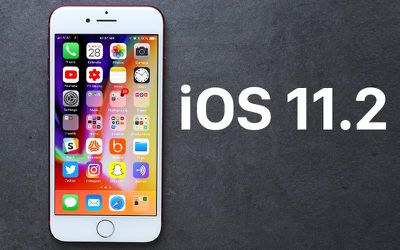
Apple today released iOS 11.2, the second major update to the iOS 11 operating system available on the iPhone, iPad, and iPod touch. iOS 11.2 comes a month after iOS 11.1, the first major update to iOS 11, and it follows several other smaller bug fix updates.

The iOS 11.2 update is available on all eligible devices over-the-air in the Settings app. To access the update, go to Settings --> General --> Software Update. Eligible devices include the iPhone 5s and later, the iPad mini 2 and later, the iPad Air and later, and the 6th-generation iPod touch.
ios11
iOS 11.2, as a major 11.x update, brings several new features and important bug fixes. It introduces Apple Pay Cash, Apple's peer-to-peer payments service. Apple Pay Cash works through the Messages app and is designed to allow for quick person-to-person money transfers, like Square Cash or Venmo.

You can quickly and easily send and receive money through iMessage conversations with Apple Pay Cash. Cash is sent from a linked debit or credit card, while received cash is stored in an Apple Pay Cash card in the Wallet app and can be used for purchases or transferred to a bank account. For more on Apple Pay Cash, check out our how to.


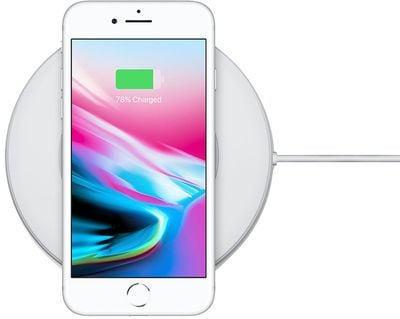
For the iPhone X, iPhone 8, and iPhone 8 Plus iOS 11.2 appears to introduce faster 7.5W wireless charging speeds through compatible Qi-based wireless charging accessories. At 7.5W charging speeds, the three new iPhones are able to charge faster wirelessly than with the standard 5W wired iPhone power adapter.
iphone8wirelesscharging 1
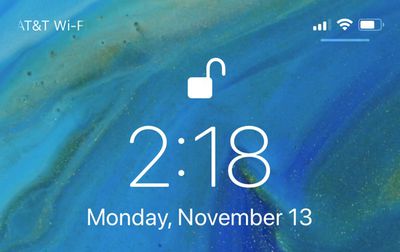
When it comes to the iPhone X interface, iOS 11.2 adds a small bar underneath the status bar icons located at the upper right side of the Lock screen, which is designed to make the location of the Control Center gesture more clear. On the iPhone X, Control Center is accessed by swiping down from the top of the device.
lockscreencontrolcenterbar
In Control Center on all devices, there are two new informational pop-ups that are displayed when using the Wi-Fi or Bluetooth toggles. These pop-ups explain that Bluetooth and Wi-Fi are disabled temporarily rather than permanently when accessed from the Control Center.
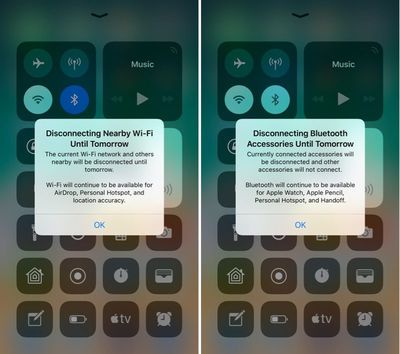
controlcenterwifitoggles
iOS 11.2 introduces a new Sports section in the dedicated TV app, which offers up access to live sports games through integration with the ESPN app. The Sports app can be accessed through a new "Sports" tab at the bottom of the app, and it offers up custom content based on team preferences and current sports seasons.
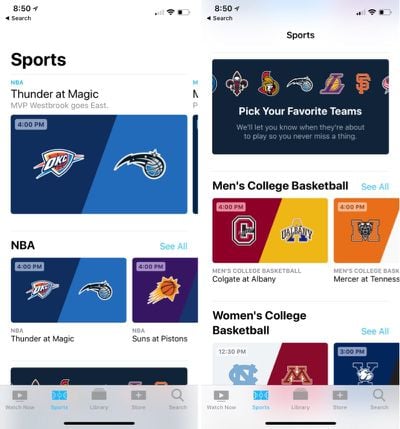
sportstabios112
There are multiple bug fixes in the update, including a fix for an animation bug in the Calculator app that caused some numbers and symbols to be ignored when entered in rapid succession. The update removes the animations from the calculator app so calculations can be done quickly with no need to pause between entering numbers to obtain the correct result.

The update also addresses a date bug that caused continual crashing in iOS 11.1.2 after December 2. The problem was linked to local notifications, and according to a support document, it is fixed in iOS 11.2. iPhone and iPad users experiencing this bug should turn off notifications and then install iOS 11.2.

Other new features in iOS 11.2 include redesigned camera emojis and other emoji tweaks, a new loading animation for Live Photos effects, and Live wallpapers for the iPhone X. For developers, the update introduces a new feature that allows them to offer new customers discounted introductory pricing for auto-renewable subscriptions in the App Store. Full release notes for the update are available below:

iOS 11.2 introduces Apple Pay Cash to send, request, and receive money from friends and family with Apple Pay. This update also includes bug fixes and improvements.

Apple Pay Cash (US Only)
Send, request, and receive money from friends and family with Apple Pay in Messages or by asking Siri

Other improvements and fixes
- Adds support for faster wireless charging on iPhone 8, iPhone 8 Plus, and iPhone X with compatible third-party accessories
- Introduces three new Live wallpapers for iPhone X
- Improves video camera stabilization
- Adds support in Podcasts to automatically advance to the next episode from the same show
- Adds support in HealthKit for downhill snow sports distance as a data type
- Fixes an issue that could cause Mail to appear to be checking for new messages even when a download is complete
- Fixes an issue that could cause cleared Mail notifications from Exchange accounts to reappear
- Improves stability in Calendar
- Resolves an issue where Settings could open to a blank screen
- Fixes an issue that could prevent swiping to Today View or Camera from the Lock Screen
- Addresses an issue that could prevent Music controls from displaying on the Lock Screen
- Fixes an issue that could cause app icons to be arranged incorrectly on the Home Screen
- Addresses an issue that could prevent users from deleting recent photos when iCloud storage is exceeded
- Addresses an issue where Find My iPhone sometimes wouldn’t display a map
- Fixes an issue in Messages where the keyboard could overlap the most recent message
- Fixes an issue in Calculator where typing numbers rapidly could lead to incorrect results
- Addressed an issue where the keyboard could respond slowly
- Adds support for real-time text (RTT) phone calls for the deaf and hard of hearing
- Improves VoiceOver stability in Messages, Settings, App Store, and Music
- Resolves an issue that prevented VoiceOver from announcing incoming Notifications

For more details on the iOS 11 operating system, make sure to check out our dedicated roundup.

Update: We're seeing several reports that Apple Pay Cash is not available in the release version of iOS 11.2. Given that this update was released at an unusual time, it may not be activated as of yet. It's likely we'll see Apple Pay Cash become available early next week.

Related Forum: iOS 11

Popular Stories

iOS 26

iOS 26.2 Coming Soon With These 8 New Features on Your iPhone

Thursday December 11, 2025 8:49 am PST by
Apple seeded the second iOS 26.2 Release Candidate to developers earlier this week, meaning the update will be released to the general public very soon. Apple confirmed iOS 26.2 would be released in December, but it did not provide a specific date. We expect the update to be released by early next week. iOS 26.2 includes a handful of new features and changes on the iPhone, such as a new...

AirPods Pro Firmware Feature

Apple Releases New Firmware for AirPods Pro 2 and AirPods Pro 3

Thursday December 11, 2025 11:28 am PST by
Apple today released new firmware designed for the AirPods Pro 3 and the prior-generation AirPods Pro 2. The AirPods Pro 3 firmware is 8B30, up from 8B25, while the AirPods Pro 2 firmware is 8B28, up from 8B21. There's no word on what's include in the updated firmware, but the AirPods Pro 2 and AirPods Pro 3 are getting expanded support for Live Translation in the European Union in iOS...
iOS 26

iOS 26.4 and iOS 27 Features Revealed in New Leak

Friday December 12, 2025 10:56 am PST by
Macworld's Filipe Espósito today revealed a handful of features that Apple is allegedly planning for iOS 26.4, iOS 27, and even iOS 28. The report said the features are referenced within the code for a leaked internal build of iOS 26 that is not meant to be seen by the public. However, it appears that Espósito and/or his sources managed to gain access to it, providing us with a sneak peek...
Google maps feaure

Google Maps Quietly Added This Long-Overdue Feature for Drivers

Wednesday December 10, 2025 2:52 am PST by
Google Maps on iOS quietly gained a new feature recently that automatically recognizes where you've parked your vehicle and saves the location for you. Announced on LinkedIn by Rio Akasaka, Google Maps' senior product manager, the new feature auto-detects your parked location even if you don't use the parking pin function, saves it for up to 48 hours, and then automatically removes it once...
iOS 26

Apple Releases iOS 26.2 With Alarms for Reminders, Lock Screen Changes, Enhanced Safety Alerts and More

Friday December 12, 2025 10:10 am PST by
Apple today released iOS 26.2, the second major update to the iOS 26 operating system that came out in September, iOS 26.2 comes a little over a month after iOS 26.1 launched. ‌iOS 26‌.2 is compatible with the ‌iPhone‌ 11 series and later, as well as the second-generation ‌iPhone‌ SE. The new software can be downloaded on eligible iPhones over-the-air by going to Settings >...
Foldable iPhone 2023 Feature 1

Apple to Make More Foldable iPhones Than Expected [Updated]

Tuesday December 9, 2025 9:59 am PST by
Apple has ordered 22 million OLED panels from Samsung Display for the first foldable iPhone, signaling a significantly larger production target than the display industry had previously anticipated, ET News reports. In the now-seemingly deleted report, ET News claimed that Samsung plans to mass-produce 11 million inward-folding OLED displays for Apple next year, as well as 11 million...
AirTag 2 Mock Feature

Apple AirTag 2: Four New Features Found in iOS 26 Code

Thursday December 11, 2025 10:31 am PST by
The AirTag 2 will include a handful of new features that will improve tracking capabilities, according to a new report from Macworld. The site says that it was able to access an internal build of iOS 26, which includes references to multiple unreleased products. Here's what's supposedly coming: An improved pairing process, though no details were provided. AirTag pairing is already...
iOS 26

15 New Things Your iPhone Can Do in iOS 26.2

Friday December 5, 2025 9:40 am PST by
Apple is about to release iOS 26.2, the second major point update for iPhones since iOS 26 was rolled out in September, and there are at least 15 notable changes and improvements worth checking out. We've rounded them up below. Apple is expected to roll out iOS 26.2 to compatible devices sometime between December 8 and December 16. When the update drops, you can check Apple's servers for the ...
macOS Tahoe 26 Thumb

Apple Releases macOS Tahoe 26.2 With Edge Light

Friday December 12, 2025 10:08 am PST by
Apple today released macOS Tahoe 26.2, the second major update to the macOS Tahoe operating system that came out in September. macOS Tahoe 26.2 comes five weeks after Apple released macOS Tahoe 26.1. Mac users can download the macOS Tahoe update by using the Software Update section of System Settings. macOS Tahoe 26.2 includes Edge Light, a feature that illuminates your face with soft...

Top Rated Comments

Wildkraut Avatar
105 months ago
Haha date bug forced them to release on Saturday
Score: 44 Votes (Like | Disagree)
Abazigal Avatar
105 months ago
It's unlike me to say this, but we are in unusual territory- I think we are past the yelling stage. Someone needs to be fired at this point. I hope it's not Craig Federighi, even though it probably is. It is his department after all. But some very drastic steps need to be taken and ASAP.
Why do people always rush to call for someone’s dismissal the instance something goes wrong?

Software is a process, not an end goal. There will always be bugs that need quashing, especially when iOS is constantly evolving and being iterated on. If a software engineer is sacked every time there is a bug, we won’t have anyone left to work before long.

Just step back, take a deep breath, and let Apple do their thing.
Score: 25 Votes (Like | Disagree)
Eliottjames Avatar
105 months ago
What a weird release time! Maybe they're rushing it out because of the time bug...
Score: 24 Votes (Like | Disagree)
QCassidy352 Avatar
105 months ago
If you need a pop up notification to explain what a toggle does, then your UI team has really failed.
Score: 20 Votes (Like | Disagree)
FoxMcCloud Avatar
105 months ago
All I care about is iMessage in iCloud. When does that arrive?
Score: 19 Votes (Like | Disagree)
tdar Avatar
105 months ago
Why do people always rush to call for someone’s dismissal the instance something goes wrong?

Software is a process, not an end goal. There will always be bugs that need quashing, especially when iOS is constantly evolving and being iterated on. If a software engineer is sacked every time there is a bug, we won’t have anyone left to work before long.

Just step back, take a deep breath, and let Apple do their thing.
Because this is not about one individual issue. It's about a trend. We have seen that the overall quality of iOS has been going down over the past 3 years. We have seen the introduction of Showstopper bugs making it into production with customers, that have never taken place before.

Let's just look at the past few weeks shall we:

1) Mac OS bug that allows for Root access to the system because a bug sets the Root Password to blank.

2) In the 11.2 beta releases for Beta 3 and Beta 4 and Beta 5 (at least, we did not have Beta 6 long enough to know- and it's production now) We saw a bug that could in it's worst form prevent your iPhone from being a phone. At the least it would break your voicemail.

3) The Date bug

That's a hell of a few weeks. If THAT'S where one finds their software development department- I think some fairly major changes are needed. Note that I did not call for the firing of a software developer. I called for the firing of management.
Score: 17 Votes (Like | Disagree)