Microsoft has revealed a redesign coming to its Outlook apps for Mac and Windows platforms, which is described as aiming for a "simplified" user interface that falls in line with the Outlook app for iOS. The Verge detailed the new and less complex version of Outlook on desktop, which was first spotted by MSPowerUser.

The Mac and Windows apps will feature a single-line ribbon that will be customizable so users can control which buttons are available, tailoring the email client to more easily accomplish their most common tasks. Clutter will be reduced with a smaller set of default commands, and the left navigation panel will include quicker access to folders across multiple accounts, visually similar to the switcher in Outlook on iOS.
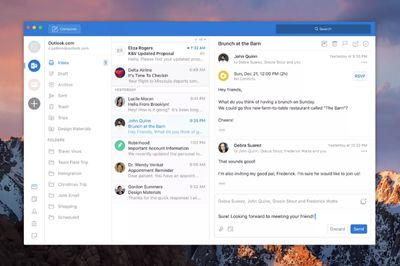
outlook mac 2


Microsoft is said to have admitted that "MacBooks are popular amongst key influencers and decision makers," so the company decided to overhaul its email client "to win these users by delivering the best Outlook has to offer." Besides the design changes, Outlook for Mac will gain improvements to search and its calendar functions.

Search will become faster and "more reliable," as well as be easier to access in the app's top right corner. For the calendar, users will see an overall improved interface that makes managing appointments less of a hassle.
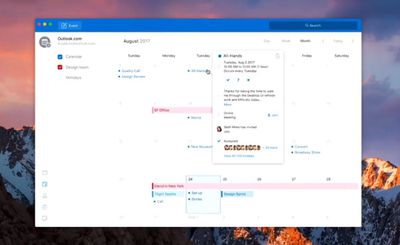
outlook mac 1
Microsoft hasn't yet detailed when the new Outlook will launch for Mac and Windows, but the company is said to be testing internal versions of the software for both platforms. Before the major update, a few minor additions will launch on Mac, including the ability to slide-to-delete messages via Apple's Magic Trackpad and a way to insert tables into emails.

It's expected that the redesigned app will debut in updates first made available for Office 365 subscribers, and then launch in Office 2019.


Top Rated Comments

mithion Avatar
107 months ago
Why would anyone outside of a business use Outlook on a Mac ?
I hate to admit it but outlook is better than apple mail. First off it actually works with our exchange 2016 mail server while apple mail fails to connect. Second, the calendar integration is much better. It's much easier to add shared calendars in outlook than it is in apple mail. I'm usually a fan of Apple's stuff, but this time I'm man enough give credit to the competition because it's simply better.
Score: 8 Votes (Like | Disagree)
Plutonius Avatar
107 months ago
Why would anyone outside of a business use Outlook on a Mac ?
Score: 3 Votes (Like | Disagree)
TheralSadurns Avatar
107 months ago
The whole application looks like Fischer price garbage!

The ribbon only made sense in Windows cause that system does not have the ever present menu bar (may macOS Full screen would make sense here).
This is actually the reason I think Office on macOS is FAR superior to Office on Windows. The Menubar... that doesn't even exist anymore in Windows. I hate that you have to click these little arrows to access menus from the ribbon... and even worse, my biggest gripe, that you don't have a file MENU... but a file SCREEN... that takes you away from your documents...
Score: 2 Votes (Like | Disagree)
H.Finch Avatar
107 months ago
I never expect MS to get anything really right and do something with taste... However the only thing that could make me change my e-mail client is Apple's ridiculous way of handeling attachments in mail...
Score: 1 Votes (Like | Disagree)
thejoshhoward Avatar
107 months ago
Good…

Good.
Score: 1 Votes (Like | Disagree)
TheralSadurns Avatar
107 months ago
Wow... this actually sucks. While I never thought the Ribbon was a good idea (taking up to much vertical space of widescreen displays) this actually makes it A LOT worse.
Score: 1 Votes (Like | Disagree)

Popular Stories

iOS 26

iOS 26.2 Coming Soon With These 8 New Features on Your iPhone

Thursday December 11, 2025 8:49 am PST by
Apple seeded the second iOS 26.2 Release Candidate to developers earlier this week, meaning the update will be released to the general public very soon. Apple confirmed iOS 26.2 would be released in December, but it did not provide a specific date. We expect the update to be released by early next week. iOS 26.2 includes a handful of new features and changes on the iPhone, such as a new...
iOS 26

iOS 26.4 and iOS 27 Features Revealed in New Leak

Friday December 12, 2025 10:56 am PST by
Macworld's Filipe Espósito today revealed a handful of features that Apple is allegedly planning for iOS 26.4, iOS 27, and even iOS 28. The report said the features are referenced within the code for a leaked internal build of iOS 26 that is not meant to be seen by the public. However, it appears that Espósito and/or his sources managed to gain access to it, providing us with a sneak peek...
AirPods Pro Firmware Feature

Apple Releases New Firmware for AirPods Pro 2 and AirPods Pro 3

Thursday December 11, 2025 11:28 am PST by
Apple today released new firmware designed for the AirPods Pro 3 and the prior-generation AirPods Pro 2. The AirPods Pro 3 firmware is 8B30, up from 8B25, while the AirPods Pro 2 firmware is 8B28, up from 8B21. There's no word on what's include in the updated firmware, but the AirPods Pro 2 and AirPods Pro 3 are getting expanded support for Live Translation in the European Union in iOS...
iOS 26

Apple Releases iOS 26.2 With Alarms for Reminders, Lock Screen Changes, Enhanced Safety Alerts and More

Friday December 12, 2025 10:10 am PST by
Apple today released iOS 26.2, the second major update to the iOS 26 operating system that came out in September, iOS 26.2 comes a little over a month after iOS 26.1 launched. ‌iOS 26‌.2 is compatible with the ‌iPhone‌ 11 series and later, as well as the second-generation ‌iPhone‌ SE. The new software can be downloaded on eligible iPhones over-the-air by going to Settings >...
Google maps feaure

Google Maps Quietly Added This Long-Overdue Feature for Drivers

Wednesday December 10, 2025 2:52 am PST by
Google Maps on iOS quietly gained a new feature recently that automatically recognizes where you've parked your vehicle and saves the location for you. Announced on LinkedIn by Rio Akasaka, Google Maps' senior product manager, the new feature auto-detects your parked location even if you don't use the parking pin function, saves it for up to 48 hours, and then automatically removes it once...
AirTag 2 Mock Feature

Apple AirTag 2: Four New Features Found in iOS 26 Code

Thursday December 11, 2025 10:31 am PST by
The AirTag 2 will include a handful of new features that will improve tracking capabilities, according to a new report from Macworld. The site says that it was able to access an internal build of iOS 26, which includes references to multiple unreleased products. Here's what's supposedly coming: An improved pairing process, though no details were provided. AirTag pairing is already...
macOS Tahoe 26 Thumb

Apple Releases macOS Tahoe 26.2 With Edge Light

Friday December 12, 2025 10:08 am PST by
Apple today released macOS Tahoe 26.2, the second major update to the macOS Tahoe operating system that came out in September. macOS Tahoe 26.2 comes five weeks after Apple released macOS Tahoe 26.1. Mac users can download the macOS Tahoe update by using the Software Update section of System Settings. macOS Tahoe 26.2 includes Edge Light, a feature that illuminates your face with soft...
iOS 26

15 New Things Your iPhone Can Do in iOS 26.2

Friday December 5, 2025 9:40 am PST by
Apple is about to release iOS 26.2, the second major point update for iPhones since iOS 26 was rolled out in September, and there are at least 15 notable changes and improvements worth checking out. We've rounded them up below. Apple is expected to roll out iOS 26.2 to compatible devices sometime between December 8 and December 16. When the update drops, you can check Apple's servers for the ...