What's New in iOS 11 Beta 5: iCloud Messages Delayed, New Icons, Control Center Music Changes and More - MacRumors
Skip to Content

What's New in iOS 11 Beta 5: iCloud Messages Delayed, New Icons, Control Center Music Changes and More

Apple seeded the fifth beta of iOS 11 to developers this morning, fixing existing bugs, introducing new bugs, and adding some tweaks to various features and design choices.

We've outlined all of the changes Apple has made to iOS 11 in the fifth update in the video and the post below.


- Messages in iCloud - Apple's iCloud Messages feature, which allows iMessages to be stored in iCloud to free up space on an iOS or Mac device, has been removed in iOS 11 beta 5. Apple says the feature will be re-released in a future update to iOS 11, suggesting there are no plans to add it back to the version of iOS 11 that will launch in September alongside new iOS devices. It's not clear why the iCloud Messages feature has been removed or exactly when it'll come back.

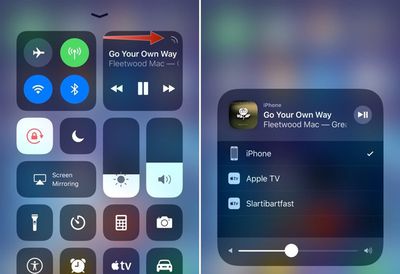
- Control Center Music Icon - The Music app in the Control Center has been redesigned with a new pulsating indicator that lists nearby audio sources like AirPods, speakers, and AirPlay devices. When the indicator is tapped, it opens up a list of sources that can be quickly selected, making it easier to connect to audio devices or AirPlay content to a television.
controlcenterios11beta5
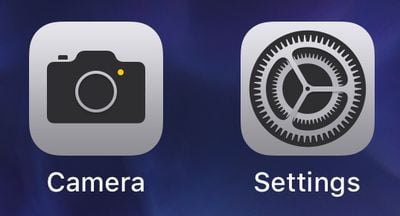
- Settings - The icon for the Settings app has been tweaked. Instead of a gray background, it has a black background, making the gears more prominent.
cameraandsettingsappsios11beta5
- Camera - The icon for the Camera app has also been subtly tweaked, introducing a simpler design that does away with the two lines that used to be present.

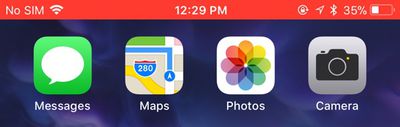
- Screen Recording - When recording your iPhone or iPad screen, the indicator bar that lets you know recording is taking place is now red instead of blue, making it more prominent.
screenrecordingios11beta5
iOS 11 beta 5 is limited to developers at the current time, but Apple will likely introduce the changes in a fourth public beta that we expect to see later this week.


Related Forum: iOS 11

Popular Stories

iPhone Handoff Feature

iOS 27 Introduces New 'iPhone Handoff' Feature

Wednesday September 2, 2026 12:35 pm PDT by
Apple has added a new "iPhone Handoff" feature to iOS 27 that will allow you to switch between two iPhones while using the same phone number on each device. This functionality was briefly mentioned during the WWDC 2026 keynote in June, on a slide that listed hundreds of new features coming in iOS 27 and corresponding software updates, but Apple never shared any further details at the time. ...

Dynamic Island iPhone 18 Pro Feature

iPhone 18 Pro Prices Estimated Ahead of Apple Event Next Week

Thursday September 3, 2026 3:41 am PDT by
Less than a week before Apple debuts new iPhone 18 Pro models, research firm TrendForce has estimated the prices of the devices based on the latest hardware cost environment. TrendForce's price estimates compared to last year's models look like this: Model Starting Price Model Starting Price Change iPhone 17 Pro $1,099 iPhone 18 Pro $...
Apple Foldable Thumb

iPhone Ultra's Very High Price and Features Revealed in New Report

Thursday September 3, 2026 7:33 am PDT by
Ahead of Apple's event on Wednesday, September 9, where it is expected to unveil its first-ever foldable iPhone, Taiwanese research firm TrendForce today outlined the device's estimated price range, features, and some other key details. In the U.S., TrendForce estimated that the foldable iPhone will have a starting price of $2,099 to $2,299 and said the highest-end configurations could...

Top Rated Comments

69Mustang Avatar
119 months ago
This has to be fake news. I only trust the HomePod firmware.:p:D
Score: 33 Votes (Like | Disagree)
ApostolisApo Avatar
119 months ago
Control Center really looks like a cluster****
At the first glance, yes. But after some hours you appreciate its compactness
Score: 21 Votes (Like | Disagree)
nsayer Avatar
119 months ago
Screen recording is a great new feature. Will be very helpful for tech support, troubleshooting remotely, etc.
Score: 21 Votes (Like | Disagree)
119 months ago
Control Center really looks like a cluster****
Score: 17 Votes (Like | Disagree)
AngerDanger Avatar
119 months ago
- Camera - The icon for the Camera app has also been subtly tweaked, introducing a simpler design that does away with the two lines that used to be present.
No more lines on the camera icon?! :mad: Well, that's it; Android, here I come!
Score: 17 Votes (Like | Disagree)
Mad Mac Maniac Avatar
119 months ago
Control Center really looks like a cluster****
Personal preference. It's definitely a radical visual change. I definitely appreciate the single page and the customizability. I really wish you could rearrange the order of the default icons. I'd love to be able to customize the position of everything (i.e. place music controls at bottom right corner, etc)
Score: 8 Votes (Like | Disagree)