Earlier this year, Apple announced a few App Store review policy changes, which included the reveal of an official API for in-app review and rating requests that developers had the option to put in their apps beginning with iOS 10.3 and macOS Sierra 10.12.4. Additionally, Apple limited how often app developers can push out such prompts to just three times each year.

Today, 9to5Mac spotted a new section in the App Store Review Guidelines, pointing towards the launch of the new policy changes coming to iOS 11 and macOS High Sierra this fall. Specifically, in section 1.1.7 of the App Store Review guidelines, Apple states that it will "disallow custom review prompts" in all apps on the App Store.
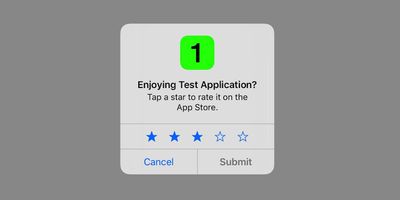
app store in app prompt

Image via 9to5Mac

The update also allows developers to respond to customer reviews for the first time.

1.1.7 App Store Reviews:
- App Store customer reviews can be an integral part of the app experience, so you should treat customers with respect when responding to their comments. Keep your responses targeted to the user’s comments and do not include personal information, spam, or marketing in your response.
- Use the provided API to prompt users to review your app; this functionality allows customers to provide an App Store rating and review without the inconvenience of leaving your app, and we will disallow custom review prompts.

The new user interface includes the App Store's traditional 5-star rating system in a pop-up box, allowing users to enter their opinion of the app without needing to leave it and visit the App Store to submit a review, as was previously the case. In addition to Apple limiting these pop-up boxes to only appear three times per year, if a user actually submits a review for the app, the developer can never request an in-app pop-up review from that user again.
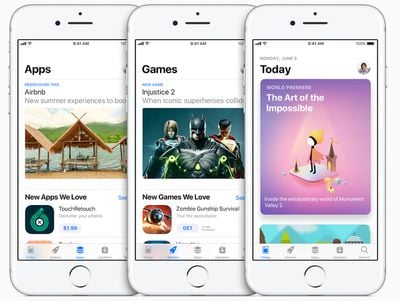
new app store ios 11

The new App Store in iOS 11

Adding to the strain on in-app review prompts, users can now also turn off these requests completely with a new "In-App Ratings & Reviews" toggle found in the iTunes and App Store section of Settings on iOS 11.

When the updates take full effect, it means that developers won't be able to ask a user for another review of an app after the same user submits a rating using Apple's in-app prompt, even if the app has recently received a huge update. On the plus side, star ratings can now carry over across updates -- if the developer chooses -- so that the App Store rating system is a true overall aggregate of an app and not just user opinions on the app's current iteration.


Related Forum: iOS 11

Top Rated Comments

Mad Mac Maniac Avatar
112 months ago
All sounds like good news to me.
Score: 14 Votes (Like | Disagree)
longofest Avatar
112 months ago
Thank god! Those have been such a pain.
Score: 8 Votes (Like | Disagree)
M_Json Avatar
112 months ago
Tinder is one of those apps which keeps asking me to give it a positive review. I just want to swipe through all the girls without being disturbed..
Score: 7 Votes (Like | Disagree)
BWhaler Avatar
112 months ago
This is why I love Apple.
Score: 5 Votes (Like | Disagree)
earthTOmitchel Avatar
112 months ago
Tinder is one of those apps which keeps asking me to give it a positive review. I just want to swipe through all the girls without being disturbed..
Okay I'm glad someone else brought this up so I don't have to.
Score: 5 Votes (Like | Disagree)
jlc1978 Avatar
112 months ago
I liked the separation of reviews by major upgrade. That made it easy to see if a developer somehow messed up the app. One app I used a lot got a complete UI overhaul which ruined the previous workflow and resulted in a lot of 1 star reviews. The author brought back the old UI and the 1 stars went back to five since it was a great app once the poorly thought out UI change was rescinded.

The new system means:

1. Apps with lots of reviews that undergo significant changes that users don't like will still have nearly 5 stars simply from sheer numbers; unless Apple weights newer reviews more heavily.

2. Developers of new apps, who fix serious problems with an update will still be poorly rated due to a previous version.

Given that people most likely simply look at stars when deciding at what apps to look closer this skews what they see.
Score: 2 Votes (Like | Disagree)

Popular Stories

maxresdefault

Where's the New Apple TV?

Monday December 22, 2025 11:30 am PST by
Apple hasn't updated the Apple TV 4K since 2022, and 2025 was supposed to be the year that we got a refresh. There were rumors suggesting Apple would release the new Apple TV before the end of 2025, but it looks like that's not going to happen now. Subscribe to the MacRumors YouTube channel for more videos. Bloomberg's Mark Gurman said several times across 2024 and 2025 that Apple would...
iPhone Top Left Hole Punch Face ID Feature Purple

iPhone 18 Pro Launching Next Year With These 12 New Features

Tuesday December 23, 2025 8:36 am PST by
While the iPhone 18 Pro and iPhone 18 Pro Max are not expected to launch for another nine months, there are already plenty of rumors about the devices. Below, we have recapped 12 features rumored for the iPhone 18 Pro models. The same overall design is expected, with 6.3-inch and 6.9-inch display sizes, and a "plateau" housing three rear cameras Under-screen Face ID Front camera in...
airpods color prototypes

Apple Tested AirPods in Bright Colors

Saturday December 27, 2025 6:06 am PST by
Apple reportedly tested a version of the first-generation AirPods with bright, iPhone 5c-like colored charging cases. The images, shared by the Apple leaker and prototype collector known as "Kosutami," claim to show first-generation AirPods prototypes with pink and yellow exterior casings. The interior of the charging case and the earbuds themselves remain white. They seem close to some...
iOS 26

iOS 26.2 Adds These 8 New Features to Your iPhone

Monday December 22, 2025 8:47 am PST by
Earlier this month, Apple released iOS 26.2, following more than a month of beta testing. It is a big update, with many new features and changes for iPhones. iOS 26.2 adds a Liquid Glass slider for the Lock Screen's clock, offline lyrics in Apple Music, and more. Below, we have highlighted a total of eight new features. Liquid Glass Slider on Lock Screen A new slider in the Lock...
maxresdefault

Hands-On With a Rough iPhone Fold Mockup

Monday December 29, 2025 10:55 am PST by
Apple is rumored to be introducing a foldable iPhone in September 2026, and since it will bring the biggest form factor change since the iPhone was introduced in 2007, curiosity about the design is high. A 3D designer created an iPhone Fold design based on rumors, and we printed it out to see how it compares to Apple's current iPhones. Subscribe to the MacRumors YouTube channel for more ...
top stories 2025 12 27

Top Stories: iPhone Fold Mockup, Where's the New Apple TV?, and More

Saturday December 27, 2025 6:00 am PST by
Merry Christmas and Happy Holidays from MacRumors! News in the Apple world has unsurprisingly been relatively slow over the past week, but Apple's upcoming foldable iPhone managed to make its way back into the news, while we also shared updates on current and future Apple TV news. iOS 26.3 will be bringing some new features, particularly for users in the EU, so we'll look for additional...
Apple Wallet ID Illinois

Apple Plans to Expand iPhone Driver's Licenses to These 7 U.S. States

Wednesday December 24, 2025 8:40 am PST by
In select U.S. states, residents can add their driver's license or state ID to the Apple Wallet app on the iPhone and Apple Watch, and then use it to display proof of identity or age at select airports and businesses, and in select apps. The feature is currently available in 13 U.S. states and Puerto Rico, and it is expected to launch in at least seven more in the future. To set up the...
maxresdefault

10 Mac Apps Worth Trying in 2026

Wednesday December 24, 2025 9:27 am PST by
2026 is almost upon us, and a new year is a good time to try out some new apps. We've rounded up 10 excellent Mac apps that are worth checking out. Subscribe to the MacRumors YouTube channel for more videos. Alt-Tab (Free) - Alt-Tab brings a Windows-style alt + tab thumbnail preview option to the Mac. You can see a full window preview of open apps and app windows. One Thing (Free) -...