

Apple Reimbursing Customers Who Recently Purchased Now-Acquired App Workflow - MacRumors
Skip to Content

Apple Reimbursing Customers Who Recently Purchased Now-Acquired App Workflow

by

Apple today began sending out emails to customers who purchased popular automation app Workflow in the last few weeks, letting them know that they'll be receiving a refund for the purchase price of the app.

Apple is handing out refunds because following its recent acquisition of the Workflow app and team, it made the Workflow app free to download and removed some key functionality.
workflowforios
A MacRumors reader shared his refund email with us, and we've also seen several reports of Workflow refunds from Twitter.

Dear iTunes Customer,
Thank you for purchasing Workflow by DeskConnect, Inc. Workflow is now available for free in the App Store. Since you recently purchased this app, we have issued you a full refund in the amount of $3.23. These funds will be applied to your original payment method and may take up to five business days from the issue date to post to your account.

Regards,

iTunes Support Team
http://www.apple.com/support/itunes/ww/

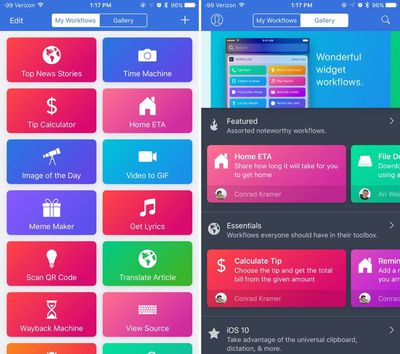
For those unfamiliar with Workflow, which is now owned by Apple, it's an automation tool that allows users to create a variety of workflows to automate tasks like creating GIFs from a series of photos, translating an article, posting photos to multiple social networks at once, calculating a tip, and tons more.

Following Apple's acquisition of Workflow, there was an update to remove certain features, including workflow functionality that involved Google Chrome, Pocket, LINE, Telegram, and Uber, likely for legal reasons.

Apple plans to keep Workflow available in the App Store, and it is now a free download. [Direct Link]


Top Rated Comments

OriginalAppleGuy Avatar
123 months ago
Jailbreak is your friend
No it's not. It may allow you to do more with the device, but it also opens it up to severe security concerns.
Score: 7 Votes (Like | Disagree)
jerry16 Avatar
123 months ago
So much potential with this app. Unfortunately, two of the immediate work flows I thought of in an effort to eliminate taps, can't be done.

* Turn on low power mode
* Close all open apps

I would hope that with the acquisition maybe a deeper integration w/ iOS would occur but I suppose if that were the case then Apple would just build these features right into iOS.

*and before anyone starts harping on me about why open apps don't matter, I don't care, I like them closed
Score: 7 Votes (Like | Disagree)
FloatingBones Avatar
123 months ago
Anyone got some good workflows to share?
Check out the archive at MacStories ('http://macstories.net'). Federico Viticci is one of the best sources anywhere on Workflow. There's more in the Club MacStories premium site, but plenty of free stuff too. And check out their Canvas podcast ('https://www.macstories.net/linked/canvas-episode-29-workflow-magic-variables/').
Score: 5 Votes (Like | Disagree)
123 months ago
Ok very nice on them.
Score: 5 Votes (Like | Disagree)
ErikGrim Avatar
123 months ago
This thread is strangely devoid of hate.
Score: 2 Votes (Like | Disagree)
123 months ago
I'd already read most of this and noted that it does not refer to the recent apps list at all. In fact it says that even a "terminated" app (how this is defined I am not sure) is woken and placed in the background if it needs to receive a location service. It says, "iOS supports the delivery of location events to apps that are suspended or no longer running." Even without being totally certain of the distinction between "terminated" and "no longer running" (if any), it's pretty clear that apps are allowed to process events when as far as the user knows the app is inactive. The user does have the option of disabling background event handling either specifically for an app or globally but I find nothing to suggest that they can do it any other way.
[doublepost=1491431713][/doublepost]

Apple doesn't make this as clear as they could to the user. This leads to a lot of speculation about how much control the user has over OS functions and how much they need to intervene to optimize performance. Apple's clear philosophy is "we took care of that, don't worry about it."
Right, with the user not allowing Background App refresh enabled for a particular app or in general then an app is only able to perform something if it's in foreground or background (suspended or not), but not if it's actually closed/terminated.

All this also only applies to this one particular location service aspect of it, while there are other ones related to VoIP, audio playback, and a few others that can allow apps to perform tasks in the background if they have been used at some point and are simply in background (suspended or otherwise), but not if they are completely closed (either haven't been launched or have been closed/terminated).

Basically that is to say that there are certainly circumstances where removing the app from the recent apps list to actually fully close/terminate it can have an effect of stopping it from doing something in the background which it otherwise might be doing.

"Note: If your app is terminated either by a user or by the system, the system doesn’t automatically restart your app when new location updates arrive. A user must explicitly relaunch your app before the delivery of location updates resumes. The only way to have your app relaunched automatically is to use region monitoring or the significant-change location service.

However, when a user disables the Background App Refresh setting either globally or specifically for your app, the system doesn’t relaunch your app for any location events, including significant-change or region monitoring events. Further, while Background App Refresh is off your app won’t receive significant-change or region monitoring events even when it's in the foreground. When a user reenables Background App Refresh for your app, Core Location restores all background services, including any previously registered regions."
Score: 1 Votes (Like | Disagree)

Popular Stories

iPhone Handoff iOS 27 Feature

T-Mobile to Charge $5 a Month for iOS 27 iPhone Handoff

Thursday September 10, 2026 3:58 pm PDT by
T-Mobile will charge customers $5 per month to use iPhone Handoff, an e-SIM feature that allows the same phone number to be used on two separate iPhones. iPhone Handoff requires carrier support, and at launch, only T-Mobile users in the U.S. and Deutsche Telekom users in Germany will be able to use it. T-Mobile says customers can use their number across two compatible iPhone models and...
iOS 27 Feature Dark

Apple Announces iOS 27 Release Date

Wednesday September 9, 2026 10:46 am PDT by
At its event today unveiling the iPhone 18 Pro, AirPods 5, Apple Watch Series 12, and more, Apple announced that iOS 27 will be released later this month. iOS 27 has already been available as a developer beta since June and as a public beta since July, and Apple today said that the update will be released for all users with a compatible iPhone model on Monday, September 14. iOS 27 is...
iphone duo

IMAX Reacts to iPhone Duo's 1:1.4 Aspect Ratio Displays

Friday September 11, 2026 4:42 am PDT by
Production theater company IMAX has responded in a mixed way to Apple's embrace of a 1:1.4 aspect ratio on the iPhone Duo's inner and outer displays. The boxier ratio happens to be very close to the classic "full-frame" IMAX 1.43:1 aspect ratio, which comes from the geometry of the company's original 15-perforation/70mm film system. In response to an X post from someone wondering if we'll see...









































