

Astropad today launched version 2.0 of its iPad app, which transforms a compatible iPad into a drawing tablet for a connected Mac. Once connected, Astropad mirrors the Mac's display onto the iPad to let users take advantage of the tablet's touch controls for drawing and editing photos in various Mac apps. The new update follows last year's introduction of support for the 12.9-inch iPad Pro and Apple Pencil.
Free for any existing Astropad user, version 2.0 of the app brings a "high-performance Liquid upgrade" to the connected drawing app in order to triple its performance speeds and "massively" reduce any pixelation. The rest of the update adds similar performance-enhancing features to Astropad, including improved image quality and latency, lessening the strain on the iPad's battery, and making the actual drawing performed within the app more naturalistic.
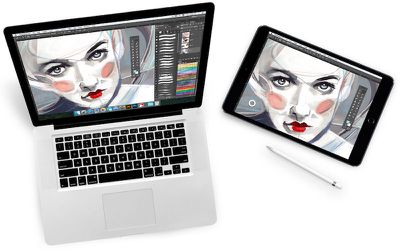
High-performance Liquid upgrade: Powered by Liquid core technology, now running three times faster with massively reduced pixelation
New Velocity control: Analyzes network conditions dozens of times per second to balance image quality and latency
Uses 3x less CPU and 4x less memory: Allows longer work sessions and extended battery life
Refined pressure curve: Hand-tuned by artists for a more natural drawing feel
Enhanced software compatibility: Supports panning and zooming gestures across more programs, including: Affinity Designer, Affinity Photo, Art Rage, Clip Studio Paint, Lightroom, Mischief, Autodesk Sketchbook
Hidden cursor: Settings option to auto-hide the cursor while drawing
Updated UI: Sleek new look and feel
Otherwise, Astropad retains its general, high-quality drawing performance, with touch feedback at 60fps "for super smooth drawing" that results in interesting, diverse pieces of art. Users can connect their iPad to a Mac both via Wi-Fi or USB, with equally solid results, although compatible iPad devices must be running iOS 8 or later, while any Mac with Mavericks or later is required to use Astropad.
For users who have yet to purchase, Astropad Drawing Tablet is available for $29.99 on the iOS App Store. [Direct Link]















































Top Rated Comments
I wonder if a USB 3 cable on a newer iPad would help?