Apple Releases WatchOS 2 With Native App Support, New Watch Faces, Nightstand Mode, and More - MacRumors
Skip to Content

Apple Releases WatchOS 2 With Native App Support, New Watch Faces, Nightstand Mode, and More

Apple today released watchOS 2 to the public, making the first major update to the watchOS software available to all Apple Watch owners. The update requires iOS 9 and can be downloaded over-the-air through the Apple Watch app on the iPhone by going to General --> Software Update.

watchOS 2 was originally scheduled to launch on Wednesday, September 16 alongside iOS 9, but Apple delayed the launch in order to address a major bug that was found shortly before the software was set to debut.

As the first significant update to watchOS, watchOS 2 introduces a lot of new features to the Apple Watch, mainly through new developer tools. watchOS 2 brings native apps that run on the watch itself instead of the iPhone, and it lets developers access several sensors and hardware features including the Taptic Engine, heart rate monitor, microphone, and accelerometer.
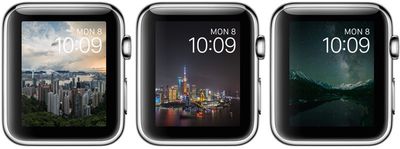
timelapsewatchfaces

The new time-lapse watch faces in watchOS 2

Along with these features for developers, which will lead to more complex and full-featured third-party apps that run much more smoothly, watchOS 2 also includes new watch faces (photo album and time-lapse), third-party Complications, a tweak that makes the screen stay on for up to 70 seconds when activated, and Activation Lock.

There's also a new Time Travel feature for viewing past and upcoming events in a watch face Complication, and a Nightstand mode that's activated when the watch is charging, displaying the time.
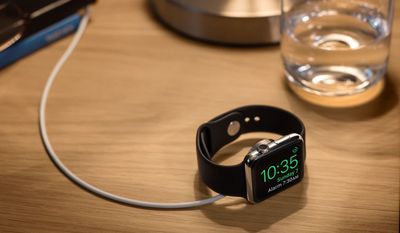
nightstandmode

Nightstand mode

More details on what's new in watchOS 2 can be found in our dedicated watchOS 2 roundup, which includes all of the features the update brings, big and small. Discussion on new features in watchOS 2 is also taking place in our dedicated Apple Watch forum, and we encourage all of our readers to join in with new discoveries and questions about the update.
Related Roundup: Apple Watch 11
Buyer's Guide: Apple Watch (Neutral)

Popular Stories

iPhone 18 Pro Deep Red Feature

iPhone 18 Pro Launching Later This Year With These 12 New Features

Wednesday March 18, 2026 7:39 am PDT by
While the iPhone 18 Pro and iPhone 18 Pro Max are not expected to launch for another six months or so, there are already plenty of rumors about the devices. It was initially reported that the iPhone 18 Pro models would have fully under-screen Face ID, with only a front camera visible in the top-left corner of the screen. However, the latest rumors indicate that only one Face ID component...
imac video apple feature

Apple Released Yet Another New Product Today

Friday March 20, 2026 2:39 pm PDT by
Apple has unveiled a whopping nine new products so far this March, including an iPhone 17e, iPad Air models with the M4 chip, MacBook Air models with the M5 chip, MacBook Pro models with M5 Pro and M5 Max chips, the all-new MacBook Neo, an updated Studio Display, a higher-end Studio Display XDR, AirPods Max 2, and now the Nike Powerbeats Pro 2. iPhone 17e features the same overall design as...
ios 26 4 yellow

Here Are Apple's Release Notes for iOS 26.4

Wednesday March 18, 2026 11:56 am PDT by
Apple provided developers and public beta testers with the release candidate versions of iOS 26.4 and iPadOS 26.4, which means we're going to see a public launch as soon as next week. The RC versions of the software include Apple's official release notes, giving us final details on what's included in the update. Apple Music - Playlist Playground (beta) generates a playlist from your...

Top Rated Comments

ghost187 Avatar
137 months ago
We took into careful consideration, the amount of time it took for the update to download, so our customers can fully appreciate their Apple Watch, and know what it is like to be without it. This sense of separation from something you hold so dear to your heart truly enhances ones ability to appreciate the very existence of that object. We worked very hard to calculate the exact time it took for a human being to feel separated from the Apple Watch and that's the reason why we unapologetically delayed the update. We have reduced the margin of error to plus or minus 50 milliseconds, to deliver the most memorable experience our customers can feel from updating their software.

Attachment Image
Score: 40 Votes (Like | Disagree)
137 months ago
Thats what I would have thought as well. My work connection is pretty fast. Just odd. Seems slow for only half a gig.
Agreed, I'm in the same boat. Maybe they're hosting the download on an Apple Watch.

Thank you, I'll be here all week.
Score: 10 Votes (Like | Disagree)
Rogifan Avatar
137 months ago
Good god there's people on Twitter complaining because the Watch needs to be on its charger in order to update. Seriously you can't wait until you get home to update? Sheesh.
Score: 9 Votes (Like | Disagree)
parseckadet Avatar
137 months ago
One gripe fest has ended. Let a whole new gripe fest begin.
Score: 8 Votes (Like | Disagree)
137 months ago
im curious how much battery improvement there will be over watchOS 1.0.1?

i have the 38 MM sport green watch band.
The green band means battery life goes down 29%.
Score: 7 Votes (Like | Disagree)
137 months ago
Well it took me under 1 hour give or take a few minutes using home wifi. Some of the directions I thought could have been better and wasted my time putting my watch on the charger when it needed to initially be on my hand. Appreciated the download progress bar but nothing to indicate anything was really happening with verify and install. The download for me was 15-17 minutes I think it said. Think the verify took 10 minutes or so but for me the install was in the area of 30 minutes or so. Like I said no indication it was even doing the install except for the text saying so. I guess I would say be patient.

I also think I could have cut down on my time by putting my watch charger, which was on a stand in the bathroom while doing the update in the adjoining bedroom, next to my phone. If you are reading the thread before downloading I'd say bring them all close together. You do need to have your watch charged to 50% at least to do the Install so take care of that first before the download. Once you start your install the Watch App software will say Do Not Restart Apple Watch or remove it from its charger.

When the install finished my Watch App/General/Software Update screen changed and said "watchOS 1.0.1 / Your software is up to date". Huh??? However I was able to check the Watch App About info to see that it was now listed as Version 2.0. That was confusing. At first I wasn't sure it actually installed the update since it had taken so long and didn't know if it crashed and just put up that screen.

My watch did require a passcode. At some point it put up the Apple logo with the circular ticks as it showed progress finalizing I guess. Then it went black and just put up the white apple logo. And then it completed and I'm off to explore my "new" watch. First checked settings in the Watch App on my phone. Some new ones to check off. I did add the 70 second watch face glance. It's not something that works when you just pick up your arm, you need to tap on the screen to wake it and get the 70 second screen.

Here's a few photos I grabbed as I was going through my install. Hopefully you all see the final apple logo and are good to go.

Then Verified then...

Huh? This screen gave me pause after I had been Installing for last half hour. It updated though. Just confusing screen.
Time to have fun!

BTW I heard about the release being out when I saw the News Alert on CNBC saying the Release was public now. I thought that was funny that a news channel was making that an Alert :p (Just think of the significance of that -- the power of Apple and the public I guess -- funny since the news channels have been saying the watch is a disappointment and flop too!) and when I went to General/Software Update it was still showing being current at 1.0.1. I went out of the settings area and went back a few minutes later and the update to 2.0 was then showing.

Attachment Image

Attachment Image

Attachment Image

Attachment Image

Attachment Image
Score: 5 Votes (Like | Disagree)