Skip to Content

iOS 8.1: 'Text Message Forwarding' Activation Requires iMessage Email Address

by

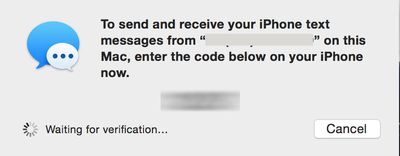
Earlier today, Apple released iOS 8.1 which introduced number of new features to iOS and Yosemite. One of the anticipated features was SMS Text Message Forwarding, which allows SMS messages received by your iPhone to be mirrored on your iPad or Mac running OS X Yosemite.
sms-forwarding
Several of our forum members had difficulty activating the feature, as the required activation code would never appear on their Macs or iPads.

MacRumors reader Michael wrote in with this solution which requires an email address to be activated in iMessage:

...you need to have your email address turned on for iMessage on your iPhone in order to enable Text Message Forwarding. If you don't, the numeric access code will not appear on your iPad or Mac during the setup process. As soon as you enable your email address for iMessage (you only need to do this on your iPhone) the numeric access codes appear as expected. Once you have text message forwarding setup you can disable your email address again in iMessage as it seems to only be necessary for the numeric access code setup step, not the actual text message forwarding itself.

MacRumors was able to verify this scenario and found that an email address does indeed have to be active on your iPhone for the activation message to properly be sent. In our testing, SMS messages were still received after the email address was removed from iMessage. The setting to add your email address to iMessage is under Settings -> Messages -> Send & Receive. Note, you may have to wait a few moments after adding an email address before the activation code will send.

Tag: iOS 8.1
Related Forum: iOS 8

Top Rated Comments

arn Avatar
148 months ago
Not sure why that would be a surprise to anyone. Your Messages account is tied to your Apple ID, which is your email address.

it doesn't entirely make sense. You are already logged into your iMessage account either way. This is just which phone numbers / email addresses you want to receive iMessages for.

arn
Score: 12 Votes (Like | Disagree)
rdlink Avatar
148 months ago
Not sure why that would be a surprise to anyone. Your Messages account is tied to your Apple ID, which is your email address.
Score: 5 Votes (Like | Disagree)
148 months ago
it just works
Score: 4 Votes (Like | Disagree)
Glassed Silver Avatar
148 months ago
I have a bunch of email addresses active in iMessages on iPhone, yet, no code.

*sigh*

(iPhone 5, iMac mid-11, iPad Air)

Glassed Silver:mac
Score: 4 Votes (Like | Disagree)
148 months ago
I think this article is inaccurate and it simply states a workaround that happens to work...

I had the same problem described in the article, and all I had to do was sign out of iMessages app on my iPhone and sign back in. After signing in, I still had a checkbox next to my phone number and I was able to receive the verification number on my Mac.
Score: 2 Votes (Like | Disagree)
148 months ago
Ok same issue seems to be under FaceTime settings too.

I only like to tick my mobile number under FaceTime not my email address as well.

When email address is not ticked, you cannot enable iPhone Mobile Calls. Keep getting error.

Anyone else?
Score: 2 Votes (Like | Disagree)

Popular Stories

macbook air blue

What's Coming in the M5 MacBook Air

Thursday February 26, 2026 3:57 pm PST by
Along with the low-cost MacBook, Apple could introduce a refreshed version of the MacBook Air next week. Most of the focus will be on the new machine, but the MacBook Air is expected to get some useful internal updates. M5 Chip The next-generation MacBook Air will adopt the M5 chip, which Apple already introduced in the iPad Pro and MacBook Pro models that came out last year. Apple's M5...
Apple Announces Special Event in New York Feature 1

Apple Teases 'A Big Week Ahead' With Announcements Starting Monday

Thursday February 26, 2026 6:06 am PST by
Apple CEO Tim Cook today teased "a big week ahead," with announcements starting Monday. His post included an #AppleLaunch hashtag with a colorful Apple logo, along with a short video that ultimately shows an Apple logo on the lid of a Mac. Apple is reportedly planning a three-day stretch of product announcements from Monday, March 2 through Wednesday, March 4, with up to five new products...
ipad mini 7 1

Could Apple's OLED iPad Mini Finally Be a Kindle Killer?

Friday February 27, 2026 12:08 pm PST by
With a similar screen size and easy, one-handed grip, the iPad mini has always been the Apple device that overlaps most with dedicated e-readers. Now, amid rumors pointing to an OLED display for the next generation, could the iPad mini finally replace devices such as the Kindle and Kobo? The shift from LCD to OLED could make the iPad mini far more appealing as a reading device. OLED panels...