Bug in iOS 8's 'Reset All Settings' Option Also Erases iCloud Drive Documents

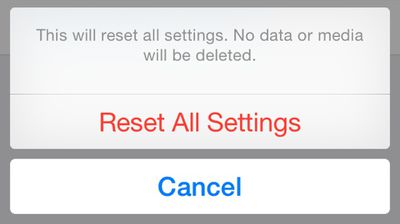
It appears that there may be a serious bug with the "Reset All Settings" option in iOS 8, causing users who activate the feature to lose all of their iWork documents stored in iCloud Drive. According to multiple posters on the MacRumors forums, using the "Reset All Settings" option under General --> Reset has caused documents to be permanently deleted from iCloud Drive.
resetallsettings

Because iOS 8 was so sluggish on my iPad 3 I reset all settings (No data or media will be deleted) and sped it up BUT deleted my iWork data! Then promptly synced and deleted it in iCloud.I have public beta of Yosemite so can't roll back via time machine. I have no pre iOS 8 backups in iTunes or iCloud to revert to (well iCloud device backups don't contain cloud documents and I should have iOS 7 backups in iTunes but can't find any. iCloud has no trash like dropbox. They seem gone forever.

The "Reset All Settings" option explicitly says that "No data or media will be deleted," and it is meant to reset all user preferences to the default out-of-the-box settings. That the option is deleting iCloud Drive documents appears to be a serious bug, though it may be limited to Apple's own iWork apps like Pages, Keynote, and Numbers. One user had all of his iWork documents wiped by using "Reset All Settings," while other app information remained in iCloud.

In our own testing, using "Reset All Settings" deleted all iWork documents stored in iCloud Drive on the iPhone and on iCloud.com. After allowing time for syncing to a Mac running OS X Yosemite, all of the documents disappeared from that machine as well. Preview and TextEdit documents, which cannot be accessed on the iPhone, remained untouched on the Mac.

There appears to be no simple way to recover iCloud Drive documents that have been erased by "Reset All Settings" in Yosemite, and several people who have been affected by the bug are now in contact with Apple support in an effort to retrieve their documents. A Mavericks user was, however, able to recover his files from a backup folder, and OS X Yosemite users may also have luck with recovering files via Time Machine.

One user said that Apple was waiting on engineers to investigate the issue, while another said his account had been placed in troubleshooting mode to attempt to recover the data.

Introduced with iOS 8 and OS X Yosemite, iCloud Drive is Apple's answer to cloud-based storage services like Dropbox. iCloud Drive allows users to store a variety of documents like spreadsheets, PDFs, images, and more, accessing them on any device. Currently OS X Mavericks users can access iCloud Drive documents via iCloud.com, but iCloud Drive will be fully functional in October, after OS X Yosemite is released.

Users who have iCloud Drive enabled may want to refrain from using the "Reset All Settings" option on their devices for the time being, in order to avoid accidentally erasing important documents stored in iCloud Drive.

Related Forum: iOS 8

Popular Stories

airpods pro 3 purple

New, Higher End AirPods Pro Coming This Year

Tuesday January 20, 2026 9:05 am PST by
Apple is planning to debut a high-end secondary version of AirPods Pro 3 this year, sitting in the lineup alongside the current model, reports suggest. Back in September 2025, supply chain analyst Ming-Chi Kuo reported that Apple is planning to introduce a successor to the AirPods Pro 3 in 2026. This would be somewhat unusual since Apple normally waits around three years to make major...
smaller dynamic island iphone 18 pro Filip Vabrous%CC%8Cek

iPhone 18 Pro Leak: Smaller Dynamic Island, No Top-Left Camera Cutout

Tuesday January 20, 2026 2:34 am PST by
Over the last few months, rumors around the iPhone 18 Pro's front-panel design have been conflicted, with some supply-chain leaks pointing to under-display Face ID, reports suggesting a top-left hole-punch camera, and debate over whether the familiar Dynamic Island will shrink, shift, or disappear entirely. Today, Weibo-based leaker Instant Digital shared new details that appear to clarify the ...
iOS 27 Mock Quick

iOS 27 Will Add These 8 New Features to Your iPhone

Sunday January 18, 2026 3:51 pm PST by
iOS 27 is still many months away, but there are already plenty of rumors about new features that will be included in the software update. The first beta of iOS 27 will be released during WWDC 2026 in June, and the update should be released to all users with a compatible iPhone in September. Bloomberg's Mark Gurman said that iOS 27 will be similar to Mac OS X Snow Leopard, in the sense...
14 inch MacBook Pro Keyboard

MacBook Pro Buyers Now Facing Up to a Two-Month Wait Ahead of New Models

Sunday January 18, 2026 6:50 pm PST by
MacBook Pro availability is tightening on Apple's online store, with select configurations facing up to a two-month delivery timeframe in the United States. A few 14-inch and 16-inch MacBook Pro configurations with an M4 Pro chip are not facing any shipping delay, but estimated delivery dates for many configurations with an M4 Max chip range from February 6 to February 24 or even later. At...
Apple Logo Spotlight

Apple Expected to Unveil Five All-New Products This Year

Wednesday January 21, 2026 10:54 am PST by
In addition to updating many of its existing products, Apple is expected to unveil five all-new products this year, including a smart home hub, a Face ID doorbell, a MacBook with an A18 Pro chip, a foldable iPhone, and augmented reality glasses. Below, we have recapped rumored features for each product. Smart Home Hub Apple home hub (concept) Apple's long-rumored smart home hub should...

Top Rated Comments

MacLawyer Avatar
148 months ago
Quality Control???

What's going on with Apple lately?
Score: 100 Votes (Like | Disagree)
Medic311 Avatar
148 months ago
Wow, iOS 8 just keeps getting worse and worse
Score: 71 Votes (Like | Disagree)
jrath1 Avatar
148 months ago
Your erasing it wrong
Score: 54 Votes (Like | Disagree)
Orlandoech Avatar
148 months ago
Lovely, just lovely.

I would be screwed if I didn't read these forums so frequently.
Score: 49 Votes (Like | Disagree)
Orlandoech Avatar
148 months ago
Your deleting it wrong

It's "you're" for "you are" not "your" for being possessive.
Score: 45 Votes (Like | Disagree)
FSMBP Avatar
148 months ago
What the hell happened to waiting to release stuff because "Details matter"? I know Apple wasn't perfect under Jobs but it wasn't this bad. The company seems too lax.
Score: 43 Votes (Like | Disagree)