Adobe Unveils Photoshop and Premiere Elements 13 for Mac

Adobe today released new versions of Photoshop Elements and Premiere Elements, its lower-cost photo and video editing software aimed at consumers. Both Photoshop Elements 13 and Premiere Elements 13 have gained several new features, focusing on improved editing tools, additional guided techniques, and Elements Live, a new portal that offers tips and tricks directly within each app.

"Our customers don't always have the time or the know-how to get the results they desire," said Shanmugh Natarajan, senior director, engineering, core technologies and products at Adobe. "In Photoshop Elements 13 and Premiere Elements 13, we focused on developing tools that automate the process or guide customers through the steps to create the photos they'll love and want to share."

Photoshop Elements 13, Adobe's image editing software, includes updates that Adobe says were inspired by customer request. One of the main new features is the Photomerge Compose tool, which is used alongside the Refine Selection Brush to allow users to seamlessly copy people or objects from one image to another with just a few clicks.

There are new tools to create matching Facebook cover and profile photos, customizable with text and graphics, plus there are new guided edits available for creating black and white photos with hits of color. Guided edits are Adobe's interactive tutorials, which offer step-by-step instructions on completing various tasks in app.

photoshop13facebooktool
Photoshop Elements 13 also gains new Effects Variations, offering extra options for each existing effect to give users up to 50 filters that can be applied with a click, and there are impressive new cropping tools that include crop suggestions. The Intelligent Crop Suggestions tool analyzes faces and photo composition to select the four best crops for a particular image.
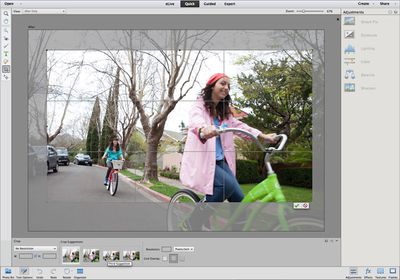
photoshop13cropsuggestions
Premiere Elements 13, Adobe's video editing software, introduces new tools to minimize the time that users spend editing their footage. Favorite Moments can be used to mark the best spots in a video, which can then be automatically assembled into a short movie, and Video Story assembles various clips, adds in transitions, music, and applies a theme for a particular occasion like a birthday party. Simple themed slideshows can also be created.
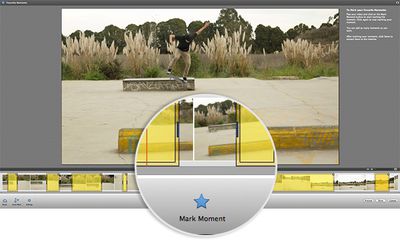
premiere13moments
Premiere Elements 13 offers improved shake stabilization to improve the look of videos shot with hand-held devices like smartphones, and there are new Guided Edits to help users add motion to movie titles and improve dramatic effects in one area of a scene using masking techniques.

Elements Live, available in both Photoshop and Premiere 13, includes content curated by Adobe, tips, tricks, and tutorials. It also lets users see what other people are using the software to create.

elementslive
Both Photoshop Elements 13 and Premiere Elements 13 for Mac and Windows can be purchased separately on Adobe's website for $99.99 each, with bundles available for $149.99. Existing users can upgrade for $79.99 or $119.99 for the bundle.

Popular Stories

Touchscreen MacBook Feature

Apple Is Expected to Launch These Four MacBooks in 2026

Friday January 9, 2026 8:17 am PST by
2026 could be a bumper year for Apple's Mac lineup, with the company expected to announce as many as four separate MacBook launches. Rumors suggest Apple will court both ends of the consumer spectrum, with more affordable options for students and feature-rich premium lines for users that seek the highest specifications from a laptop. Below is a breakdown of what we're expecting over the next ...
iPhone Top Left Hole Punch Face ID Feature Purple

10 Reasons to Wait for This Year's iPhone 18 Pro

Thursday January 8, 2026 2:56 am PST by
Apple's iPhone development roadmap runs several years into the future and the company is continually working with suppliers on several successive iPhone models at the same time, which is why we often get rumored features months ahead of launch. The iPhone 18 series is no different, and we already have a good idea of what to expect for the iPhone 18 Pro and iPhone 18 Pro Max. One thing worth...
proposed unicode emoji 18%402x

Squinting Face, Pickle, and Lighthouse Among New Emoji Coming to iOS

Friday January 9, 2026 4:24 am PST by
The Unicode Consortium has published a draft list of emoji that could come to smartphones and other devices in the future. The list shared by Emojipedia outlines 19 emoji candidates under consideration for Emoji 18.0, which is expected to be finalized in September 2026. Among the proposed additions are a squinting face emoji, left- and right-pointing thumb gestures, a pickle, a lighthouse, a ...
apple homekit ios 18 5

Apple Reminding Users of Pending Home App Upgrade Requirement

Friday January 9, 2026 10:08 am PST by
Back in late 2022 and early 2023, Apple rolled out a new architecture for its Apple Home platform to deliver improved performance and compatibility, although the rollout came with some hiccups that forced Apple to pull and later re-release the upgrade. Three years later, Apple is now on the verge of ending support for the old version of the Home architecture, which may result in access to...
grok logo purple gradient

U.S. Senators Ask Apple and Google to Remove X and Grok Apps Over Sexualized Image Generation

Friday January 9, 2026 9:43 am PST by
In a letter to Apple CEO Tim Cook and Google CEO Sundar Pichai, U.S. Senators Ron Wyden, Ben Ray Lujan, and Edward Markey have requested that Apple and Google remove X Corp's X and Grok apps from their app stores over recent incidents of "mass generation of nonconsensual sexualized images of women and children." X has come under fire over the past week amid reports of Grok's AI image...
iOS 26 Glass Feature

iOS 26 Shows Unusually Slow Adoption Months After Release

Thursday January 8, 2026 3:44 pm PST by
iOS 26 is showing unusually slow adoption among iPhone users months after release, according to third-party analytics. Usage data published by StatCounter (via Cult of Mac) for January 2026 indicates that only around 15 to 16% of active iPhones worldwide are running any version of iOS 26. The breakdown shows iOS 26.1 accounting for approximately 10.6% of devices, iOS 26.2 for about 4.6%, and ...
iphone fold text

iPhone Fold to Pave Way for Thinner, Brighter Display on iPhone Air 2

Friday January 9, 2026 3:37 am PST by
The iPhone Fold will be the first Apple device to adopt a Samsung-made OLED technology called CoE (Color Filter on Encapsulation), which could make the display brighter and thinner than previous panels, reports The Elec. In a traditional OLED panel, a polarizing film sits above the display to cut reflections and improve contrast. The drawback is that this film also absorbs some of the OLED's ...

Top Rated Comments

benface Avatar
148 months ago
Still no perpetual license and pay a monthly Adobe tax? Huge pass!
What are you talking about? The software is $99.99 to buy, you just pay once...
Score: 13 Votes (Like | Disagree)
theheadguy Avatar
148 months ago
Still no perpetual license and pay a monthly Adobe tax? Huge pass!
R*T*F*A.

Both Photoshop Elements 13 and Premiere Elements 13 for Mac and Windows can be purchased separately on Adobe's website for $99.99 each, with bundles available for $149.99. Existing users can upgrade for $79.99 or $119.99 for the bundle.

Score: 12 Votes (Like | Disagree)
Paradoxally Avatar
148 months ago
I much prefer Pixelmator on Mac. Low price point and does everything an amateur/semi-pro Photoshop user needs. Plus the UI looks better.
Score: 11 Votes (Like | Disagree)
jkool Avatar
148 months ago
Shove it Adobe.

Sincerely, a former 20 year customer.
Score: 6 Votes (Like | Disagree)
xmichaelp Avatar
148 months ago
Still no perpetual license and pay a monthly Adobe tax? Huge pass!

Many you should actually read the article next time?
Score: 6 Votes (Like | Disagree)
Parasprite Avatar
148 months ago
I much prefer Pixelmator on Mac. Low price point and does everything an amateur/semi-pro Photoshop user needs. Plus the UI looks better.

Just the opposite for me. I own Pixelmator, but I find the black UI very difficult with which to work. So, I still do almost everything on Photoshop CS3.

In any case, it's nice to see that Adobe is still actually selling software, and not everything is subscription-based.

I love Pixelmator, but they definitely have some odd choices in UI.

Still not nearly as user unfriendly as GIMP though.
Score: 5 Votes (Like | Disagree)