

The upcoming USB 3.1 specification, an update to USB 3.0 that provides a throughput of up to 10 Gbit/s, also includes a new "Type C" connector, which is reversible much like Apple's Lightning cable.
Announced in December [PDF], the reversible design was said to be smaller in size, similar to existing Micro USB plugs. While no cables are available yet, the USB Implementers Forum (via CNET) has released renderings showing what the cable might look like.
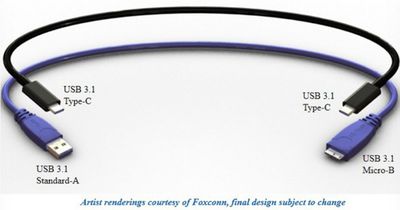
The reversible design, which looks a lot like a Lightning cable, aims to replace USB and Micro USB with one cable that can be used from either direction. The USB prong is 8.3 x 2.5mm, which is much smaller than standard USB ports but larger than Micro USB.
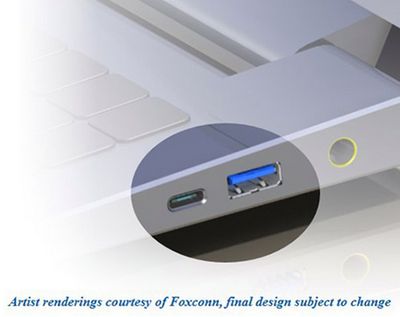
At the current point in time, the cable's design has yet to be finalized, which means a final product could look somewhat different. The specification is expected to be finished in July of 2014.

















































Top Rated Comments
As much as people rail on Apple for using a non-standard port and cable, it took Apple to show everyone what we've been missing all along. And soon we will all benefit with better USB cables.
Edit: Note that this is opposite of the Lightning connector, where the male connector sits inside the socket. That design will mean a lot of sockets inside expensive electronics will what breaks, instead of the connector on a cheap cable. These USB guys really couldn't be more daft...
We need more standards to standardize the existing standards. Has anyone standardized the process of standardizing standards? I love new standards.
Apple is the catalyst of change (or guenie pig) in the tech industry. Most companies don't have the gut to make drastic changes unless Apple does it first. This is not all the times, but most of the time.
This is why I'm not a fan of those short sighted exec sitting in their corner office blocking tech progression.
The lightning connector is just the physical interface. The reason why you are seeing USB 2.0 speed when syncing is because the devices have USB 2.0 chipsets in them.
This is just like a USB connector which can carry USB 1.1, 2.0, or 3.0. It's not the connector, it's the chipset in the device.
It's the little things. This will sound ridiculous to anyone who doesn't use it, but to anyone who does use it, they will know what I'm saying. It's really a genuine pleasure to use. The reversible aspect is a large part of it, but there's more:
1) There's also a nice snap to it as it goes in that gives you confidence it's in all the way and secure. USB connectors just sort of slide in and have the same amount of friction whether its barely in or all the way.
2) It's easy to plug in. USB, even if you have it the right way up, doesn't naturally align. How many times have I tried to plug it in, assumed it was upside down, flipped it over and tried to plug it in again, assumed it was upside down THIS TIME, and flipped it over AGAIN, and finally it goes in.
3) It's smaller than it's predecessor. Micro USB got BIGGER going to USB 3, AND more finicky to insert. Seriously???
4) Lightning is solid. Micro USB has a reputation for being fragile and cellphone repair shops say it is the most commonly broken part they fix.
5) All my Apple devices use the same connector. My USB devices, which are "standard", use USB 2.0, Micro USB, Micro USB 3.0, and Mini USB. Four different cables for USB, and soon to be five when this one comes out.