

Night Sky 2 Launches with High Quality Imagery, Original Artwork, and Community Feature - MacRumors
Skip to Content

Night Sky 2 Launches with High Quality Imagery, Original Artwork, and Community Feature

by

The follow-up to the popular stargazing app The Night Sky has launched today, introducing a number of new features. As with the original app, Night Sky 2 allows users to view the sky above them on an iPad or an iPhone to identify nearby celestial bodies.

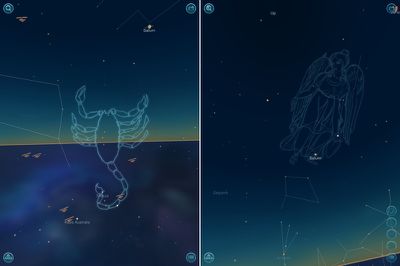
The revamped app offers a redesigned sky view that includes both higher quality imagery and original artwork constellations, along with a browse and search feature that was absent from the previous version. It also includes detailed information on both the sky and the weather.
nightsky21
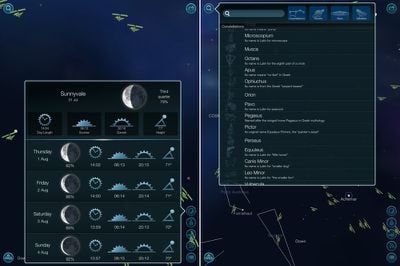
With search, users can type in the name of any satellite, star, planet, or constellation to view it within the app. Constellations have been improved and instead of showing just a general outline, full but non-intrusive artwork depicting the constellation is displayed.

Sky Info, accessible from the app’s many buttons, provides a look at moon phases, sun rise and sun set times, daylight duration, and sun elevation. A similar mode, Stargazing Weather, offers information on cloud cover, temperature, wind speeds, and visibility, with an overall view indicating whether or not the local sky is visible.
nightsky22
Night Sky 2 includes an optional community mode, which requires a monthly membership fee priced between $2.99 for a month and $20.99 for two years. The community is designed to allow users to share stargazing sites around the world with one another. The app also features smoother sky tracking, detailed information on celestial bodies, and sharing tools.

Night Sky 2 is a universal app that can be purchased from the App Store for $0.99. [Direct Link]

Top Rated Comments

ThatsMrsGeek2U Avatar
169 months ago
worst thing about this app is that it is 99¢

its a perfect example of a app that is way better than that, deserves more and sets a bad precedent.

really is a nice app
Score: 5 Votes (Like | Disagree)
169 months ago
Star Walk is an order of magnitude better. Smoother scrolling by far, better graphics by far, better UI, nicer icon, the original app (released the previous year), etc. Night Sky feels like a bad ripoff of Star Walk. Seriously.

I personally think Star Walk is overrated. I don't like how the you can't fade the Milky Way at all. And the sky is not realistic looking. The two I use are SkySafari Plus and Sky Guide. For 99 cents I think I will give Night Sky a try as well.
Score: 1 Votes (Like | Disagree)
169 months ago
Star Walk is an order of magnitude better. Smoother scrolling by far, better graphics by far, better UI, nicer icon, the original app (released the previous year), etc. Night Sky feels like a bad ripoff of Star Walk. Seriously.

Even this new version?
Score: 1 Votes (Like | Disagree)

Popular Stories

iphone 16 teal

'Siri AI' Lawsuit Update: Apple to Pay Owners of These iPhone Models

Thursday July 9, 2026 7:08 am PDT by
In May, Apple agreed to pay $250 million to settle a U.S. class action lawsuit over Siri AI's delayed launch, and eligible iPhone users could receive up to a $95 payout. This week, the California court overseeing the case held a hearing regarding preliminary approval of the settlement, but the judge has not yet issued a ruling. It will likely be at least a few more months before eligible...
Apple TV Thumb 3

Everything Coming in the 2026 Apple TV 4K

Wednesday July 8, 2026 4:51 pm PDT by
The Apple TV 4K hasn't been updated since 2022, and it's due for a refresh. An update is planned for 2026, but Apple is likely going to wait to launch it after Siri AI launches in iOS 27. Design Apple TV design updates don't happen often, and that's not changing. The next Apple TV is going to have the same squircle shape as the current model, and it'll continue to be made from a black...
apple wallet drivers license feature iPhone 15 pro

Apple Says iPhone Driver's Licenses Will Expand to These 6 U.S. States

Thursday July 9, 2026 7:29 am PDT by
In select U.S. states, residents can add their driver's license or state ID to the Apple Wallet app on the iPhone and Apple Watch, and then use it to display proof of identity or age at select airports and businesses, and in select apps. To set up the feature, open the Wallet app on the iPhone and tap on the plus sign in the top-right corner. Next, tap on Driver's License and ID Cards,...















