Now that the iPhone 5 has reached the hands of possibly millions of new customers, there are reports that some customers are having a problem with the iPhone 5's Wi-Fi connectivity.
A thread titled Painfully Slow WiFi on new iPhone 5 on our own forums details some of the problems that have been seen by some customers. Byran85 writes:
I just got done setting up my iPhone 5 (as new, not restore). I was trying to download my music from iTunes when it seemed to be taking forever. I cancelled the downloads and then kept testing the WiFi in various other ways. Just loading the app store, my iPhone 4 will load anything faster than my iPhone 5 right now. I've rebooted the router and tried multiple devices and have narrowed the problem down to the WiFi in the iPhone 5. I've also tried using different bands, 2.4 and 5 both produce the same outcome. I launched speedtest.net app about 2 minutes ago and hit begin test. Its still "finding the closest server". I have also tried the reset network settings. Still the same issue.
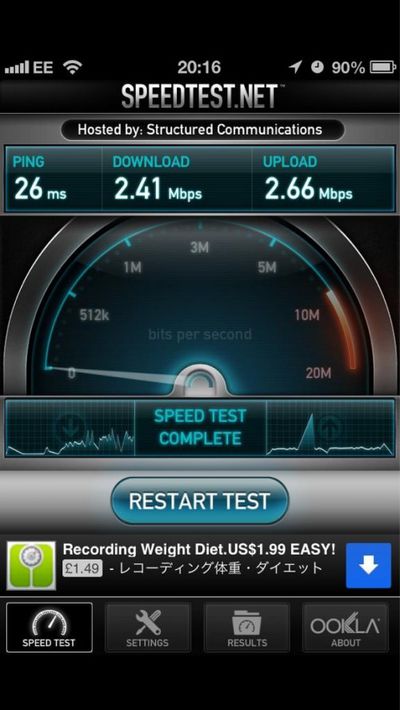
The rest of the thread shows others with the same type of problem (slow to no connectivity), while others report simply slower-than-normal connectivity. The image on the right was posted by @I_Am_Lucas showing ~2.5Mbps (~300K/s) on his Wi-Fi network. Others have even reported speeds down to 0.5Mbps (~62K/s).
Some users have been able to isolate their problem to when connecting to WPA2 encrypted Wi-Fi routers, and found that moving to (the much less secure) WEP encryption or being unprotected can resolve the issue. Since Apple Retail Stores have unprotected Wi-Fi, the issue may not show up at all in-store. Some have reported success with iPhone 5 hardware replacements from Apple, but several users have reported no success after getting a replacement unit. It should be noted that there may be multiple Wi-Fi related issues that could be affecting users. A lengthy thread in Apple's own discussion forum also reflects the same issues amongst many customers.
One Apple forum poster received confirmation from AppleCare that Apple seems to be aware of the issue, but a resolution is not yet available:
Just spoke with iPhone AppleCare and they are definitely aware of the problem and Apple engineers are working on it. I asked if it was hardware or software related and she said the WPA2 issue seems to be software based and the non-connecting issue may be hardware based, but that they are still trying to identify the cause.
According to the AppleCare representative, they are still working on the issue. The issue seems to affect a small minority of iPhone 5 owners.

Thursday December 11, 2025 8:49 am PST by Joe Rossignol
Apple seeded the second iOS 26.2 Release Candidate to developers earlier this week, meaning the update will be released to the general public very soon.
Apple confirmed iOS 26.2 would be released in December, but it did not provide a specific date. We expect the update to be released by early next week.
iOS 26.2 includes a handful of new features and changes on the iPhone, such as a new...
Friday December 12, 2025 10:56 am PST by Joe Rossignol
Macworld's Filipe Espósito today revealed a handful of features that Apple is allegedly planning for iOS 26.4, iOS 27, and even iOS 28.
The report said the features are referenced within the code for a leaked internal build of iOS 26 that is not meant to be seen by the public. However, it appears that Espósito and/or his sources managed to gain access to it, providing us with a sneak peek...
Friday December 12, 2025 10:10 am PST by Juli Clover
Apple today released iOS 26.2, the second major update to the iOS 26 operating system that came out in September, iOS 26.2 comes a little over a month after iOS 26.1 launched. iOS 26.2 is compatible with the iPhone 11 series and later, as well as the second-generation iPhone SE.
The new software can be downloaded on eligible iPhones over-the-air by going to Settings >...
Thursday December 11, 2025 11:28 am PST by Juli Clover
Apple today released new firmware designed for the AirPods Pro 3 and the prior-generation AirPods Pro 2. The AirPods Pro 3 firmware is 8B30, up from 8B25, while the AirPods Pro 2 firmware is 8B28, up from 8B21.
There's no word on what's include in the updated firmware, but the AirPods Pro 2 and AirPods Pro 3 are getting expanded support for Live Translation in the European Union in iOS...
Friday December 12, 2025 10:08 am PST by Juli Clover
Apple today released macOS Tahoe 26.2, the second major update to the macOS Tahoe operating system that came out in September. macOS Tahoe 26.2 comes five weeks after Apple released macOS Tahoe 26.1.
Mac users can download the macOS Tahoe update by using the Software Update section of System Settings.
macOS Tahoe 26.2 includes Edge Light, a feature that illuminates your face with soft...
Thursday December 11, 2025 10:31 am PST by Juli Clover
The AirTag 2 will include a handful of new features that will improve tracking capabilities, according to a new report from Macworld. The site says that it was able to access an internal build of iOS 26, which includes references to multiple unreleased products.
Here's what's supposedly coming:
An improved pairing process, though no details were provided. AirTag pairing is already...
Friday December 12, 2025 10:09 am PST by Juli Clover
Apple today released iPadOS 26.2, the second major update to the iPadOS 26 operating system released in September. iPadOS 26.2 comes a month after iPadOS 26.1.
The new software can be downloaded on eligible iPads over-the-air by going to Settings > General > Software Update.
iPadOS 26.2 continues with the multitasking improvements that were added with iPadOS 26.1. You can now drag and...
Friday December 12, 2025 11:11 am PST by Juli Clover
Apple today released iOS 26.2, iPadOS 26.2, and macOS 26.2, all of which introduce new features, bug fixes, and security improvements. Apple says that the updates address over 20 vulnerabilities, including two bugs that are known to have been actively exploited.
There are a pair of WebKit vulnerabilities that could allow maliciously crafted web content to execute code or cause memory...
The problem with using sites like Speedtest.com for this testing is that it is highly dependent on the customer's ISP and access points which have little to NOTHING to do with the iPhone 5.
A lot of the reports are from head-to-head comparisons of an iPhone 4S vs iPhone 5 on the same network.
Total BS I have iPhone 5 my wifi works absolutely fine, some people like to rain on everyone's parade. This is the best smartphone out there, some people just want to see it fail.
Written on my iPhone 5.
Dude this is the most ignorant thing to say. Just because it's a Apple product does not make it bulletproof. I had this problem as well but I did a factory restore without iCloud and I'm working fine. Hopefully it's a software problem that can be fixed pretty quickly. Just because your not having the issue does not mean other people are crazy, lying or out to destroy Apples image.
You my friend have a lot of growing up to do.
The problem with using sites like Speedtest.com for this testing is that it is highly dependent on the customer's ISP which has NOTHING to do with the iPhone 5.
If you use it on your other devices and it works fine, and then it doesn't work on your iPhone 5 using the same server, then it is very clearly a problem with the iPhone 5's connection and not your internet connection in general.
OT: Hopefully this problem is not based in the hardware. Seeing as the reports indicate that it may be a WEP2-specific problem, it seems to be software-related and can hopefully be fixed by an update from Apple.