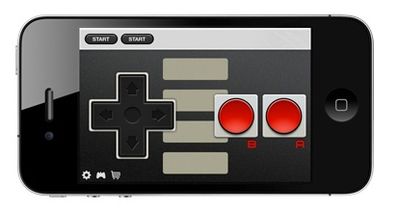
Need a controller for your Mac or iOS-based game, but don't have a physical controller handy? Pull out your iPhone and install Joypad.

The app turns your iPhone or iPod touch into a wireless virtual controller with a configurable set of buttons. It syncs up to a desktop client and remaps the buttons on the Joypad to keyboard buttons on your desktop. It's very clever, and is a free download.
joypadnes
Taking the app to the next level, the two-man development team, Zell Interactive, offers several sets of skins to give Joypad that retro feel, including classic NES and Super Nintendo controllers. Sounds perfect for some MAME-emulation, doesn't it?

Finally, the makers of Joypad have developed an iOS SDK to allow other developers to incorporate Joypad support into their games. Similar to how the Scrabble iPad game lets users store their tiles on their iPhone to hide them from other players, JoyPad let's you control a game on your iPad from your iPhone. It works via Bluetooth and it's awesome:


The app itself is free, with 8 skins available individually for $0.99 or all together for a discounted price.


Top Rated Comments

WiiDSmoker Avatar
189 months ago
Except you have ZERO tactile feedback.
Score: 3 Votes (Like | Disagree)
Boardumb Avatar
189 months ago
Most pointless app ever? Oh yes, a joypad needs the tactile feedback, without it you'll keep looking at your iphone and not the monitor!

This is true for some games, but for others it's really not an issue. The movement controls with a d-pad or analog stick don't really need to be constantly monitored, and if you don't need to use a ton of buttons at once then they are large enough that you don't really need to keep your eyes on those either. More complex button setups or games where you need to push multiple buttons at the same time can be difficult to play though, but for the most part it works pretty well.

What I think is really cool is the mouse integration for playing desktop games. It lets you control the mouse cursor using the accelerometer, and click the mouse using the screen. It works really well and is totally handy if you travel and play games on a laptop a lot. Here's a vid of Minecraft being played with a Joypad:


The one thing the iPod/iPhone is no good at - controllers!
Wouldn't this also have latency issues, since your iPod has to communicate with the router and then to your computer. I can't imagine that being snappy!

If you're on a busy WiFi network then yeah it can have some lag problems. If it's not too crowded though it works really well. Also you can connect via Bluetooth now which eliminates the need for using a WiFi network at all.


So yeah, I'm definitely an advocate of the Joypad, but that's because I've used it quite a lot and think it works really well. Plus I see a ton of potential with the availability of an SDK for integrating easy Joypad support into games. But really, don't take my word for it, just try it yourself! It's free to download the app and desktop client, and it's pretty easy to get it set up and running. You may find it's actually a pretty handy thing to have around if you are out and about and feel like gaming and aren't equipped with a proper Bluetooth controller.

Here's the original article I did about this on TouchArcade: http://toucharcade.com/2011/06/13/wwdc-2011-joypad-game-controller/
Score: 1 Votes (Like | Disagree)
b0r1s Avatar
189 months ago
Most pointless app ever? Oh yes, a joypad needs the tactile feedback, without it you'll keep looking at your iphone and not the monitor!
Score: 1 Votes (Like | Disagree)
RickyB Avatar
189 months ago
Well I, for one, think it's a good idea.
Score: 0 Votes (Like | Disagree)
Cheerwino Avatar
189 months ago
MacRumors! Your message here!
Score: 0 Votes (Like | Disagree)
LastLine Avatar
189 months ago
Yesterday dominoes, today this...what's tomorrow? ;-)
Score: 0 Votes (Like | Disagree)

Popular Stories

iOS 26

iOS 26.4 and iOS 27 Features Revealed in New Leak

Friday December 12, 2025 10:56 am PST by
Macworld's Filipe Espósito today revealed a handful of features that Apple is allegedly planning for iOS 26.4, iOS 27, and even iOS 28. The report said the features are referenced within the code for a leaked internal build of iOS 26 that is not meant to be seen by the public. However, it appears that Espósito and/or his sources managed to gain access to it, providing us with a sneak peek...
iOS 26

iOS 26.2 Coming Soon With These 8 New Features on Your iPhone

Thursday December 11, 2025 8:49 am PST by
Apple seeded the second iOS 26.2 Release Candidate to developers earlier this week, meaning the update will be released to the general public very soon. Apple confirmed iOS 26.2 would be released in December, but it did not provide a specific date. We expect the update to be released by early next week. iOS 26.2 includes a handful of new features and changes on the iPhone, such as a new...
iOS 26

Apple Releases iOS 26.2 With Alarms for Reminders, Lock Screen Changes, Enhanced Safety Alerts and More

Friday December 12, 2025 10:10 am PST by
Apple today released iOS 26.2, the second major update to the iOS 26 operating system that came out in September, iOS 26.2 comes a little over a month after iOS 26.1 launched. ‌iOS 26‌.2 is compatible with the ‌iPhone‌ 11 series and later, as well as the second-generation ‌iPhone‌ SE. The new software can be downloaded on eligible iPhones over-the-air by going to Settings >...
AirPods Pro Firmware Feature

Apple Releases New Firmware for AirPods Pro 2 and AirPods Pro 3

Thursday December 11, 2025 11:28 am PST by
Apple today released new firmware designed for the AirPods Pro 3 and the prior-generation AirPods Pro 2. The AirPods Pro 3 firmware is 8B30, up from 8B25, while the AirPods Pro 2 firmware is 8B28, up from 8B21. There's no word on what's include in the updated firmware, but the AirPods Pro 2 and AirPods Pro 3 are getting expanded support for Live Translation in the European Union in iOS...
macOS Tahoe 26 Thumb

Apple Releases macOS Tahoe 26.2 With Edge Light

Friday December 12, 2025 10:08 am PST by
Apple today released macOS Tahoe 26.2, the second major update to the macOS Tahoe operating system that came out in September. macOS Tahoe 26.2 comes five weeks after Apple released macOS Tahoe 26.1. Mac users can download the macOS Tahoe update by using the Software Update section of System Settings. macOS Tahoe 26.2 includes Edge Light, a feature that illuminates your face with soft...
AirTag 2 Mock Feature

Apple AirTag 2: Four New Features Found in iOS 26 Code

Thursday December 11, 2025 10:31 am PST by
The AirTag 2 will include a handful of new features that will improve tracking capabilities, according to a new report from Macworld. The site says that it was able to access an internal build of iOS 26, which includes references to multiple unreleased products. Here's what's supposedly coming: An improved pairing process, though no details were provided. AirTag pairing is already...
ipados 26 1 slide over

Apple Releases iPadOS 26.2 With Multitasking Improvements

Friday December 12, 2025 10:09 am PST by
Apple today released iPadOS 26.2, the second major update to the iPadOS 26 operating system released in September. iPadOS 26.2 comes a month after iPadOS 26.1. The new software can be downloaded on eligible iPads over-the-air by going to Settings > General > Software Update. iPadOS 26.2 continues with the multitasking improvements that were added with iPadOS 26.1. You can now drag and...
bug security vulnerability issue fix larry

Update Now: iOS 26.2 Fixes 20+ Security Vulnerabilities

Friday December 12, 2025 11:11 am PST by
Apple today released iOS 26.2, iPadOS 26.2, and macOS 26.2, all of which introduce new features, bug fixes, and security improvements. Apple says that the updates address over 20 vulnerabilities, including two bugs that are known to have been actively exploited. There are a pair of WebKit vulnerabilities that could allow maliciously crafted web content to execute code or cause memory...