Walkthrough of Apple's iMessage in iOS 5
One of the surprising new iOS 5 features announced during the WWDC 2011 keynote was the introduction of Apple's own messaging service called iMessage. The new service offers a number of advantages over current SMS/text messaging. Features include delivery receipts, see when someone's typing, secure encryption and support for iPad and iPod Touch devices. iMessage also circumvents the costly text messaging plans required by carriers. According to DaringFireball, Apple's mobile carrier partners only learned about the new feature at the same time as the rest of us: during the keynote.
Cult of Mac has posted a nice walkthrough explaining how iMessages work alongside standard SMS messages.
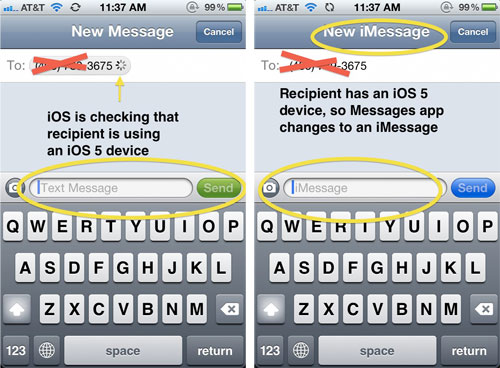
Fortunately, for the end user, the transition will be relatively transparent. iMessage has been integrated into the existing "Messages" app. If you would like to text someone, iOS 5 automatically checks to see if they are eligible to receive iMessages rather than the more costly standard text message:
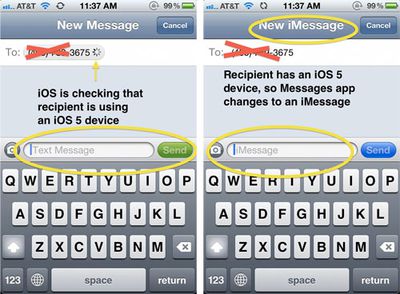
Once a contact is known to support iMessage, a special blue chat bubble appears by that contact's name to indicate they support iMessage. If you don't want to ever send any standard text messages, there is a preference for Messages to only try to send iMessages instead of SMSs. In summary:
Overall, iMessages are great. Being able to see when a message has been delivered and whether it's been read or not really enhance the communication experience. The best part is that you don't have to even think about them because if Apple is doing all of the work completely behind the scenes so that you won't even notice. Using iMessages on multiple devices with the new support of iCloud ensures that you'll never miss a beat when you're working on both your iPad and iPhone.
Apple previewed iOS 5 during the WWDC 2011 keynote on Monday. iOS 5 is presently available as a beta to registered developers but won't be released to the public until this fall.
Popular Stories
Apple today shared an ad that shows how the upgraded Center Stage front camera on the latest iPhones improves the process of taking a group selfie.
"Watch how the new front facing camera on iPhone 17 Pro takes group selfies that automatically expand and rotate as more people come into frame," says Apple. While the ad is focused on the iPhone 17 Pro and iPhone 17 Pro Max, the regular iPhone...
In select U.S. states, residents can add their driver's license or state ID to the Apple Wallet app on the iPhone and Apple Watch, and then use it to display proof of identity or age at select airports and businesses, and in select apps.
The feature is currently available in 13 U.S. states and Puerto Rico, and it is expected to launch in at least seven more in the future.
To set up the...
It has been a slow start to 2026 for Apple product launches, with only a new AirTag and a special Apple Watch band released so far. We are still waiting for MacBook Pro models with M5 Pro and M5 Max chips, the iPhone 17e, a lower-cost MacBook with an iPhone chip, long-rumored updates to the Apple TV and HomePod mini, and much more.
Apple is expected to release/update the following products...
New MacBook Pro models with the M5 Pro and M5 Max chips could arrive as soon as Monday, March 2, according to Bloomberg's Mark Gurman.
In today's "Power On" newsletter, Gurman said that the release of new MacBook Pro models is tied to the release of macOS Tahoe 26.3. The launch is said to be slated for as early as the week of March 2. He added that the M4 Pro and M4 Max models on sale today...
Apple is planning to launch new MacBook Pro models as soon as early March, but if you can, this is one generation you should skip because there's something much better in the works.
We're waiting on 14-inch and 16-inch MacBook Pro models with M5 Pro and M5 Max chips, with few changes other than the processor upgrade. There won't be any tweaks to the design or the display, but later this...