

Airmail 3.0 for Mac Brings VIP Contacts, Smart Folders, and More - MacRumors
Skip to Content

Airmail 3.0 for Mac Brings VIP Contacts, Smart Folders, and More

by

Airmail, the third party email client for Mac, has been updated to version 3, bringing some major new features to the popular application and a redesigned interface.

The new update adds Smart Folders for enhanced message filtering and organization, VIP contacts, OS X notifications, and support for the "send later" feature available to Gmail and Exchange account holders.
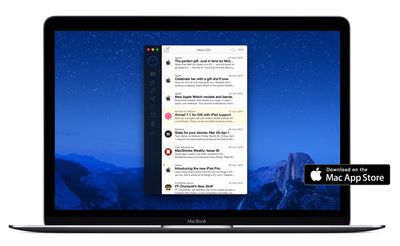
Airmail 3
The Mac update also means that Airmail for OS X now syncs account preferences across iPhone and iPad devices, syncing rules, VIP contacts, and Smart Folders over iCloud.

Airmail 3 supports multiple accounts including MS Exchange, Gmail, Google Apps, IMAP, POP3, Yahoo, AOL, Outlook.com, and Live.com.

Other new changes bring options for customizable menus, gestures, keyboard shortcuts, and folders, as well as calendar integration, rules for forwarding messages, Asana and Trello integration, primary inbox support for Gmail, and redesigned message threads.

Airmail 3.0 is available for El Capitan on the Mac App Store, priced at $9.99. [Direct Link]

Tag: Airmail

Top Rated Comments

Dilster3k Avatar
129 months ago
Am I literally the only person who uses the stock Mails app on OS X? Suits all my basic needs.
Score: 11 Votes (Like | Disagree)
dannys1 Avatar
129 months ago
Am I literally the only person who uses the stock Mails app on OS X? Suits all my basic needs.
Nah I use it to run 5 e-mail accounts with multiple alias' and about 600,000 e-mails in the database. Works fine for me. Most of these other clients seem to be about dismissing e-mail so you always have an empty inbox - I don't work like that. Each to their own, Mail works fine for me, the only feature missing was send later, so I bought a plugin for that.
Score: 8 Votes (Like | Disagree)
129 months ago
Am I literally the only person who uses the stock Mails app on OS X? Suits all my basic needs.
No, you're not! And I think it works great.
Score: 4 Votes (Like | Disagree)
129 months ago
I hate app-store apps. Is there any way to test drive AirMail? I have to pay out $10 to the app store just to figure out a couple days later that I don't like the app?
Score: 3 Votes (Like | Disagree)
129 months ago
LOL, I'm not moving every attachment to the end of the email! Come on man, that's just being an apologist.
No, it's indifference on my part, it's such a trivial thing. While dragging a document, you can easily place it where you want it and if you don't like that, there is nothing stopping you from just waiting until the end before you drop your attachments in. As usual, you are blowing issues way out of proportion because you don't like how Apple designed their programs.
Score: 2 Votes (Like | Disagree)
129 months ago
Doesn't work. Only turns images into icons and they still show up inside the body of the email. Mail app is pretty miserable.
They are supposed to look like this, now they don't occupy as much space. My images are attached at the end, but in your case you could still easily drag them to the bottom if it annoys you. The Mail app is not miserable, your expectations don't meet how Apple designed this application.
Score: 2 Votes (Like | Disagree)
















