New iTunes Metadata Suggests Users May Soon Be Able to Hide Stock iOS Apps - MacRumors
Skip to Content

New iTunes Metadata Suggests Users May Soon Be Able to Hide Stock iOS Apps

Apple may be laying the groundwork to allow users to remove or hide stock iOS apps, such as Compass and Tips, from their iPhones in an upcoming version of its mobile software, based on recently added metadata keys showing up on App Store apps.
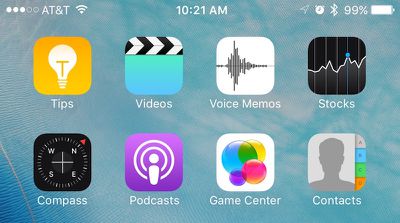
Stock iOS Apps
As discovered by AppAdvice, Apple several weeks ago added a new pair of keys called "isFirstParty" and "isFirstPartyHideableApp" to the metadata of every App Store listing in iTunes. The new keys allow for a Boolean value of "true" or "false" to denote whether the app would be allowed to be hidden or removed from the user's iPhone. It's unclear whether the metadata is referring to an Apple-approved way to simply hide the first-party apps, or remove them altogether.

Last September, Apple CEO Tim Cook spoke about the long-standing desire by users to remove apps like Stocks and Voice Memos from their iPhones to reduce clutter of unused apps. He admitted the company was at a bit of an impasse over the situation, because while some of its first-party experiences could be removed without much of a headache, certain apps "are linked to something else on the iPhone." Their removal could begin a domino effect of bugs and issues elsewhere in iOS, so implementing a feature allowing their removal would be understandably risky.
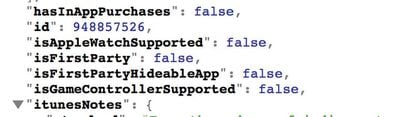
Stock Apps metadata

Image via AppAdvice

The hints found in the metadata of iTunes could be the potential solution, with Apple specifically targeting first-party apps that are safe to hide or remove, and letting users decide on their end if they choose to do so. With no official word from Apple on the topic since last year, it's hard to say when -- or if -- we will see such a feature implemented into iOS, although iOS 10 coming later this year is an obvious opportunity.

Users looking to minimize clutter from less popular stock apps such as Tips and Compass, and even newer editions like Health and News in some cases, frequently sequester their least favorite apps into a forgotten folder somewhere on their home screens, but some have even gotten crafty in figuring out ways to go one step further in removing unsightly crammed folders from their home screens, without needing to resort to jailbreaking their devices.

Popular Stories

Apple App Store Awards 2025

Apple Updates App Store Connect With More Than 100 New Metrics

Wednesday March 25, 2026 6:38 am PDT by
App Store Connect is a tool that allows app developers to view App Store metrics such as total downloads, and today it is receiving a major update. "Analytics in App Store Connect receives its biggest update since its launch," said Apple, in a post on its developer news portal. Apple says App Store Connect has a refreshed user experience that makes it easier to measure the performance of...
iOS App Store General Feature Black

Apple Pulls Vibe Coding App 'Anything' From App Store, Escalating Enforcement [Updated]

Monday March 30, 2026 2:33 pm PDT by
Apple has removed a "vibe coding" app from its App Store, reports The Information. AI app building app "Anything" was pulled from the App Store, and Anything co-founder Dhruv Amin was told that his app violated Guideline 2.5.2. "Vibe coding" is a term used for code generated using AI based on natural language with no coding experience necessary. Anything and other apps like it let users...
Apple App Store Awards 2025

Apple Turns Off Payments in Russia

Thursday April 2, 2026 8:47 am PDT by
As of April 1, payment processing is no longer available for purchases made across the App Store and other Apple services in Russia, according to Apple. In a new support document, Apple said new purchases, in-app purchases, and subscription renewals are no longer available in Russia unless a user already has funds in their Apple Account balance, which can continue to be used. This change...

Top Rated Comments

131 months ago
This means the end of the "Crapple" folder.
Score: 19 Votes (Like | Disagree)
hybrid_x Avatar
131 months ago
I don't see what the big deal is with being able to hide the default apps. Just collect the ones you don't want to see into a folder, and bury it on the last home screen. Done. Hidden.


Score: 16 Votes (Like | Disagree)
jasonklee Avatar
131 months ago
Finally. Can't wait to remove useless apps like Game Center, Tips, Compass, Messages, Safari, News, Health, Calendar, Photos, Camera, FaceTime, Contacts, Settings, App Store, iTunes Store, Music, Mail, Stocks, Reminders, Notes, Videos, Maps, Wallet, Watch, Activity, iBooks, Podcasts, Find My Friends, Find My iPhone, Calculator, Voice Memos, and Phone.
Score: 12 Votes (Like | Disagree)
Mac Rules Avatar
131 months ago
Isn't this one of the signs of the apocalypse?
Score: 12 Votes (Like | Disagree)
131 months ago
This would be great!
Score: 9 Votes (Like | Disagree)
gsmornot Avatar
131 months ago
This says hide, not remove. Is that right? If so, I'm already doing this.
Score: 8 Votes (Like | Disagree)