Toshiba today at CES 2015 announced the launch of the company's first TransferJet file transfer dongle with support for the iPhone, iPad, and iPod touch. The new TJM35420LT dongle includes a Lightning adapter for iOS devices and allows for the transfer of files between compatible devices using Sony's TransferJet close proximity wireless transfer technology.
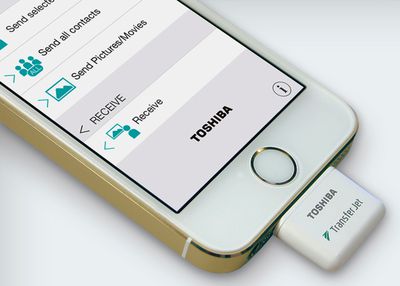
toshiba-transferjet
The low-power TransferJet dongle works over very short distances (3 cm or less) and supports data transfer speed of up 375 Mbps, which is fast enough to send a 100 MB file in just three seconds.

Users only need to attach the 24 millimeter-square adapter to their iOS devices and open the TranferJet iOS app in order to initiate file transfers. Files can be transferred via the TransferJet dongle to another iOS device or other TransferJet-compatible devices such as CyberShot digital cameras, VAIO computers, and more.

Toshiba's new TransferJet for iOS with Lightning adapter will be available this spring starting first in Japan and followed by Europe, the Americas, and Asia. A Toshiba spokesman tells Macworld the dongle is planned to retail for the equivalent of $33-$41.


Top Rated Comments

ArtOfWarfare Avatar
145 months ago
Anyone know if this is bidirectional, eg I could use it to send files from say a camera with wifi TO the iPhone?

- Bearing in mind that Apple wont let its own SD Card adapter transfer files from an SD card to an iPhone.
The picture in the article clearly shows a "Receive" section in the companion app.
Score: 2 Votes (Like | Disagree)
John.B Avatar
145 months ago
As frustrating as AirDrop has been (works from Mac to iPhone for me, but not iPhone to Mac) an alternative couldn't be any worse.
Score: 2 Votes (Like | Disagree)
145 months ago
Wait, so both users have to have the dongle? Seems DOA if that's the case.
Score: 2 Votes (Like | Disagree)
Tumbleweed666 Avatar
145 months ago
Anyone know if this is bidirectional, eg I could use it to send files from say a camera with wifi TO the iPhone?

- Bearing in mind that Apple wont let its own SD Card adapter transfer files from an SD card to an iPhone.
Score: 2 Votes (Like | Disagree)
145 months ago
What kind of issues you face? I've never had any issues with using airdrop across my personal devices that are linked to my own icloud account (not that, that is a requirement).

It works every time, only time I've had issue which is fixable by enabling older Mac mode when transferring files from new Mac to a old Mac.

Also I don't think airdrop from iPhones works with older macs like 2011 and older despite running Yosemite.

nearly every time i try to air drop one of us has to restart our phone to actually get it to show up on the other persons device. or we have to fiddle with turning bluetooth on and off or something. it has only "just worked" once or twice since it came out for me, and it's rarely a situation in which the configurations weren't correct. toggling on/off almost always fixes it without doing anything else.
Score: 1 Votes (Like | Disagree)
145 months ago
although i've practically never been able to get airdrop to work successfully on a first attempt (which should be embarrassing for Apple, honestly), i think i'd rather fight with AirDrop than buy this nonsense.

Hahaha yep - same experience here, "wait for it...wait for it...OK ACCEPT BEFORE IT GOES AWAY!"
Score: 1 Votes (Like | Disagree)

Popular Stories

maxresdefault

Apple Shows Off a Key Reason to Upgrade to the iPhone 17

Saturday February 7, 2026 9:26 am PST by
Apple today shared an ad that shows how the upgraded Center Stage front camera on the latest iPhones improves the process of taking a group selfie. "Watch how the new front facing camera on iPhone 17 Pro takes group selfies that automatically expand and rotate as more people come into frame," says Apple. While the ad is focused on the iPhone 17 Pro and iPhone 17 Pro Max, the regular iPhone...
m5 macbook pro deal

Why You Shouldn't Buy the Next MacBook Pro

Tuesday February 10, 2026 4:27 pm PST by
Apple is planning to launch new MacBook Pro models as soon as early March, but if you can, this is one generation you should skip because there's something much better in the works. We're waiting on 14-inch and 16-inch MacBook Pro models with M5 Pro and M5 Max chips, with few changes other than the processor upgrade. There won't be any tweaks to the design or the display, but later this...
iOS 26

Apple Releases iOS 26.3 and iPadOS 26.3

Wednesday February 11, 2026 10:07 am PST by
Apple today released iOS 26.3 and iPadOS 26.3, the latest updates to the iOS 26 and iPadOS 26 operating systems that came out in September. The new software comes almost two months after Apple released iOS 26.2 and iPadOS 26.2. The new software can be downloaded on eligible iPhones and iPads over-the-air by going to Settings > General > Software Update. According to Apple's release notes, ...
apple wallet drivers license feature iPhone 15 pro

Apple Says These 7 U.S. States Plan to Offer iPhone Driver's Licenses

Monday February 9, 2026 6:24 am PST by
In select U.S. states, residents can add their driver's license or state ID to the Apple Wallet app on the iPhone and Apple Watch, and then use it to display proof of identity or age at select airports and businesses, and in select apps. The feature is currently available in 13 U.S. states and Puerto Rico, and it is expected to launch in at least seven more in the future. To set up the...
Apple Logo Zoomed

Apple Expected to Launch These 10+ Products Over the Coming Months

Tuesday February 10, 2026 6:33 am PST by
It has been a slow start to 2026 for Apple product launches, with only a new AirTag and a special Apple Watch band released so far. We are still waiting for MacBook Pro models with M5 Pro and M5 Max chips, the iPhone 17e, a lower-cost MacBook with an iPhone chip, long-rumored updates to the Apple TV and HomePod mini, and much more. Apple is expected to release/update the following products...