

Since Thunderbolt ports can support up to six peripherals in a daisy chain, which is a wiring scheme where multiple devices are chained together in a certain order, Macworld decided to test how many devices they could daisy chain together with the new Mac Pro's six Thunderbolt ports, four USB 3.0 ports, one HDMI port and two gigabit Ethernet ports.
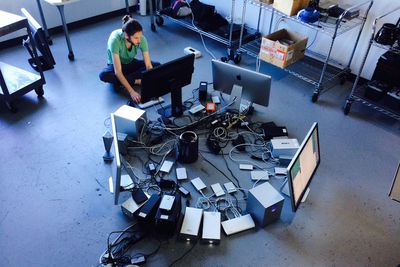
Macworld named the test the "Mac Pro Daisy Chain Challenge" and was able to connect a total of 42 peripheral devices to the Mac Pro.
We connected 36 drives (19 Thunderbolt, 15 USB, 2 FireWire 800) with a combined capacity of 100.63TB. In addition to the drives, we also connected two Thunderbolt docks (the Belkin Thunderbolt Express Dock and the CalDigit Thunderbolt Station, an Apple Thunderbolt Display, two Apple Cinema Displays, and one HP Z Display Z27. All this to a single Mac Pro.
Only a dozen of the drives were being powered from the cables connecting them to the Mac Pro. The 24 remaining drives required external power and had to be plugged into three power strips with an attached Watts Up power meter. The combine power draw when Macworld ran a script that copied data from the Mac Pro's internal flash storage to the drives was 865 Watts.
Through Mac OS X's Activity Monitor, the lab found that there was a combined throughput of 3 Gbps. The rate slowed as the fastest drives, of which OWC's Mercury Helios was the fastest, finished transferring data.
The lab also found that the daisy chains didn't affect the performance of a single drive working alone. Rather, the location of the drive within the daisy chain affected performance. For instance, one drive's average write speed was 709.8 Mbps when tested at the beginning of the daisy chain and without a daisy chain and only 556.7 Mbps when placed at the end of the chain.
The full list of devices connected to the Mac Pro, along with more information on the challenge and future tests can be found at Macworld.
Top Rated Comments
This is a more realistic picture:
Popular Stories
Apple Unveils Seven New Products
Apple Planning 'MacBook Ultra' With Touchscreen and Higher Price
First MacBook Neo Benchmarks Are In: Here's How It Compares to the M1 MacBook Air
Next Article
Videos
Guides
Our comprehensive guide highlighting every major new addition in iOS 26, plus how-tos that walk you through using the new features.
Transfer to Android tool, new weather wallpapers, and more.
New features and lesser-known changes to check out if you're upgrading.
Apple's four new iPhones feature more differences between the latest models than ever before, so which one should you buy?
Upcoming
Apple's new low-cost MacBook starting at just $599, with A18 Pro chip and 13-inch display in four fun colors.
A19 chip, MagSafe support, doubled 256GB base storage, and new soft pink color option.
New M5 Pro and M5 Max chips, plus memory, storage, and networking improvements.
M4 chip with 12GB memory, N1 networking chip with Wi-Fi 7, and C1X modem on cellular models.
Other Stories
13 hours ago by Joe Rossignol
19 hours ago by Joe Rossignol
2 days ago by Joe Rossignol
4 days ago by Joe Rossignol
5 days ago by Joe Rossignol