iOS 6.1 Tidbits: Music Controls on Lock Screen, Maps 'Report a Problem' Button, Diagonal Swiping Bug - MacRumors
Skip to Content

iOS 6.1 Tidbits: Music Controls on Lock Screen, Maps 'Report a Problem' Button, Diagonal Swiping Bug

by

While iOS 6.1 brought several widely publicized new features such as support for several dozen new LTE carriers and new support for ordering Fandango movie tickets through Siri in the United States, a number of other minor changes were also included in the update. Given the frequency with which our readers have been pointing some of them out, we thought it would be appropriate to make note of them in a brief roundup.

- Lock screen music controls: The music controls on the iPhone's lock screen have been enhanced as noted by TUAW, bringing them in line with those in the Music app.


music
music-prev
The shortcut controls, accessed by pressing the home button twice while on the lock screen, have adopted both the look and layout of the Music app. One notable change is that the previous and next buttons are now much further apart from the play/pause button, making them much less likely to be pressed accidentally.

The volume knob also copies the Music app's visual trick of using the phone's accelerometer to vary the angle of virtual reflections on it.

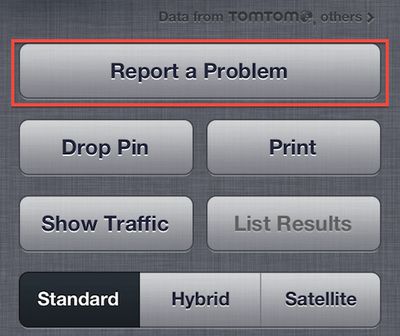
- Maps "Report a Problem" button: Apple has tweaked the "Report a Problem" button in its Maps app, accessible in the preferences section by tapping at the lower right corner of the map page. The option had previously been a small text link, but Apple has now made it a much more prominent and accessible button which is actually now the largest button on the page.
maps_report_problem_button
- Rapid diagonal swiping issue improved: Several readers have noted that an issue with rapid diagonal swiping on the iPhone 5 and fifth-generation iPod touch resulting in loss of touch recognition appears to have been fixed or at least improved in iOS 6.1. Not all readers have experienced improvements, however, with some indicating that performance remains the same under iOS 6.1.


Related Forums: iPhone, iPod touch and iPod

Top Rated Comments

172 months ago
Hallelujah! I'm sure a lot of people will consider this an insignificant update, but it's a big improvement for me.

I listen to a lot of audiobooks. I can't tell you how many times I've accidentally hit the forward or backward button instead of the play/pause button and then spent several minutes trying to find where I was in the book.
Score: 18 Votes (Like | Disagree)
utwarreng Avatar
172 months ago
I concur...give us features that we actually care about.

I'm sure this little reflection change won't even make it to iOS7

The reflection has been in since iOS 6 came out, just only within the Music app (and possibly Podcast...?).

Complaining about how much time they spent on this "feature" is a moot point, as they most certainly just copied the code over from these other apps and replaced the existing button. Come down from your soapbox and put the razorblade down, chicken little. The sky is not falling.
Score: 10 Votes (Like | Disagree)
Chumburro2U Avatar
172 months ago
speak for yourself

I concur...give us features that we actually care about.

I'm sure this little reflection change won't even make it to iOS7

I like this, abeit small touch. It says to me that Apple cares about small niceties. And, why wouldn't it make it to iOS 7? :apple:
Score: 6 Votes (Like | Disagree)
Apple Key Avatar
172 months ago
I love that the reflection changes as you move your phone via the accelerometer. Wonderful detail here! Just like the icon on icloud.com when you move your mouse.
Score: 5 Votes (Like | Disagree)
172 months ago
I'm also able to control my music from my iPhone when it's connected via usb in my car. It used to say accessory connected and I either had to use the car controls or select my music then plug it in. I love this!
Score: 4 Votes (Like | Disagree)
172 months ago
The maps 'report a problem' button is not new (which I know you stated). It's been there from the beginning. People just dont bother as Apple dont fix the problems.

Moving the button and making it more prominent really wont fix maps. It just makes it more obvious that Apple are having a hard time doing it themselves.

Stuff I reported on launch day is still not fixed.
Score: 4 Votes (Like | Disagree)

Popular Stories

Apple Event Logo

Apple to Launch These 15+ New Products Later This Year

Friday March 27, 2026 2:03 pm PDT by
March has been an incredibly busy month for Apple, with the company unveiling more than 10 new products and accessories. We said hello to the MacBook Neo at the start of the month, and we bid farewell to the Mac Pro at the end of it. Nevertheless, there is still a lot more to come this year. Beyond the usual annual updates to iPhones and Apple Watches, Apple's all-new smart home hub is...
iOS 26

iOS 26.4 Adds Two New Features to CarPlay

Tuesday March 24, 2026 1:55 pm PDT by
iOS 26.4 was released today, and it includes a couple of new features for CarPlay: an Ambient Music widget and support for voice-based chatbot apps. To update your iPhone 11 or newer to iOS 26.4, open the Settings app and tap on General → Software Update. CarPlay will automatically offer the new features so long as the iPhone connected to your vehicle is running iOS 26.4 or later....
Mac Pro Feature Teal

Apple Confirms Mac Pro Is Dead, No Future Models Planned

Thursday March 26, 2026 2:04 pm PDT by
Apple has discontinued the Mac Pro and has removed the machine from its website, reports 9to5Mac. Apple said it does not plan to design a new version of the Mac Pro, and no new model will be coming in the future. The Mac Pro was last updated in 2023, which was when Apple added an M2 Ultra Apple silicon chip, but the chassis has not been refreshed since 2019. Apple redesigned the Mac Pro to...