

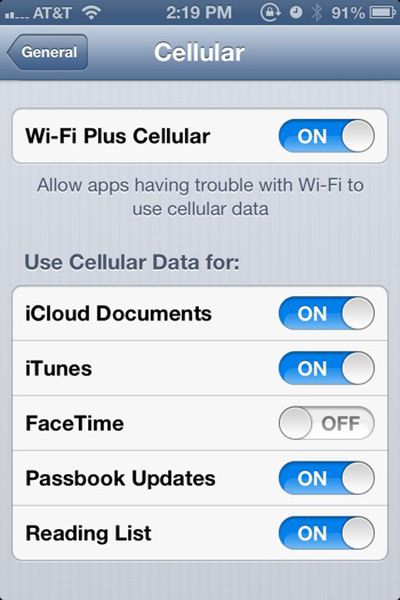
As we noted earlier this week when iOS 6 Beta 4 was released to developers, one of the newest features in the release was the addition of a "Wi-Fi Plus Cellular" setting to the General/Cellular control panel.

The setting appears to allow apps to fall back on the iPhone's cellular data connection when having difficulties moving data via the Wi-Fi connection, something that can happen with a weak Wi-Fi signal or a temperamental Internet connection.
Wifipluscellular

Less clear is the purpose of the series of controls below that. There are individual On/Off switches to use cellular data for iCloud Documents, iTunes, FaceTime, Passbook Updates and Reading List. Some believe these are a submenu setting for the Wi-Fi Plus Cellular control, allowing tasks such as downloading music from iTunes or syncing iCloud Documents to require the use of Wi-Fi -- forbidding some apps from connecting via Cellular Data while others are allowed to.

We've reached out to Apple for clarification and as it's still a beta release, restricted to 'developers', the settings could always change to be made more clear or removed entirely.


Top Rated Comments

ajcadoo Avatar
176 months ago
YES! No more sitting in your driveway, with a 1 bar WiFi connection, seeing the spinny loading icon while loading the Maps app!
Score: 20 Votes (Like | Disagree)
176 months ago
This is a welcome addition for anyone who finds that it takes wifi way too long to realize it actually doesn't have a signal.

Walk out the door on my way out of the house, it takes a good minute or two to kick itself off wifi.
Score: 12 Votes (Like | Disagree)
Kaibelf Avatar
176 months ago
"Less clear is the purpose of the series of controls below that. There are individual On/Off switches to use cellular data for iCloud Documents, iTunes, FaceTime, Passbook Updates and Reading List."

Ever heard of a data cap?
Score: 7 Votes (Like | Disagree)
Agent OrangeZ Avatar
176 months ago
Welcome edition! :)

It's a welcome addition too! ;)
Score: 6 Votes (Like | Disagree)
176 months ago
So anyone know if this will work if you've got a good Wifi signal but internet access is blocked?

The problem I have is that I use free Wifi in McDonalds and Starbucks a lot. But you have to sign in to use it and due to them using BT OpenZone it also connects to any of their Wifi points it finds (which is like millions).

So I'll often totally lose the data connection as it switches to a Wifi connection that it can't actually connect to the internet over. It is a complete pain in backside and easily my biggest gripe with the iPhone.
Score: 4 Votes (Like | Disagree)
176 months ago
Hallelujah! I really hope this works as advertised. For anyone who walks around a "campus" environment could tell you, wandering just on the fringe of access points when going outdoors kills functionality of programs like iTunes Match.
Score: 4 Votes (Like | Disagree)

Popular Stories

maxresdefault

Apple Shows Off a Key Reason to Upgrade to the iPhone 17

Saturday February 7, 2026 9:26 am PST by
Apple today shared an ad that shows how the upgraded Center Stage front camera on the latest iPhones improves the process of taking a group selfie. "Watch how the new front facing camera on iPhone 17 Pro takes group selfies that automatically expand and rotate as more people come into frame," says Apple. While the ad is focused on the iPhone 17 Pro and iPhone 17 Pro Max, the regular iPhone...
apple wallet drivers license feature iPhone 15 pro

Apple Says These 7 U.S. States Plan to Offer iPhone Driver's Licenses

Monday February 9, 2026 6:24 am PST by
In select U.S. states, residents can add their driver's license or state ID to the Apple Wallet app on the iPhone and Apple Watch, and then use it to display proof of identity or age at select airports and businesses, and in select apps. The feature is currently available in 13 U.S. states and Puerto Rico, and it is expected to launch in at least seven more in the future. To set up the...
m5 macbook pro deal

Why You Shouldn't Buy the Next MacBook Pro

Tuesday February 10, 2026 4:27 pm PST by
Apple is planning to launch new MacBook Pro models as soon as early March, but if you can, this is one generation you should skip because there's something much better in the works. We're waiting on 14-inch and 16-inch MacBook Pro models with M5 Pro and M5 Max chips, with few changes other than the processor upgrade. There won't be any tweaks to the design or the display, but later this...
Apple Logo Zoomed

Apple Expected to Launch These 10+ Products Over the Coming Months

Tuesday February 10, 2026 6:33 am PST by
It has been a slow start to 2026 for Apple product launches, with only a new AirTag and a special Apple Watch band released so far. We are still waiting for MacBook Pro models with M5 Pro and M5 Max chips, the iPhone 17e, a lower-cost MacBook with an iPhone chip, long-rumored updates to the Apple TV and HomePod mini, and much more. Apple is expected to release/update the following products...
iOS 26

Apple Releases iOS 26.3 and iPadOS 26.3

Wednesday February 11, 2026 10:07 am PST by
Apple today released iOS 26.3 and iPadOS 26.3, the latest updates to the iOS 26 and iPadOS 26 operating systems that came out in September. The new software comes almost two months after Apple released iOS 26.2 and iPadOS 26.2. The new software can be downloaded on eligible iPhones and iPads over-the-air by going to Settings > General > Software Update. According to Apple's release notes, ...
















