

Apple's new 14-inch and 16-inch MacBook Pro models will begin arriving to customers this Tuesday, October 26, and ahead of time, the embargo has lifted on the first reviews of the notebooks across media publications and YouTube channels.
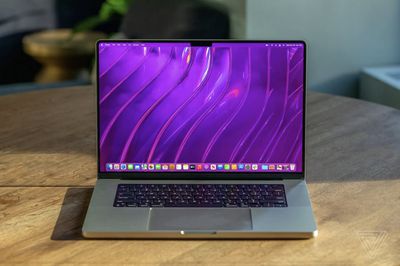
We've rounded up more video reviews of the new MacBook Pro models in a separate story, while highlights from written reviews can be found below.
Performance: M1 Pro and M1 Max
Both the 14-inch and 16-inch MacBook Pro can be configured with either the M1 Pro or M1 Max, with both chips featuring a 10-core CPU. The difference between the chips comes down to graphics, with the M1 Pro available with up to a 16-core GPU and the M1 Max available with up to a 32-core GPU.
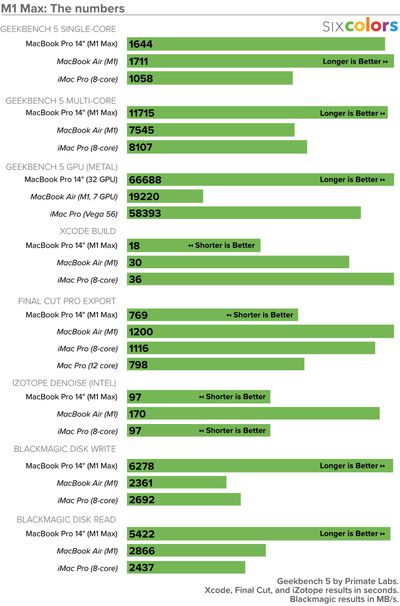
The first Geekbench 5 benchmark results for the new MacBook Pro models revealed the M1 Pro and M1 Max chips are over 1.5x faster than the M1 chip in lower-end Macs, while Apple said the M1 Max chip has up to 4x faster graphics than the M1 chip.
Jason Snell shared a useful chart comparing benchmark scores at Six Colors:
MobileSyrup's Patrick O'Rourke:
In my time with the 14-inch MacBook Pro and its M1 Pro chip, I didn't encounter a single instance of slowdown, even when editing photos with Lightroom and Photoshop CC, while also cutting video in Premiere CC when connected to a 4K HDR external monitor. In fact, the laptop's fans only turned on while exporting a 4K video file.
As we previously reported, 16-inch MacBook Pro models configured with an M1 Max chip feature a new High Power Mode that is designed to maximize performance during intensive, sustained workloads.
Design: Notch, Keyboard, and More
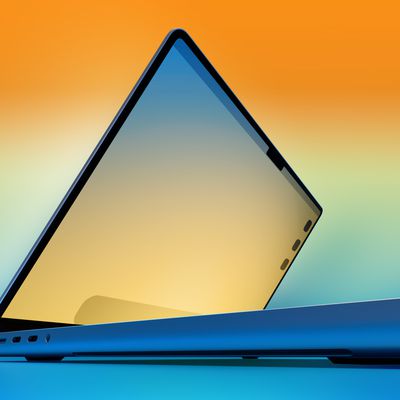
Key design changes to the new MacBook Pro models include a notch at the top of the display that houses an upgraded 1080p webcam, and a revamped keyboard with an all-black design and full-size function keys instead of a Touch Bar.
And yes, the display has a notch, which we know will be polarizing, but I very quickly stopped noticing it, just like everyone stops seeing the iPhone notch. We'll see how I feel after another few days with this thing.
I like that Apple got rid of the Touch Bar screen up top, which I didn't really find useful on earlier MacBook Pro models, and instead replaced it with full-sized function keys that are easy to tap to adjust the volume, screen brightness and more.
Added Ports: HDMI, SD Card Slot, and MagSafe
Apple has brought back many ports on the 14-inch and 16-inch MacBook Pro models that it had previously removed in 2016, including an HDMI port, an SD card slot, and MagSafe for a magnetic power cable.
It's as if Apple designers decided to go through all the feedback they've gotten for years and cherry pick everyone's top handful of wishlist requests (with apologies to whoever wanted mini-DisplayPort or DVI to return). […]
HDMI is something people have been asking to get back. It's great to be future-forward, but HDMI remains immensely useful, even if it's transitioning into being more of a legacy port. That's also why we had laptops with VGA ports for so many years after they should have vanished. People have older or legacy devices, like printers, projectors, displays, etc., and they want to be able to plug into those immediately, with a cable common enough that you might luck out and find one buried in the back of a desk drawer.
Displays: Mini-LED and ProMotion
The new MacBook Pro models are equipped with Liquid Retina XDR displays with mini-LED backlighting for up to 3x higher brightness when viewing HDR content, while the addition of ProMotion allows for an adaptive refresh rate between a power-preserving 24Hz and a smooth-looking 120Hz depending on the type of content that is showing on the screen.
The new Pro displays have also been upgraded with the iPad Pro's ProMotion feature, which is so good that it's now upsetting to use a laptop without it. ProMotion, which is turned on by default, makes it so the Pro can adjust its refresh rate between 10Hz and 120Hz, depending on what you're doing. You can turn off ProMotion and use the Pro at a fixed refresh rate (47.95Hz, 48Hz, 50Hz, 59.94Hz, or 60Hz) if you want to, but I tried using it at 60Hz and found the difference too glaring after almost a week at 120Hz. It really is so much smoother with ProMotion turned on.
Battery Life
Apple said the new MacBook Pro models get up to 10 hours longer battery life per charge compared to the previous-generation models.
[T]he efficiency of the M1 chip's ARM design leads to great battery performance. The 14-inch MacBook Pro lasted 12 hours and 35 minutes in our benchmark, while the 16-inch went for 16 hours and 34 minutes. That’s over five hours longer than the last Intel model.
Key Takeaways
With very fast performance, the return of useful ports like HDMI and an SD card slot, and improved displays, the new MacBook Pro models check all of the boxes for a lot of professional users and are a very worthwhile upgrade.
Much like the return of MagSafe, the abandonment of the Touch Bar is a prime example of why the new MacBooks are the best in years. They build on the technologies and learnings of previous generations introduce some key breakthroughs and, perhaps, most importantly, listened to user feedback. That means moving on from what doesn't work and doubling down on what does, and above all, not ever assuming you know what's best for the consumer — particularly in the case of extremely particular creative pros.
Priced between $1,999 and $5,899, this is very much not the MacBook for everyone. For most consumers, the MacBook Air gets the job done — and then some. But if you're someone who regularly finds yourself pushing your machine to the limits, the new Pro is a great marriage of the line's best elements.
More Reviews
- Pocket-lint's Stuart Miles
- TechRadar's Matt Hanson
- Tom's Guide's Henry T. Casey
- Macworld's Roman Loyola
- PCMag's Tom Brant
MacRumors will share its own hands-on impressions of the new MacBook Pro later this week.














Top Rated Comments
I’m looking forward to the detailed comparisons of the different configurations that should come out over the next week or so.