

iPhone Displays Green and Orange Dots: What Do They Mean? - MacRumors
Skip to Content

iPhone Displays Green and Orange Dots: What Do They Mean?

by

Digital privacy is a perennial hot topic these days, and Apple is regarded as being at the forefront of security when it comes to smartphone and tablet operating systems. For example, for an app to access your iPhone or iPad's camera, camera and microphone access must be enabled for the app in question in the Settings app.
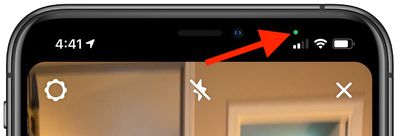
recordingindicatorios14arrow

Social media apps will often ask you for access to your device's camera or microphone when you first launch them, which is fair enough if you want to record and share audio and video on these platforms.

However, Meta's Facebook and Instagram have both been found guilty in the past of accessing device cameras in the background when the apps are in use. Therefore, in response to legitimate concerns, Apple includes a security feature in iOS to indicate when an app does exactly this.

Green Dot

  • Green dot means an iOS app is currently using the camera.

Orange Dot

  • Orange dot means an iOS app is currently using the microphone.

When an app is using either the camera or the microphone on your iPhone or ‌iPad‌, a small dot will appear in the status bar just above the WiFi and cellular signal bars.
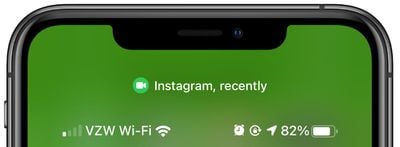
recordingindicatorios14controlcenter
If you close the app using the camera or microphone and then open the Control Center, there will be a camera or microphone icon along with the name of the app that was recently using the feature. In this way, recording indicators prevent the camera or microphone from being accessed by an app in the background without your knowledge, so you can be sure that apps aren't sneakily recording conversations or videos.

Popular Stories

macOS 26 and Terminal Feature

macOS 26.4 Introduces New Security Feature for Terminal Commands

Wednesday March 25, 2026 1:24 pm PDT by
macOS Tahoe 26.4 introduces a new security feature that warns Mac users if they paste certain commands in the Terminal app that may be harmful. For those unaware, the Terminal app allows you to enter text commands to perform tasks on your Mac. Terminal is primarily intended for advanced users and developers, but unfortunately casual users can be tricked into entering harmful commands that...
lock screen notifications for iPhones running out of date versions of iOS feature 3

Apple Now Sending Critical Security Alerts to iPhones Running iOS 17 and Earlier

Friday March 27, 2026 7:21 am PDT by
Apple has begun pushing Lock Screen notifications to iPhones and iPads running older versions of iOS and iPadOS, warning users of active web-based attacks. The alerts, which appear as a "Critical Software" notification from the Settings app, warn that Apple "is aware of attacks targeting out-of-date iOS software, including the version on your iPhone," and urge users to install a critical...


apple lock security bug vulnerability fix privacy

Apple Says No iPhone in Lockdown Mode Has Ever Been Hacked

Friday March 27, 2026 9:33 am PDT by
Apple says it has no record of a successful spyware attack against any device running Lockdown Mode, the opt-in security feature it introduced in 2022. "We are not aware of any successful mercenary spyware attacks against a Lockdown Mode-enabled Apple device," an Apple spokesperson told TechCrunch. Lockdown Mode is available on the iPhone, iPad, and Mac, and dramatically restricts...








































