With the launch of the iPhone 13 Pro and Pro Max, Apple introduced Macro mode, a new camera feature that's exclusive to the Pro models and brings the immensely detailed world of close-up macro photography to iPhones for the first time. Keep reading to learn how it works.

iphone 13 macro
With Macro mode enabled, you can take pictures or video of subjects that are as close as 2cm to your ‌iPhone‌'s camera lens, which means you can now take shots of flowers, textures, insects, or pretty much anything small or at close distance, with accurate focus, rich detail, and no blurring.

Here's how to use the Macro mode feature on ‌iPhone‌ 13 Pro and ‌iPhone‌ 13 Pro Max. Bear in mind that Macro mode is exclusive to these models and isn't supported on ‌iPhone‌ 13 mini or ‌iPhone‌ 13.

  1. Launch the Camera app on your ‌iPhone‌ 13 Pro.
  2. Make sure Photo mode is highlighted in the camera mode menu. If you're shooting video, swipe to Video mode instead.
  3. Line up your close-up subject in the viewfinder and allow the camera to switch to the wide-angle lens. Move in closer – the subject can be as close as 2cm away from the lens (you can use the zoom if necessary).
    camera

  4. Hold the phone steady. Once the lens has focused on the subject, tap the shutter to take the shot or begin capturing video. If you're shooting video, tap the shutter button again to finish.
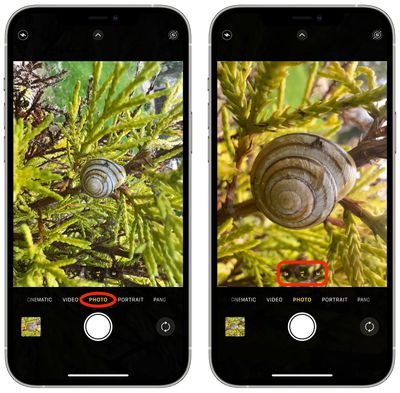
When you're experimenting with Macro mode, you'll likely notice that your ‌iPhone‌ 13 Pro switches automatically to the new mode as soon as it detects an object that's within 14cm away from the lens. This can cause the viewfinder to jitter as it switches between the wide-angle lens to ultra-wide angle, which can be quite jarring and distracting.

As of writing, there's no way to prevent this behavior when taking macro photos. If you're shooting macro video, however, you can prevent it by enabling the Lock Camera option under Settings -> Camera -> Record Video.
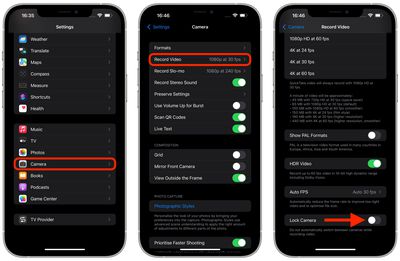
settings
Apple says that a forthcoming update, due in the fall, will allow users to specifically turn off automatic camera switching when shooting macro photography at close distances.


Related Forums: iOS 15, iPhone

Popular Stories

iPhone Top Left Hole Punch Face ID Feature Purple

iPhone 18 Pro Launching Later This Year With These 12 New Features

Thursday January 15, 2026 10:56 am PST by
While the iPhone 18 Pro and iPhone 18 Pro Max are not expected to launch for another eight months, there are already plenty of rumors about the devices. Below, we have recapped 12 features rumored for the iPhone 18 Pro models, as of January 2026: The same overall design is expected, with 6.3-inch and 6.9-inch display sizes, and a "plateau" housing three rear cameras Under-screen Face ID...
Apple MacBook Pro M4 hero

These 5 Apple Products Will Reportedly Be Upgraded With OLED Displays

Friday January 16, 2026 7:07 pm PST by
Apple plans to upgrade the iPad mini, MacBook Pro, iPad Air, iMac, and MacBook Air with OLED displays between 2026 and 2028, according to DigiTimes. Bloomberg's Mark Gurman previously reported that the iPad mini and MacBook Pro will receive an OLED display as early as this year, but he does not expect the MacBook Air to adopt the technology until 2028 at the earliest. A new iPad Air is...
iOS 27 Mock Quick

iOS 27 Will Add These 8 New Features to Your iPhone

Sunday January 18, 2026 3:51 pm PST by
iOS 27 is still many months away, but there are already plenty of rumors about new features that will be included in the software update. The first beta of iOS 27 will be released during WWDC 2026 in June, and the update should be released to all users with a compatible iPhone in September. Bloomberg's Mark Gurman said that iOS 27 will be similar to Mac OS X Snow Leopard, in the sense...
Apple Wallet ID Illinois

Apple Plans to Expand iPhone Driver's Licenses to These 7 U.S. States

Friday January 16, 2026 12:12 pm PST by
In select U.S. states, residents can add their driver's license or state ID to the Apple Wallet app on the iPhone and Apple Watch, and then use it to display proof of identity or age at select airports and businesses, and in select apps. The feature is currently available in 13 U.S. states and Puerto Rico, and it is expected to launch in at least seven more in the future. To set up the...
14 inch MacBook Pro Keyboard

MacBook Pro Buyers Now Facing Up to a Two-Month Wait Ahead of New Models

Sunday January 18, 2026 6:50 pm PST by
MacBook Pro availability is tightening on Apple's online store, with select configurations facing up to a two-month delivery timeframe in the United States. A few 14-inch and 16-inch MacBook Pro configurations with an M4 Pro chip are not facing any shipping delay, but estimated delivery dates for many configurations with an M4 Max chip range from February 6 to February 24 or even later. At...