Skip to Content

How to Set and Manage HomePod Timers on iPhone and iPad

by

Did you know that you can manage multiple timers on your HomePod directly from the Home app on iPhone and iPad? Keep reading to learn how.
HomePodandMini feature green
Ever since iOS 12, ‌HomePod‌ users have been able to set timers, but previously this was only possible via Siri voice commands and there was no app interface for managing them. These days, however, you can set and manage times in the Home interface. Here's how.

  1. Launch the Home app on your iPhone or ‌iPad‌.
  2. Tap a ‌HomePod‌ card.
  3. To set a new timer, scroll down below "Alarms" and select New next to "Timers."
  4. Give your timer an identifying label, e.g. "Pizza." home app timer management
  5. Set the hours, minutes, and seconds for your timer, then tap Start.
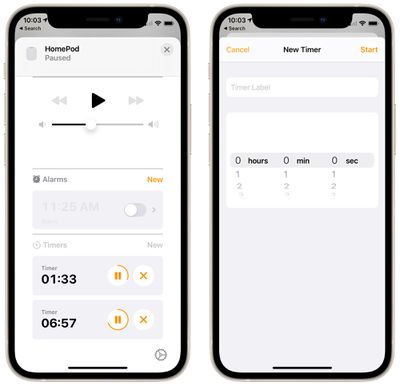
You can set a timer with a maximum timer limit of 24 hours. Any timers you have set on a particular ‌HomePod‌ will appear in this Timers section, and you can pause them or delete them individually using the respective buttons.

You can still set and manage timers via ‌Siri‌. All you need to say is "Hey Siri, set a timer for [x amount of time]." At any point while the timer is running, you can also ask ‌Siri‌ to turn it off with a command like "Hey Siri, turn off the timer" or "Hey Siri, pause the timer." You can also change the timer countdown with a command like "Hey Siri, change the timer to 10 minutes."

Just be aware that different HomePods aren't aware of timers set on other HomePods, even if they're on the same network.


Related Roundups: HomePod, HomePod mini

Popular Stories

Apple Event Logo

Apple Released Seven New Products Today

Wednesday March 11, 2026 7:05 am PDT by
Starting today, the seven new Apple products that were announced last week are available at Apple Stores and beginning to arrive to customers. The colorful MacBook Neo and all of the other new products are on display at most Apple Store locations around the world starting today. Apple Stores have inventory of the new products for both walk-in customers and Apple Store pickup, but...
iOS 27 Mock Quick

10+ New Features Coming in iOS 27

Friday March 13, 2026 2:13 pm PDT by
We're only three months away from Apple's WWDC 2026 event, which will see the company unveil iOS 27. With the fully revamped version of Siri possibly delayed until September, iOS 27 is shaping up to be the update we wanted iOS 26 to be. There will be new Apple Intelligence features, updates for the iPhone Fold, and more, with the latest rumors summarized below. Foldable iPhone Features...
Apple 50 Years of Thinking Different

Apple Announces 50th Anniversary Plans

Thursday March 12, 2026 6:10 am PDT by
Apple today announced that it will celebrate the company's 50th anniversary over the coming weeks, but it has yet to reveal any specific plans. Apple was founded on April 1, 1976, so the company will turn 50 on April 1, 2026. "While Apple is known for looking forward, this milestone offers a special moment to reflect on the journey that has brought the company here, to celebrate the...