Skip to Content

How to Schedule Emails on iPhone and iPad

by

Unlike Apple Mail, Gmail lets users schedule emails to send later on iPhone and iPad. This article explains how it's done.

newgmaillogo
Have you ever tried to remember to email someone about something on a particular date in the not-so-distant future, but ended up forgetting to send it when the day eventually came around? If that sounds familiar, scheduling emails could be the perfect way to ensure it doesn't happen again.

Whether it's a birthday or other celebration, or maybe something business-related that you need to bring up on a specific future date, Google's Gmail offers you the ability to schedule emails ahead of time.

Before anything else, you'll want the free Gmail app on your iPhone or iPad and need to be signed into your Gmail account. Then simply follow the steps below.

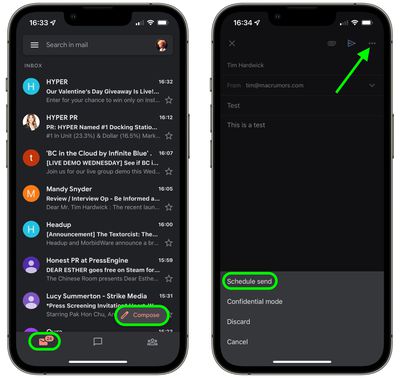
  1. Launch the Gmail app, and with your mailbox selected, tap the Compose button in the bottom-right corner of the screen.
  2. Compose your new email by entering the email address that you want to send it to, followed by the subject and message body.
  3. Tap the More (three dots) button in the top-right of the screen.
  4. Tap Schedule send.
    gmail

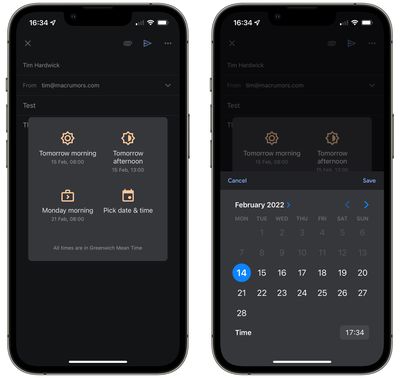
  5. Select Tomorrow morning (08:00), Tomorrow afternoon (13:00), or Monday morning (8:00), or tap Pick date & time and use the onscreen options to adjust the scheduling details, then tap Save.
    gmail

Your email will now be scheduled to send at the selected time/date. If you immediately have second thoughts, you can always tap Undo, and any scheduled emails that you choose to cancel will be automatically saved in your "Drafts" folder. You can also find any active scheduled emails in your Gmail account's "Scheduled" folder, where you can opt to Cancel send at any time.


Tag: Gmail

Popular Stories

MacBook Neo Feature Pastel 1

First MacBook Neo Benchmarks Are In: Here's How It Compares to the M1 MacBook Air

Thursday March 5, 2026 4:07 pm PST by
Benchmarks for the new MacBook Neo surfaced today, and unsurprisingly, CPU performance is almost identical to the iPhone 16 Pro. The MacBook Neo uses the same 6-core A18 Pro chip that was first introduced in the iPhone 16 Pro, but it has one fewer GPU core. The MacBook Neo earned a single-core score of 3461 and a multi-core score of 8668, along with a Metal score of 31286. Here's how the...
HomePod mini and Apple TV Sage

New Apple TV and HomePod Mini Are Still Missing, Here's Why

Thursday March 5, 2026 6:11 am PST by
Apple this week unveiled seven products, ranging from the iPhone 17e to the MacBook Neo, but new Apple TV and HomePod mini models were not among them. Given that there have been rumors about the next-generation Apple TV and HomePod mini since all the way back in late 2024, some customers are wondering why the devices have yet to launch, and the answer likely relates to Siri. In September, ...
MacBook Neo Feature Pastel 1

Apple Announces $599 'MacBook Neo' With A18 Pro Chip

Wednesday March 4, 2026 6:15 am PST by
Apple today announced the "MacBook Neo," an all-new kind of low-cost Mac featuring the A18 Pro chip for $599. The MacBook Neo is the first Mac to be powered by an iPhone chip; the A18 Pro debuted in 2024's iPhone 16 Pro models. Apple says it is up to 50% faster for everyday tasks than the bestselling PC with the latest shipping Intel Core Ultra 5, up to 3x faster for on-device AI workloads,...